Code the leaderboard
Part of the Adventure Game Series in Roblox. Create a leaderboard in Roblox Studio to track player items.
In-game, player will have important stats they need to see like the items they've collected. These numbers will be displayed using a leaderboard. Leaderboards are built-in features of Roblox that need a script to be activated and customized.
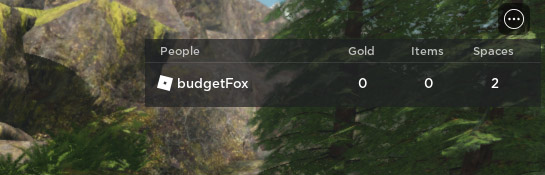
Note that the leaderboard in this game doesn't save player information in-between sessions. For information on saving player data, you'll need to use an advanced coding concept called data stores.
Set up the leaderboard#
Whenever a player is added to the game, they'll need to be added to the leaderboard along with code for tracking the individual stats.
In the Explorer, under ServerScriptService, create a new script named PlayerSetup. In that script, delete the hello world line and write a descriptive comment.
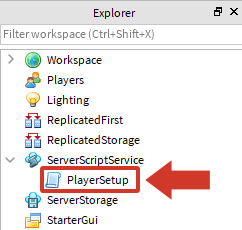
After the comment, create a custom function named onPlayerJoin with a parameter named player.
-- Creates a leaderboard that shows player variables

local function onPlayerJoin(player)

end
In
onPlayerJoin, create a variable namedleaderstats, and have it create a new Folder Instance.local function onPlayerJoin(player) local leaderstats = Instance.new("Folder") endName the new Folder instance
leaderstats, and parent it to the player. Naming the folderleaderstatslets Roblox Studio know to create a leaderboard.local function onPlayerJoin(player) local leaderstats = Instance.new("Folder") leaderstats.Name = "leaderstats" leaderstats.Parent = player end
Because leaderboards are a built-in feature, they must be named exactly as seen. For example, a folder named "leaderboard" wouldn't work.
After the end of the function, connect
OnPlayerJointo thePlayerAddedevent. Whenever a player joins the game, each player will be provided the leaderboard.local Players = game:GetService("Players") local function onPlayerJoin(player) local leaderstats = Instance.new("Folder") leaderstats.Name = "leaderstats" leaderstats.Parent = player end Players.PlayerAdded:Connect(onPlayerJoin)
Don't test yet since you won't see a leaderboard. Because there are no stats to display, the leaderboard won't appear.
Track player stats#
Now that a leaderboard is created, it needs to show the player these numbers:
- Gold - How much money the player has.
- Items - How many items the player has collected from the world.
- Spaces - The most items a player can hold at one time.
Each of these numbers will be an IntValue, a placeholder object for a number.
Code player gold#
Start with coding a stat for gold.
In
OnPlayerJoin, underleaderstats.Parent = player, typelocal gold = Instance.new("IntValue"). This creates a new IntValue and stores it in the variable gold.local function onPlayerJoin(player) local leaderstats = Instance.new("Folder") leaderstats.Name = "leaderstats" leaderstats.Parent = player local gold = Instance.new("IntValue") endNext, type
gold.Name = "Gold". This gives the IntValue a name so you can use it in other scripts. The name will also be shown to players on the leaderboard.local function onPlayerJoin(player) local gold = Instance.new("IntValue") gold.Name = "Gold" end
If you decide to use your own stat names, keep track of their exact name and spelling. They'll be referenced later in the series for other scripts.
On a new line, type
gold.Value = 0. This sets the starting value for players.local function onPlayerJoin(player) local gold = Instance.new("IntValue") gold.Name = "Gold" gold.Value = 0 end
While variables are normally changed using = as in myNumber = 10, an IntValue is changed using Value, like myIntValue.Value = 10.
Type
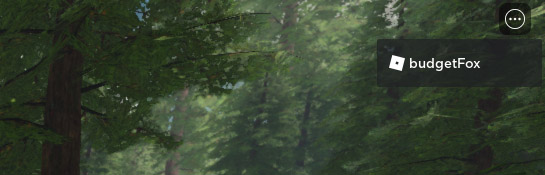
gold.Parent = leaderstats. This parents the IntValue for gold to leaderstats. If the IntValue is not parented to leaderstats, players won't see it.local function onPlayerJoin(player) local gold = Instance.new("IntValue") gold.Name = "Gold" gold.Value = 0 gold.Parent = leaderstats endPlay your project and notice that a leaderboard appears in the top right.
Troubleshooting tips#
If you don't see the leaderboard, try the following:
- Make sure that
.Valueis capitalized. - Make sure that the variable for the IntValue is parented to the leaderboard like
gold.Parent = leaderstats.
Code items and spaces#
Remember that the stat names can be anything based off the game design document. In other words, "Items" can be "Crystals" instead.
Add a blank line to separate the next stat, then create the item stat by setting up a new IntValue the same way you did for gold.
 local function onPlayerJoin(player)
   gold.Parent = leaderstats

   -- Create the Items stat
   local items = Instance.new("IntValue")
   items.Name = "Items"
   items.Value = 0
   items.Parent = leaderstats
 end
Create a new stat for the player's bag spaces. Set
spaces.Valueto2so players start the game only being able to hold two items at once, encouraging them buy a new bag as soon as they can.local function onPlayerJoin(player) items.Parent = leaderstats -- Create the Spaces stat local spaces = Instance.new("IntValue") spaces.Name = "Spaces" spaces.Value = 2 spaces.Parent = leaderstats endTest the project. Players should have a leaderboard showing Gold, Items, and Spaces.
If the leaderboard doesn't appear, try checking the following below.
- If you can't see the number on the leaderboard, check that each IntValue is parented to leaderstats.
- Make sure each IntValue is spelled exactly as shown
- Check that the PlayerAdded event is at the bottom of the script
Complete PlayerSetup script#
A finished version of the script can be referenced below.
 local Players = game:GetService("Players")

 -- Creates a leaderboard that shows player variables
 local function onPlayerJoin(player)
   local leaderstats = Instance.new("Folder")
   leaderstats.Name = "leaderstats"
   leaderstats.Parent = player

   local gold = Instance.new("IntValue")
   gold.Name = "Gold"
   gold.Value = 0
   gold.Parent = leaderstats

   local items = Instance.new("IntValue")
   items.Name = "Items"
   items.Value = 0
   items.Parent = leaderstats

   local spaces = Instance.new("IntValue")
   spaces.Name = "Spaces"
   spaces.Value = 2
   spaces.Parent = leaderstats
 end

 -- Run onPlayerJoin when the PlayerAdded event fires
 Players.PlayerAdded:Connect(onPlayerJoin)