Add new models
Part of the Roblox Build It, Play It Challenge - Island of Move. Decorate the template.
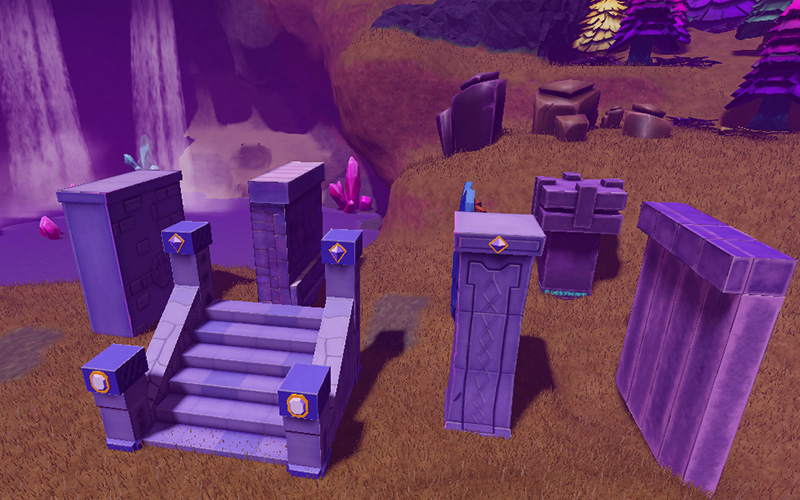
Create new buildings or expand the current ruins with this kit of extra parts. Once you finish designing a more visually impressive world, get a new avatar item.
Add to your inventory#
Get extra parts to work with by importing an asset. Assets are parts of a Roblox game, like a 3D model or sound, that are stored online.
Open the link to the kit below in your web browser.
Extra PropsOn the page for the asset, click the Get button to add it into your inventory.
Import into the game#
All assets can be found in your Inventory. This stores any models you've added and lets you add them into a game.
In Studio, find the Toolbox. If it's not visible, open it from the Window menu.
Select the Inventory tab.
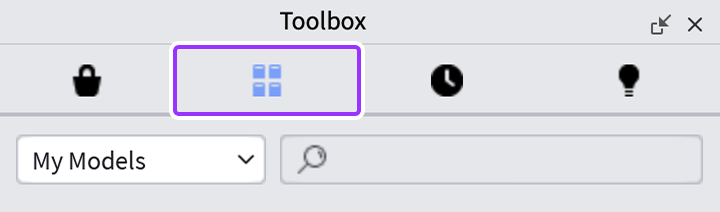
Make sure the left dropdown is set to My Models. Then, find and click on Island of Move Extra Props. This will add the parts into your game.
Challenge checkpoint#
You've customized your game, now claim your free prize! Celebrate your new skills by getting the Crystalline Companion and Bringing the World Alive badge. Copy the code below.
WorldAlive
Click the button to open a Roblox game, find the in-game character, and click REDEEM CODE to get your prize.
Enter World