Save and publish
Part of the Roblox Build It, Play It Challenge - Island of Move. Save the project.
Save the animation#
With the first pose is finished, save the animation.
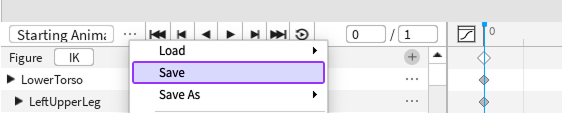
In the Animation Editor, find and click on the three dots icon.
From the menu, select Save.
Save the place#
The animation is saved, but it's important to save the whole project by publishing it to Roblox. It's a good idea to publish every ten minutes while you're working or after making a big change.
Select File → Publish to Roblox to open the publishing window.
Enter a place name and an optional description.
When ready, click the Create button. Once published, games can be edited from any computer since they're connected to your account.
This game runs on mobile
Players can use mobile devices with accelerometers as a way to move characters. Anyone playing on desktop devices will still click a button to move.
Saving after publishing
Next time you want to save your work, just go to File ⟩ Publish to Roblox or use the hotkey combo (AltP/⌥P).