Start coding
Part of the Story Games series that teaches you to code in Roblox. Open the script used to manage the game.
In Roblox, code is typed inside of scripts using the coding language Luau. Games often have separate scripts for each thing the game needs to do. The library template already has a script named StoryManager which you'll add more code to for your word game.
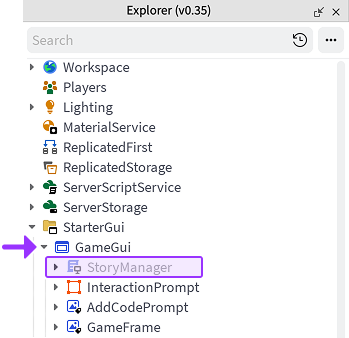
Find the StoryManager#
In the Explorer window, click the arrow next to StarterGUI to see everything beneath it.
Click the arrow next to GameGUI to expand that section.
Double-click the StoryManager script to open it.
Script contents#
The script already contains some of the code that's necessary for showing the completed story to the player. All of the code you create will be typed below the dashed lines.
For now, notice how a large portion of the script starts with the -- symbol. Lines of code starting with -- are called comments. These are used to leave notes for coders and don't change the way a program runs.
-- GLOBAL VARIABLES
local storyMaker = require(script:WaitForChild("StoryMaker"))

-- Code controlling the game
local playing = true

while playing do
	storyMaker:Reset()

	-- Code story between the dashes
	-- =============================================


	-- =============================================

	-- Add the story variable between the parenthesis below
	storyMaker:Write()

	-- Play again?
	playing = storyMaker:PlayAgain()
end