Plant reference project
A deep dive into building of the Plant game, a game where players plant seeds and harvest plants.
Plant is a reference game where players plant and water seeds, so they can later harvest and sell the resulting plants.
The project focuses on common use cases that you might encounter when developing a game on Roblox. Where applicable, you'll find notes on tradeoffs, compromises, and the rationale of various implementation choices, so you can make the best decision for your own games.
Get the file#
- Navigate to the Plant game page.
- Click the ⋯ button and Edit in Studio.
Use cases#
Plant covers the following use cases:
- Session data and player data persistence
- UI view management
- Client-server networking
- First Time User Experience (FTUE)
- Hard and soft currency purchases
In addition, this project solves narrower sets of problems that are applicable to many games, including:
- Customization of an area in the place that's associated with a player
- Managing the player character's movement speed
- Creating an object that follows characters around
- Detecting what part of the world a character is in
Note that there are several use cases in this game that are too small, too niche, or don't demonstrate a solution to an interesting design challenge; these are not covered.
Project structure#
The first decision when creating a game is deciding how to structure the project, which mainly includes where to place specific instances in the data model and how to organize and structure entry points for both client and server code.
Data model#
The following table describes which container services in the data model instances are placed in.
| Service | Types of instances |
|---|---|
Workspace |
Contains static models representing the 3D world, specifically parts of the world that don't belong to any player. You don't need to dynamically create, modify, or destroy these instances at runtime, so it's acceptable to leave them here. There is also an empty |
Lighting |
Atmospheric and lighting effects. |
ReplicatedFirst |
Contains the smallest possible subset of instances needed to display the loading screen and initialize the game. The more instances that are placed in start LocalScript is the entry point for all client-side code in the project.
|
ReplicatedStorage |
Serves as a storage container for all instances for which access is required on both the client and the server. - In the Dependencies folder exists some third party libraries used by the project. - In the Instances folder exists a wide range of prefabricated instances. - In the Source folder exists all code not required for the loading process that needs to be accessible from both the client and the server. |
ServerScriptService |
Contains a |
ServerStorage |
Serves as a storage container for all instances that do not need to be replicated to the client. - In the Instances folder exists a template Farm model. A copy of this is placed inWorkspace when the player joins the game, where it will be replicated to all players.
- In the Source folder exists all code that is exclusive to the server.
|
SoundService |
Contains the |
Entry points#
Most projects organize code inside reusable ModuleScripts
that can be imported across the entire codebase.
ModuleScripts are reusable but they do not execute
on their own; they need to be imported by a Script or LocalScript. Many Roblox
projects will have a large number of Script and LocalScript objects, each
pertaining to a behavior or particular system in the game, creating multiple
points of entry.
For the Plant microgame, a different approach is implemented through
a single LocalScript that is the entry point for all client code, and a
single Script that is the entry point for all server code. The correct
approach for your project depends on your requirements, but a single point of
entry provides greater control over the order in which systems are executed in.
The following lists describe the tradeoffs of both approaches:
Single entry point
- A single
Scriptand a singleLocalScriptcover server and client code respectively. - Greater control over the order in which different systems are started because all code is initialized from a single script.
- Can pass objects by reference between systems.
Multiple entry points
- New
ScriptorLocalScriptobjects are created as needed. - Greater ability to isolate code.
- Can take advantage of
Actorsand Multi-Threading. - Execution is in a non-deterministic order.
High level systems architecture#
The top-level systems in the project are detailed below. Some of these systems are substantially more complex than others, and in many cases their functionality is abstracted across a hierarchy of other classes.
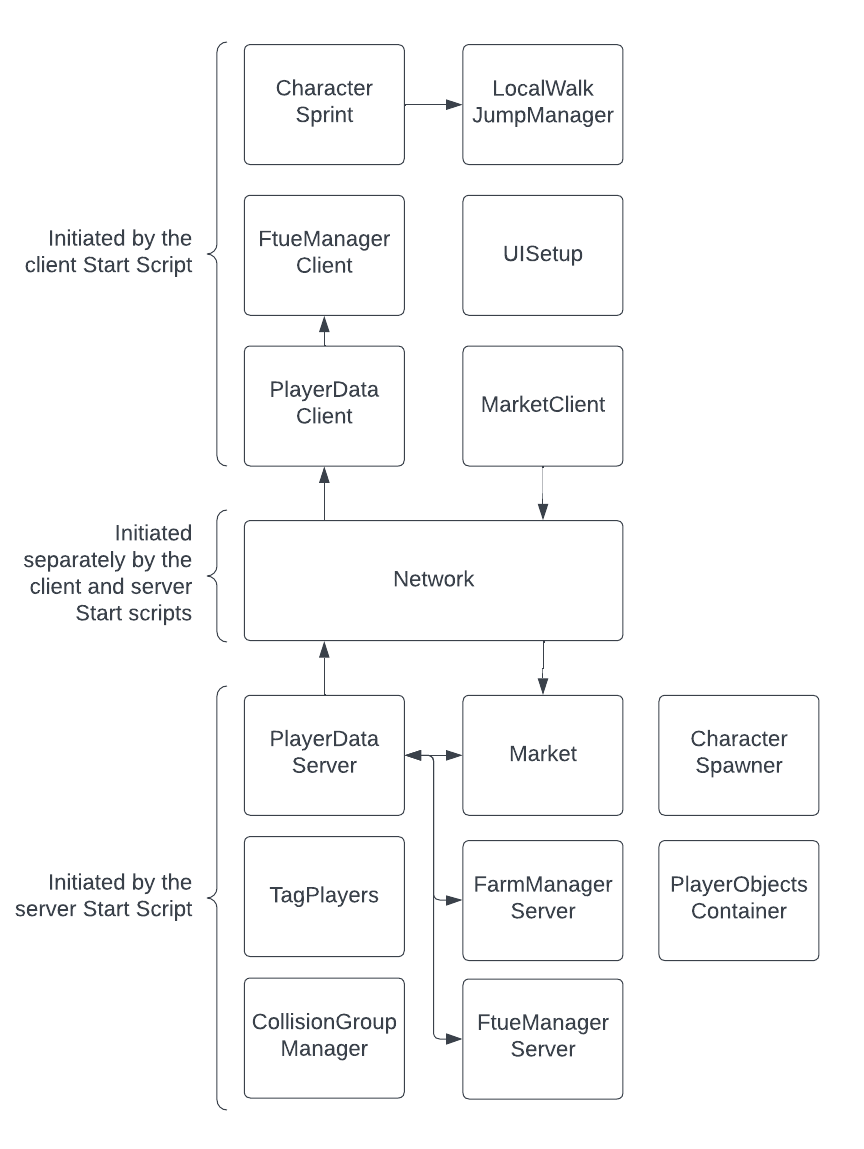
Each of these systems is a "singleton," in that it's a non-instantiable class
that is instead initialized by the relevant client or server start script. You
can read more about the singleton pattern later in this guide.
Server#
The following systems are associated with the server.
| System | Description |
|---|---|
| Network |
- Creates all RemoteEvent and RemoteFunction instances.
- Exposes methods for sending and listening to messages from the client.
- Type validation for arguments received from the client at runtime.
|
| PlayerDataServer |
- Saves and loads persistent player data using DataStoreService.
- Stores player data in memory and replicates mutations to the client.
- Exposes signals and methods for subscribing to, querying, and updating player data.
|
| Market | - Handles soft currency transactions from the client. - Exposes a method to sell harvested plants. |
| CollisionGroupManager | - Assigns player character models to collision groups. - Configures collision groups so player characters can not collide with plant wagons. |
| FarmManagerServer | - Re-creates a player's farm model from their player data when they join the game. - Removes the farm model when a player leaves. - Updates the player data when a player's farm is changed. - Exposes a method to access the Farm class associated with a given player. |
| PlayerObjectsContainer | - Creates various objects associated with the lifetime of a player and provides a method to retrieve these. |
| TagPlayers |
- Adds CollectionService tags to all player and character objects.
|
| FtueManagerServer | - During the FTUE, executes each stage and waits for it to complete. |
| CharacterSpawner |
- Respawns characters when they die. Note that Players.CharacterAutoLoads has been disabled so that spawning is paused until the player's data has loaded.
|
Client#
The following systems are associated with the client.
| System | Description |
|---|---|
| Network |
- Waits for the server to create all RemoteEvent and RemoteFunction instances.
- Exposes methods for sending and listening to messages to and from the server.
- Enforces runtime parameter type validation.
- Runs LuaGlobals.pcall() on remote functions.
|
| PlayerDataClient | - Stores the local player's data in memory. - Exposes methods and signals for querying and subscribing to changes in player data. |
| MarketClient | - Exposes a method to request the server to purchase an item for soft currency. |
| LocalWalkJumpManager |
- Exposes methods to modify the WalkSpeed or JumpHeight of a character via multipliers to avoid conflicts when modifying these values from multiple places.
|
| FarmManagerClient |
- Listens for specific CollectionService tags being applied to instances and creates "components" appending behavior to these instances. A "component" refers to a class that is created when a CollectionService tag is added to an instance and destroyed when it is removed; these are used for the CTA prompts in the farm and various classes telegraphing farm state to the player.
|
| UISetup | - Initializes all UI layers. - Configures certain layers to be visible only in physical sections of the world. - Hooks up a special camera effect for when menus are enabled. |
| FtueManagerClient | - Configures FTUE stages on the client. |
| CharacterSprint |
- Uses LocalWalkJumpManager to increase WalkSpeed when a player character is outside of their farm.
|
One notable callout for the singleton pattern is the Network
ModuleScript which includes logic that runs on both the client and the
server, initialized through separate startServer() and startClientAsync()
methods. This is a pattern that you should generally avoid, as it exposes
server-side logic unnecessarily to the client and can make files more complex
than needed. In this case, however, a unified ModuleScript setup
presents a more streamlined interface for what is a high touch part of the
codebase.
Client-server communication#
Most Roblox games involve some element of communication between the client and server. This can include the client requesting the server perform a certain action and the server replicating updates to the client.
In this project, client-server communication is kept as generic as possible by
limiting the use of RemoteEvent and RemoteFunction objects in
order to decrease the amount of special rules to keep track of. This project
uses the following methods, in order of preference:
- Replication via the player data system.
- Replication via attributes.
- Replication via tags.
- Messaging directly via the Network module.
Replication via player data system#
The player data system allows data to be associated with the player which persists between save sessions. This system provides replication from client to server and a set of APIs that can be used to query data and subscribe to changes, making it ideal for replicating changes to player state from the server to the client.
For example, rather than firing a bespoke UpdateCoins RemoteEvent to
tell the client how many coins it has, you can call the following and let the
client subscribe to it via the PlayerDataClient.updated event.
PlayerDataServer.setValue(player, "coins", 5)Of course, this is only useful for server-to-client replication and for values that you want to persist between sessions, but this applies to a surprising number of cases in the project, including:
- The current FTUE stage
- The player's inventory
- The amount of coins the player has
- The state of the player's farm
Replication via attributes#
In situations where the server needs to replicate a custom value to the client
that's specific to a given Instance, you can use
attributes. Roblox automatically replicates
attribute values, so you don't need to maintain any code paths to replicate
state associated with an object. Another advantage is that this replication
happens alongside the instance itself.
This is particularly useful for instances created at runtime, as attributes set
on a new instance before it is parented to the data model will replicate
atomically with the instance itself. This circumvents any need to write code to
"wait" for extra data to be replicated via a RemoteEvent or
StringValue.
You can also directly read attributes from the data model, from either the
client or the server, with the GetAttribute()
method, and subscribe to changes with the
GetAttributeChangedSignal() method.
In the Plant project, this approach is used for, amongst other
things, replicating the current status of plants to clients.
Replication via tags#
CollectionService lets you apply a string tag to an Instance.
This is useful for categorizing instances and replicating that categorization to
the client.
For example, the CanPlant tag is applied on the server to signify to the client that a given pot is able to receive a plant.
Message directly via network module#
For situations where none of the previous options apply, you can use custom network calls through the Network module. This is the only option in the project that allows client-to-server communication and is therefore most useful for transmitting client requests and receiving a server response.
Plant uses direct network calls for a variety of client requests, including:
- Watering a plant
- Planting a seed
- Purchasing an item
The drawback with this approach is that each individual message requires some bespoke configuration which can increase the complexity of the project, although this has been avoided wherever possible, particularly for server-to-client communication.
Classes and singletons#
Classes in the Plant project, like instances on Roblox, can be created and destroyed. Its class syntax is inspired by the idiomatic Lua approach to object-oriented programming with a number of changes to enable strict typechecking support.
Instantiation#
Many classes in the project are associated with one or more
Instances. Objects of a given class are created using a new()
method, consistent with how instances are created in Roblox using
Instance.new().
This pattern is generally used for objects where the
class has a physical representation in the data model, and the class extends its
functionality. A good example is BeamBetween which creates a Beam
object between two given Attachment objects and keeps those attachments
orientated so that the beam is always facing upwards. These instances could be cloned from a prefabricated version in ReplicatedStorage or passed into new() as an argument and stored inside the object under self.
Corresponding instances#
As noted above, many classes in this project have a data model representation, an instance that corresponds with the class and is manipulated by it.
Rather than creating these instances when a class object is instantiated, the code generally opts to Clone() a prefabricated version of the Instance stored under ReplicatedStorage or ServerStorage. Although it would be possible to serialize the properties of these instances and create them from scratch in the class' new() functions, doing so would make editing the objects very cumbersome and make them harder for a reader to parse. Additionally, cloning an instance is generally a faster operation than creating a new instance and customizing its properties at runtime.
Composition#
Although inheritance is possible in Luau using
metatables, the project opts to instead allow classes
to extend each other through composition. When combining classes through
composition, the "child" object is instantiated in the new() method of the
class and is included as a member under self.
For an example of this in action, see the CloseButton class which wraps the Button class.
Cleanup#
Similar to how an Instance can be destroyed with the
Destroy() method, classes which can be instantiated
can also be destroyed. The destructor method for project classes is destroy()
with a lowercase d for camelCase consistency across the codebase's methods,
as well as to distinguish between the project's classes and Roblox instances.
The role of the destroy() method is to destroy any instances created by the
object, disconnect any connections, and call destroy() on any child objects.
This is particularly important for connections because instances with active
connections are not cleaned up by the Luau garbage collector, even if no
references to the instance or connections to the instance remain.
Singletons#
Singletons, as the name suggests, are classes for which only one object can ever
exist. They are the project's equivalent of Roblox's Services. Rather than storing a reference to the singleton object and passing it around in the Luau code, Plant takes
advantage of the fact that requiring a ModuleScript caches its returned value. This means that requiring the same singleton ModuleScript
from different places consistently provides the same returned object.
The only exception to this rule would be if different environments (client or server) accessed the ModuleScript.
Singletons are distinguished from instantiable classes by the fact that they
don't have a new() method. Rather, the object along with its methods and
state is returned directly via the ModuleScript. As singletons are not
instantiated, the self syntax is not used and methods are instead called
with a dot (.) rather than a colon (:).
Strict type inference#
Luau supports gradual typing which means you're free to add optional
type definitions to some or all of your code. In this project, strict typechecking is used for every script. This is the least permissive option for
Roblox's Script Analysis tool and thus the most likely to catch type errors
before runtime.
Strong typing is undoubtedly powerful, but it's still an evolving feature in the Luau language and Studio. As a result, there are a number of limitations that, at the time of writing, required workarounds detailed in the following sections.
Typed class syntax#
The established approach to creating classes in Lua is well documented, however it is not well suited to strong Luau typing. In Luau, the simplest approach for getting the type of a class is the RobloxGlobals.typeof() method:
type ClassType = typeof(Class.new())This works but it isn't very useful when your class is initiated with values that only exist at runtime, for example Player objects. Additionally, the assumption made in idiomatic Lua class syntax is that declaring a method on a class self will always be an instance of that class; this is not an assumption the type inference engine can make.
In order to support strict type inference, the Plant project uses a solution that differs from idiomatic Lua class syntax in a number of ways, some of which may feel non-intuitive:
- The definition of
selfis duplicated, both in the type declaration and in the constructor. This introduces a maintainability burden, but warnings will be flagged if the two definitions fall out of sync with each other. - Class methods are declared with a dot, so
selfcan be explicitly declared to be of typeClassType. Methods can still be called with a colon as expected.
--!strict

local MyClass = {}
MyClass.__index = MyClass

export type ClassType = typeof(setmetatable(
	{} :: {
		property: number,
	},
	MyClass
))

function MyClass.new(property: number): ClassType
	local self = {
		property = property,
	}

	setmetatable(self, MyClass)

	return self
end

function MyClass.addOne(self: ClassType)
	self.property += 1
end

return MyClass
Cast types after logical guards#
At the time of writing, the type of a value is not narrowed after a guard conditional statement. For example, following the guard below, the type of optionalParameter is not narrowed to number.
--!strict

local function foo(optionalParameter: number?)
	if not optionalParameter then
		return
	end

	print(optionalParameter + 1)
end
To mitigate this, new variables are created after these guards with their type explicitly cast.
--!strict

local function foo(optionalParameter: number?)
	if not optionalParameter then
		return
	end

	local parameter = optionalParameter :: number

	print(parameter + 1)
end
Traverse DataModel hierarchies#
In some cases, the codebase needs to traverse the data model hierarchy of a tree of objects that are created at runtime. This presents an interesting challenge for typechecking. At the time of writing, it's not possible to define a generic data model hierarchy as a type. As a result, there are cases where the only type information available for a data model structure is the type of the top level instance.
One approach to this challenge is to cast to any and then refine. For example:
local function enableVendor(vendor: Model)
	local zonePart: BasePart = (vendor :: any).ZonePart
end
The problem with this approach is that it impacts readability. Instead, the
project uses a generic module called getInstance for traversing data model
hierarchies that casts to any internally.
local function enableVendor(vendor: Model)
	local zonePart: BasePart = getInstance(vendor, "ZonePart")
end
As the type engine's understanding of the data model evolves, it's possible that patterns like this will no longer be necessary.
User interface#
Plant includes a variety of complex and simple 2D user interfaces. These include non-interactive heads up display (HUD) items like the coin counter and complex interactive menus like the shop.
UI approach#
You can loosely compare Roblox UI to the HTML DOM, because it's a hierarchy of objects that describe what the user should be seeing. Approaches to creating and updating a Roblox UI are broadly divided into imperative and declarative practices.
| Approach | Advantages and drawbacks |
|---|---|
| Imperative |
In the imperative approach, UI is treated like any other instance hierarchy on Roblox. The UI structure is created before runtime in Studio and added to the data model, typically directly in This approach comes with some advantages. You can create the UI from scratch in Studio and store it in the data model. This is a simple and visual editing experience that can accelerate UI creation. Because imperative UI code only concerns itself with what needs changing, it also makes simple UI changes easy to implement. A notable drawback is that, since imperative UI approaches require state to be manually implemented in the form of transformations, complex representations of state can become very hard to find and debug. It's common for errors to emerge when developing imperative UI code, especially when state and the UI becomes desynchronized due to multiple updates interacting in an unexpected order. Another challenge with imperative approaches is that it's harder to break down UI into meaningful components that can be declared once and reused. Because the entire UI tree is declared at edit time, common patterns may be repeated in multiple parts of the data model. |
| Declarative |
In the declarative approach, the desired state of UI instances are declared explicitly, and the efficient implementation of this state is abstracted away by libraries such as Roact or Fusion. The advantage of this approach is the implementation of state becomes trivial and you only need to describe what you want your UI to look like. This makes identifying and resolving bugs significantly easier. The key drawback is having to declare the entire UI tree in code. Libraries like Roact and Fusion have syntax to make this easier, but it's still a time consuming process and a less intuitive editing experience when composing UI. |
Plant uses an imperative approach under the notion that showing the transformations directly gives a more effective overview of how UI is created and manipulated on Roblox. This would not be possible with a declarative approach. Some repeated UI structures and logic are also abstracted into reusable components to avoid a common pitfall in imperative UI design.
High-level architecture#
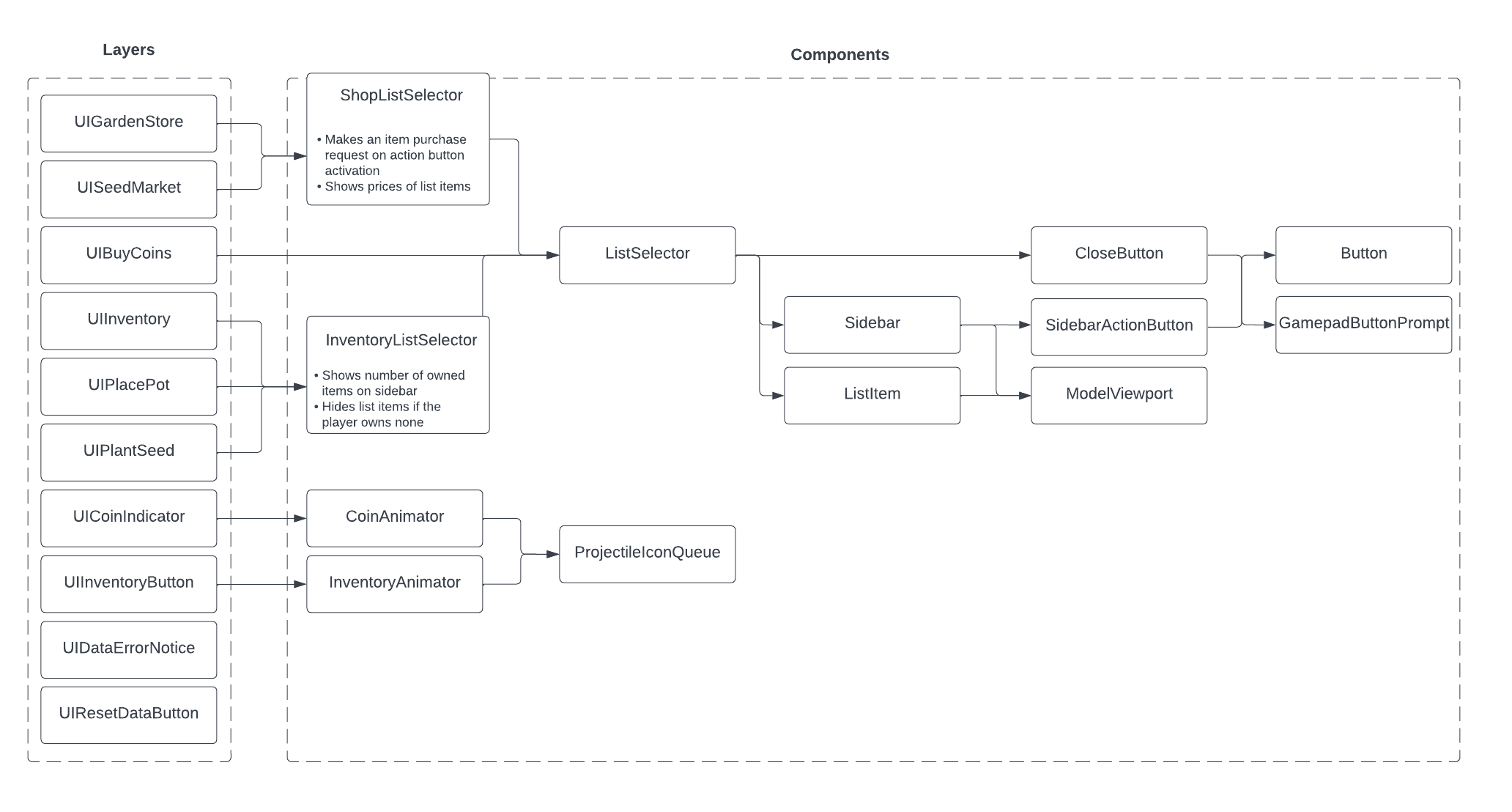
Layer and components#
In Plant, all UI structures are either a Layer or a Component.
Layeris defined as a top level grouping singleton that wraps prefabricated UI structures inReplicatedStorage. A layer may contain a number of components, or it may encapsulate its own logic entirely. Examples of layers are the inventory menu or the number of coins indicator in the heads up display.Componentis a reusable UI element. When a new component object is instantiated, it clones a prefabricated template fromReplicatedStorage. Components may in themselves contain other components. Examples of components are a generic button class or the concept of a list of items.
View handling#
A common UI management problem is view handling. This project has a range of menus and HUD items, some of which listen to user input, and careful management of when they are visible or enabled is required.
Plant approaches this problem with its UIHandler system which manages when a UI layer should or should not be visible. All UI layers in the game are categorized as HUD or Menu and their visibility is managed by the following rules:
- The enabled state of
MenuandHUDlayers can be toggled. - Enabled
HUDlayers are only shown if noMenulayers are enabled. - Enabled
Menulayers are stored in a stack, and only oneMenulayer is visible at a time. When aMenulayer is enabled, it is inserted to the front of the stack and shown. When aMenulayer is disabled, it is removed from the stack and the next enabledMenulayer in the queue is shown.
This approach is intuitive because it allows menus to be navigated with history. If one menu is opened from another menu, closing the new menu will show the old menu again.
UI layer singletons register themselves with the UIHandler and are provided with a signal that fires when its visibility should change.
Further reading#
From this thorough overview of the Plant project, you may want to explore the following guides which go further in depth on related concepts and topics.
- Client-Server Model — An overview of the client-server model in Roblox.
- Luau — Details on Luau, the Roblox-created scripting language descended from Lua 5.1.
- Remote Events and Callbacks — All about remote network events and callbacks for communication across the client-server boundary.
- UI — Details on user interface objects and design on Roblox.