Rich text markup
Rich Text Markup are simple markup tags to style sections of a string.
UI rich text utilizes simple markup tags to style sections of a string in bold, italics, underline, fill color, stroke variations, and more. You can apply styling tags to TextLabel, TextButton, and TextBox objects.
Enable rich text#
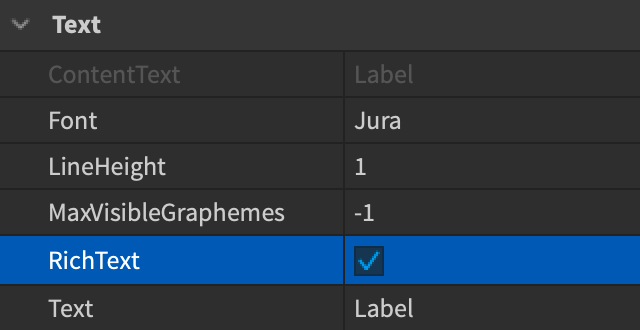
You must enable rich text on a per-object basis through its RichText property in the Properties window, or by setting the property to true in a LocalScript.
local title = Instance.new("TextLabel")
title.RichText = true

title.Text = "Use a <b>bold title</b>"
When editing an object's Text property in Studio, toggling the RichText checkbox in the Properties window displays the text string as a final render. This is useful for identifying and correcting mistakes in any supported tags.
Localizing a game to support other languages removes rich text formatting tags. To ensure formatting appears in other languages, re-apply the tags manually to your localized strings.
Supported tags#
Rich text tags are similar to XML/HTML tags and you must include both an opening and closing tag around the formatted text.
Formatted text
You can also nest tags inside each other as long as you close them in the reverse order of how you opened them.
Formatted text
Font color#
`I want the orange candy.`
`I want the orange candy.`
Font size#
`This is big. This is small.`
Font face#
`This is Michroma face.`
Font face/family names are listed on the Font enum reference page.
Font family#
`This is Michroma face.`
Font face/family names are listed on the Font enum reference page.
Font weight#
`This is normal. This is heavy.`
`This is normal. This is heavy.`
Font weight can be a case-insensitive string name including Thin, ExtraLight, Light, Regular, Medium, SemiBold, Bold, ExtraBold, or Heavy; it can also be a number in factors of 100 between 100 and 900.
Font transparency#
`Text at 50% transparency.`
Stroke#
| Parameter | Equivalent Property | Example Values |
|---|---|---|
color |
UIStroke.Color |
"rgb(255,125,0)", "#FF7800" |
thickness or th |
UIStroke.Thickness |
"1", "4", "0.5" |
transparency or tr |
UIStroke.Transparency |
"0", "0.5", "1" |
joins |
UIStroke.LineJoinMode |
"round", "bevel", "miter" |
sizing |
UIStroke.StrokeSizingMode |
"fixed", "scaled" |
`You won25 gems .`
See UI appearance modifiers for details on thickness and joins.
Bold#
`Text in bold.`
Italic#
`Text italicized.`
Underline#
`Text underlined.`
Strikethrough#
`Text withstrikethroughapplied.`
Line break#
`New line occurs after this sentence.
Next sentence...`
Uppercase#
`Uppercase makes words read loudly!`
`Uppercase makes words read loudly!`
Small caps#
`My name isDiva Dragonslayer .`
`My name isDiva Dragonslayer .`
Mark#
`Text highlighted.`
Comment#
`After this is a comment... and now more text...`
Escape forms#
If you want to render certain characters like < or > and exempt them from consideration as part of rich text tags, you can write them in their escape form.
| Character | Escape | Example | Result |
|---|---|---|---|
| `<` | `<` | `10 < 100` | 10 < 100 |
| `>` | `>` | `100 > 10` | 100 > 10 |
| `"` | `"` | `Meet "Diva Dragonslayer"` | Meet "Diva Dragonslayer" |
| `'` | `'` | `Diva's pet is a falcon!` | Diva's pet is a falcon! |
| `&` | `&` | `Render another escape form < by escaping an ampersand` | Render another escape form **<** by escaping an ampersand |