CSS Comparisons
Explore how CSS concepts map to Roblox UI styling concepts.
Most CSS concepts map to Roblox styling concepts. The following examples show how CSS and HTML align with Luau and Roblox classes/properties.
To test each of the following Luau script examples:
In the Explorer, create the following:
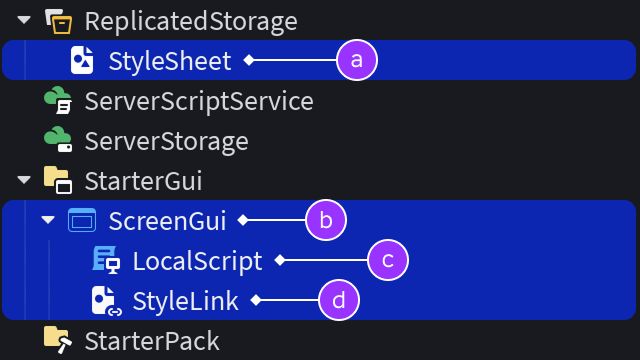
StyleSheetinstance insideReplicatedStorage.ScreenGuicontainer inStarterGui.LocalScriptinstance inside theScreenGui.StyleLinkobject inside theScreenGui.
In the
LocalScript, paste the following supporting code:```lua title="LocalScript" local CollectionService = game:GetService("CollectionService") local ReplicatedStorage = game:GetService("ReplicatedStorage")
local coreSheet = ReplicatedStorage:FindFirstChildWhichIsA("StyleSheet") local screenGui = script.Parent local styleLink = screenGui:FindFirstChildWhichIsA("StyleLink") styleLink.StyleSheet = coreSheet ```
For each example below, paste the Luau code lines following the supporting lines 1–7.
Selectors#
The Selector property of a StyleRule specifies which instances the rule should affect. The following selector types map from CSS to Luau and can be used with combinators.
Element#
Equivalent to CSS element selectors are Roblox class selectors which select all instances of a given GuiObject class, for example Frame, ImageLabel, TextButton, etc.
text title="CSS" button { background-color: #335FFF; color: #E1E1E1; width: 15%; height: 40px; border: none; }
text title="HTML"
```lua title="Luau" local rule = Instance.new("StyleRule") rule.Parent = coreSheet
rule.Selector = "TextButton" -- Roblox class selector rule:SetProperties({ BackgroundColor3 = Color3.fromHex("335FFF"), TextColor3 = Color3.fromHex("E1E1E1"), Size = UDim2.new(0.15, 0, 0, 40), BorderSizePixel = 0 })
local button = Instance.new("TextButton") button.Text = "Main Menu" button.Parent = screenGui ```
Class#
The Roblox equivalent to CSS class selectors are tag selectors which utilize tags applied through CollectionService.
text title="CSS" .button-primary { background-color: #335FFF; color: #E1E1E1; }
text title="HTML"
```lua title="Luau" local rule = Instance.new("StyleRule") rule.Parent = coreSheet
rule.Selector = ".ButtonPrimary" -- Roblox tag selector rule:SetProperties({ BackgroundColor3 = Color3.fromHex("335FFF"), TextColor3 = Color3.fromHex("E1E1E1"), AutomaticSize = Enum.AutomaticSize.XY })
local button = Instance.new("TextButton") button.Text = "Main Menu" button.Parent = screenGui -- Apply tag to button CollectionService:AddTag(button, "ButtonPrimary") ```
Identifier#
The closest Roblox comparison to CSS id is the #[name] selector which selects according to the value of Instance.Name. Unlike the W3C specification of the id attribute, names are not expected to be unique.
text title="CSS" #modal-frame { background-color: #000022; opacity: 0.5; width: 50%; min-height: 100px; }
text title="HTML"
```lua title="Luau" local rule = Instance.new("StyleRule") rule.Parent = coreSheet
rule.Selector = "#ModalFrame" -- Instance name selector rule:SetProperties({ BackgroundColor3 = Color3.fromHex("000022"), BackgroundTransparency = 0.5, Size = UDim2.new(0.5, 0, 0, 100), AutomaticSize = Enum.AutomaticSize.Y })
local frame = Instance.new("Frame") frame.Parent = screenGui -- Rename frame to match selector frame.Name = "ModalFrame" ```
Combinators#
Combinators let you mix basic selectors to match deeper hierarchy relationships.
Child#
The child selector of > is identical between CSS and Roblox.
.menu-container > button {
background-color: #335FFF;
color: #E1E1E1;
width: 80%;
height: 40px;
border: none;
}
text title="HTML"
```lua title="Luau" local rule = Instance.new("StyleRule") rule.Parent = coreSheet
rule.Selector = ".MenuContainer > TextButton" -- Child selector rule:SetProperties({ BackgroundColor3 = Color3.fromHex("335FFF"), TextColor3 = Color3.fromHex("E1E1E1"), Size = UDim2.new(0.8, 0, 0, 40), BorderSizePixel = 0 })
-- Create menu container local menuContainer = Instance.new("Frame") menuContainer.Size = UDim2.new(0.25, 0, 0, 0) menuContainer.AutomaticSize = Enum.AutomaticSize.Y menuContainer.Parent = screenGui -- Apply tag CollectionService:AddTag(menuContainer, "MenuContainer")
-- Create button local button = Instance.new("TextButton") button.Text = "Options" -- Set menu container as parent of button button.Parent = menuContainer ```
Descendant#
Unlike the CSS whitespace syntax, for example .menu-container button seen here, Roblox uses the >> combinator to indicate a descendant relationship.
.sub-container { width: 75%; }
.menu-container button {
background-color: #335FFF;
color: #E1E1E1;
width: 80%;
height: 40px;
border: none;
}
text title="HTML"
```lua title="Luau" local rule = Instance.new("StyleRule") rule.Parent = coreSheet
rule.Selector = ".MenuContainer >> TextButton" -- Descendant selector rule:SetProperties({ BackgroundColor3 = Color3.fromHex("335FFF"), TextColor3 = Color3.fromHex("E1E1E1"), Size = UDim2.new(0.8, 0, 0, 40), BorderSizePixel = 0 })
-- Create menu container local menuContainer = Instance.new("Frame") menuContainer.Size = UDim2.new(0.25, 0, 0, 0) menuContainer.AutomaticSize = Enum.AutomaticSize.Y menuContainer.Parent = screenGui -- Apply tag CollectionService:AddTag(menuContainer, "MenuContainer")
-- Create sub-container local subContainer = Instance.new("Frame") subContainer.Size = UDim2.new(0.75, 0, 0, 0) subContainer.AutomaticSize = Enum.AutomaticSize.Y -- Set menu container as parent of sub-container subContainer.Parent = menuContainer
-- Create button local button = Instance.new("TextButton") button.Text = "Options" -- Set sub-container as parent of button button.Parent = subContainer ```
Selector list#
Multiple selectors (including selectors with combinators) can be declared with the same property block, separated by commas, to reduce redundancy.
text title="CSS" img, p { background-color: #FF0033; }

Main Menu
``````lua title="Luau" local rule = Instance.new("StyleRule") rule.Parent = coreSheet
rule.Selector = "ImageLabel, TextLabel" -- Selector for image labels AND text labels rule:SetProperty("BackgroundColor3", Color3.fromHex("ff0033"))
-- Create image label local imageLabel = Instance.new("ImageLabel") imageLabel.Image = "rbxassetid://104919049969988" imageLabel.Size = UDim2.new(0, 100, 0, 100) imageLabel.Parent = screenGui
-- Create text label local textLabel = Instance.new("TextLabel") textLabel.Size = UDim2.new(1, 0, 0, 0) textLabel.AutomaticSize = Enum.AutomaticSize.Y textLabel.TextXAlignment = Enum.TextXAlignment.Left textLabel.TextYAlignment = Enum.TextYAlignment.Top textLabel.Text = "Main Menu" textLabel.Parent = screenGui ```
Pseudo-classes#
The Roblox equivalent to CSS pseudo-class selectors are state selectors which correspond to one of the four GuiState values such as Hover or Press.
text title="CSS" img:hover { opacity: 0.5; }
text title="HTML"
```lua title="Luau" local rule = Instance.new("StyleRule") rule.Parent = coreSheet
rule.Selector = "ImageLabel:Hover" -- State selector rule:SetProperty("ImageTransparency", 0.5)
-- Create image label local imageLabel = Instance.new("ImageLabel") imageLabel.Image = "rbxassetid://104919049969988" imageLabel.Size = UDim2.new(0, 100, 0, 100) imageLabel.BackgroundTransparency = 1 imageLabel.Parent = screenGui ```
Pseudo-instances#
Similar to how CSS pseudo-elements can modify specific parts of an element, Roblox can create phantom UIComponents through a style rule's Selector property. For example, the following rule effectively creates a UICorner modifier under every Frame tagged with RoundedCorner20 and sets each modifier's CornerRadius to 20 pixels.
local rule = Instance.new("StyleRule")
rule.Parent = coreSheet

rule.Selector = "Frame.RoundedCorner20::UICorner" -- UI component selector
rule:SetProperty("CornerRadius", UDim.new(0, 20))

-- Create frame
local frame = Instance.new("Frame")
frame.Size = UDim2.new(0.4, 0, 0.2, 0)
frame.Parent = screenGui
-- Apply tag to frame
CollectionService:AddTag(frame, "RoundedCorner20")Queries#
Roblox style queries bridge the gap between CSS media queries and container queries. Using the @ prefix, you can toggle styles based on parent dimensions, input device types, or user accessibility settings.
In CSS, @container applies styles based on the size of a parent element. In Roblox, you define a pseudo‑instance query using ::StyleQuery followed by an identifier for the condition's Selector property, for example "::StyleQuery #WideContainer", alongside a StyleQuery condition name like "MinSize" to evaluate the parent's GuiObject.AbsoluteSize. Then, to apply styles to the instance or its children when the query is active, create a StyleRule with the @[identifier] prefix as its Selector, for example @WideContainer.
@container (min-width: 400px) {
button {
background-color: #cc0033;
}
}
text title="HTML"
```lua title="Luau" -- Container rule local containerRule = Instance.new("StyleRule") containerRule.Selector = "Frame" -- Roblox class selector containerRule:SetProperties({ BackgroundColor3 = Color3.fromRGB(0, 0, 34), BackgroundTransparency = 0.5, BorderSizePixel = 0 }) containerRule.Parent = coreSheet
-- Button rule local buttonRule = Instance.new("StyleRule") buttonRule.Selector = "TextButton" -- Roblox class selector buttonRule:SetProperties({ BackgroundColor3 = Color3.fromHex("335FFF"), TextColor3 = Color3.fromHex("E1E1E1"), Size = UDim2.new(0.75, 0, 0, 40), BorderSizePixel = 0 }) buttonRule.Parent = containerRule -- Child of container rule
-- Query condition (#WideContainer) local queryCondition = Instance.new("StyleRule") queryCondition.Selector = "::StyleQuery #WideContainer" queryCondition:SetProperty("MinSize", Vector2.new(400, 0)) queryCondition.Parent = containerRule -- Child of container rule
-- Rule that applies when condition is active (@WideContainer) local queryStyle = Instance.new("StyleRule") queryStyle.Selector = "@WideContainer Frame > TextButton" -- Child selector queryStyle:SetProperty("BackgroundColor3", Color3.fromHex("CC0033")) queryStyle.Parent = containerRule -- Child of container rule
-- Create instances local container = Instance.new("Frame") container.Size = UDim2.new(0.8, 0, 0, 200) container.Parent = screenGui local button = Instance.new("TextButton") button.Text = "Main Menu" button.Parent = container ```
Roblox also provides built-in queries that map directly to global environment states such as ViewportDisplaySize or ReducedMotionEnabled. These do not require a ::StyleQuery definition and can be used directly with a @ prefix.
| CSS Media Feature | Roblox Style Query Selector |
|---|---|
(max-width: 600px) |
@ViewportDisplaySizeSmall |
(min-width: 601px) and (max-width: 1200px) |
@ViewportDisplaySizeMedium |
(min-width: 1201px) |
@ViewportDisplaySizeLarge |
(pointer: fine) |
@PreferredInputKeyboardAndMouse |
(pointer: coarse) |
@PreferredInputTouch |
(any-pointer: coarse) |
@PreferredInputGamepad |
(prefers-reduced-motion: reduce) |
@ReducedMotionEnabledTrue |
(prefers-reduced-motion: no-preference) |
@ReducedMotionEnabledFalse |
@media (prefers-reduced-motion: reduce) {
.container {
background-color: rgba(0, 0, 34, 1);
}
}
text title="HTML"
```lua title="Luau" -- Container rule local containerRule = Instance.new("StyleRule") containerRule.Selector = "Frame" -- Roblox class selector containerRule:SetProperties({ BackgroundColor3 = Color3.fromRGB(0, 0, 34), BackgroundTransparency = 0.5, BorderSizePixel = 0 }) containerRule.Parent = coreSheet
-- Built-in query local motionRule = Instance.new("StyleRule") motionRule.Selector = "@ReducedMotionEnabledTrue Frame" motionRule:SetProperty("BackgroundTransparency", 0) motionRule.Parent = containerRule -- Child of container rule
-- Create instances local container = Instance.new("Frame") container.Size = UDim2.new(0.8, 0, 0, 200) container.Parent = screenGui ```
Variables#
CSS lets you declare and reference variables throughout a style system. Roblox achieves this through tokens and the instance attributes system. Using $ as a prefix, you can reference attributes declared in a StyleRule or StyleSheet inheritance chain when setting style properties.
button {
background-color: var(--button-bg-color);
color: var(--button-text-color);
}
text title="HTML"
```
```lua title="Luau" local rule = Instance.new("StyleRule") rule.Parent = coreSheet
-- Set style sheet tokens using attributes coreSheet:SetAttribute("ButtonBgColor", Color3.fromHex("335FFF")) coreSheet:SetAttribute("ButtonTextColor", Color3.fromHex("E1E1E1"))
rule.Selector = "TextButton" -- Class selector rule:SetProperties({ BackgroundColor3 = "$ButtonBgColor", TextColor3 = "$ButtonTextColor" })
-- Create button local button = Instance.new("TextButton") button.AutomaticSize = Enum.AutomaticSize.XY button.Text = "Main Menu" button.Parent = screenGui ```
Transitions#
CSS transitions let you tween property values over a set duration. You can achieve this in Roblox by setting property transitions on a StyleRule through SetPropertyTransition() (single) or SetPropertyTransitions() (multiple).
text title="CSS" button { background-color: #335FFF; color: #E1E1E1; width: 15%; height: 40px; border: none; transition: background-color 1s ease-out, transform 1.25s ease-out } button:hover { background-color: #33AAFF; transform: rotate(-5deg); }
text title="HTML"
```lua title="Luau" -- Button rule local buttonRule = Instance.new("StyleRule") buttonRule.Selector = "TextButton" -- Roblox class selector buttonRule:SetProperties({ BackgroundColor3 = Color3.fromHex("335FFF"), TextColor3 = Color3.fromHex("E1E1E1"), Size = UDim2.new(0.15, 0, 0, 40), BorderSizePixel = 0 }) -- Set property transition behaviors buttonRule:SetPropertyTransitions({ BackgroundColor3 = TweenInfo.new(1, Enum.EasingStyle.Cubic, Enum.EasingDirection.Out), Rotation = TweenInfo.new(1.25, Enum.EasingStyle.Cubic, Enum.EasingDirection.Out) }) buttonRule.Parent = coreSheet
-- Button hover rule local hoverRule = Instance.new("StyleRule") hoverRule.Selector = "TextButton:Hover" -- State selector hoverRule:SetProperties({ AutoButtonColor = false, BackgroundColor3 = Color3.fromHex("33AAFF"), Rotation = -5 }) hoverRule.Parent = coreSheet
-- Create text button local button = Instance.new("TextButton") button.Text = "Main Menu" button.Parent = screenGui ```
Nesting and merging#
Borrowing a concept from SCSS, StyleRules can be nested together and their selectors will merge.
> button { background-color: #335FFF; color: #E1E1E1; width: 80%; height: 40px; border: none;
&:hover {
opacity: 0.5;
}
}
}
text title="HTML"
```lua title="Luau" -- Menu frame rule local menuFrameRule = Instance.new("StyleRule") menuFrameRule.Selector = "#MenuFrame" menuFrameRule:SetProperties({ BackgroundColor3 = Color3.fromHex("000022"), Size = UDim2.new(0.25, 0, 0, 200), AutomaticSize = Enum.AutomaticSize.Y }) menuFrameRule.Parent = coreSheet
-- Menu layout rule local menuLayoutRule = Instance.new("StyleRule") menuLayoutRule.Selector = "::UIListLayout" menuLayoutRule:SetProperties({ FillDirection = Enum.FillDirection.Vertical, VerticalFlex = Enum.UIFlexAlignment.SpaceEvenly, HorizontalAlignment = Enum.HorizontalAlignment.Center }) menuLayoutRule.Parent = menuFrameRule -- Set menu frame rule as parent
-- Button rule local buttonRule = Instance.new("StyleRule") buttonRule.Selector = "> TextButton" buttonRule:SetProperties({ BackgroundColor3 = Color3.fromHex("335FFF"), TextColor3 = Color3.fromHex("E1E1E1"), Size = UDim2.new(0.8, 0, 0, 40), BorderSizePixel = 0 }) buttonRule.Parent = menuFrameRule -- Set menu frame rule as parent
-- Button hover rule local buttonHoverRule = Instance.new("StyleRule") buttonHoverRule.Selector = ":Hover" buttonHoverRule:SetProperties({ AutoButtonColor = false, BackgroundTransparency = 0.5, TextTransparency = 0.5 }) buttonHoverRule.Parent = buttonRule -- Set button rule as parent
-- Create parent frame local menuFrame = Instance.new("Frame") menuFrame.Name = "MenuFrame" menuFrame.Parent = screenGui
-- Create buttons inside frame local button1 = Instance.new("TextButton") button1.Text = "Charms" button1.Parent = menuFrame local button2 = Instance.new("TextButton") button2.Text = "Mana" button2.Parent = menuFrame local button3 = Instance.new("TextButton") button3.Text = "Scrolls" button3.Parent = menuFrame ```