Class
GuiService
NotCreatableServiceNotReplicated
Offers numerous properties and methods for working with
GuiObjects, player preferences, and other UI‑related tasks.
GuiService offers numerous properties and methods for working with
GuiObjects, player preferences, and other UI‑related tasks.
Properties 13#
AutoSelectGuiEnabledboolean | If activated, the Select button on a gamepad or Backslash will automatically set a GUI as the selected object.ReadSafe |
CoreGuiNavigationEnabledboolean | Toggles whether or not objects in the CoreGui can be navigated
using a gamepad.ReadSafeHiddenNotReplicated |
GuiNavigationEnabledboolean | Used to enable and disable the default controller GUI navigation.ReadSafe |
IsModalDialogboolean | Indicates whether a modal dialog is visible.ReadSafeDeprecatedReadOnlyNotReplicated |
IsWindowsboolean | Indicates whether the user is playing on a computer running Windows.ReadSafeDeprecatedReadOnlyNotReplicated |
MenuIsOpenboolean | Returns true if any menu of CoreGui is open.ReadSafeReadOnlyNotReplicated |
PreferredTextSizePreferredTextSize | Gets the player's preferred text size as an PreferredTextSize
value.ReadSafeReadOnlyNotReplicated |
PreferredTransparencyfloat | Gets the player's preferred transparency as a number between 0 and 1.ReadSafeHiddenReadOnlyNotReplicated |
ReducedMotionEnabledboolean | Returns true if the player has enabled reduced motion.ReadSafeHiddenReadOnlyNotReplicated |
SelectedObjectGuiObject | Sets the GuiObject currently being focused on by the GUI
navigator.ReadSafe |
TopbarInsetRect | Used to determine the absolute size and position of unobstructed area within top bar space.ReadSafeReadOnlyNotReplicated |
TouchControlsEnabledboolean | Used to enable and disable touch controls and touch control display UI.
Defaults to true.ReadSafe |
ViewportDisplaySizeDisplaySize | Read-only property which represents the physical rendering size of the viewport.ReadSafeReadOnlyNotReplicated |
AutoSelectGuiEnabled: boolean#
ReadSafe
If activated, the Select button on a gamepad or
Backslash will automatically set a GUI as the selected object.
Disabling this means that GUI navigation will still work if
GuiNavigationEnabled is enabled,
but you will have to set SelectedObject
manually to start navigation.
IsModalDialog: boolean#
ReadOnlyNotReplicatedDeprecatedReadSafeDeprecated
Deprecated. This item is deprecated. Do not use it for new work.
This property tells whether or not a modal dialog is visible, such as the game menu or a purchase prompt.
IsWindows: boolean#
ReadOnlyNotReplicatedDeprecatedReadSafeDeprecated
Deprecated. This item is deprecated. Do not use it for new work.
The IsWindows property defines if the user is playing on a computer running Windows.
MenuIsOpen: boolean#
ReadOnlyNotReplicatedReadSafe
Returns true if any menu of CoreGui is open.
PreferredTextSize: PreferredTextSize#
ReadOnlyNotReplicatedReadSafe
Gets the player's preferred text size as an PreferredTextSize value
of Medium (default),
Large,
Larger, or
Largest. This property maps to the
Text Size setting available to players from the Roblox and
in‑game Settings menus, and it can be combined with
Object.GetPropertyChangedSignal() to detect text size setting
changes for purposes of adjusting UI.
When working with UI elements, note the following behaviors:
Text that is constrained to a minimum and/or maximum size through a
UITextSizeConstraintwill not shrink below or expand above the setMinTextSize/MaxTextSize, regardless of the player's text size setting.When
TextScaledis enabled for aTextLabelorTextButton, the element's text will not be scaled by thePreferredTextSizevalue.UI elements with
AutomaticSizeenabled will shrink/grow asPreferredTextSizedecreases/increases (element bounds will resize to fit the resized text).When
TextWrappedis enabled for aTextLabelorTextButton, the element's text will wrap to additional lines asPreferredTextSizeincreases, within limits of the element's absolute size.The results returned by
TextService:GetTextSize()andTextService:GetTextBoundsAsync()honor changes related toPreferredTextSize.
PreferredTransparency: float#
HiddenReadOnlyNotReplicatedReadSafe
Gets the player's preferred transparency as a number between 0 and 1.
This property maps to the Background Transparency setting
available to players from the Roblox and in‑experience Settings menus,
and it can be combined with Object.GetPropertyChangedSignal() to
detect transparency setting changes for purposes of adjusting UI.
A value of 1 (default) indicates the player prefers the default
background transparency, while a value of 0 indicates the player prefers
fully opaque (non‑transparent) background transparency for improved
readability and contrast. Multiplying a UI element's
BackgroundTransparency with
PreferredTransparency is the
recommended approach, such that backgrounds become more opaque as
PreferredTransparency approaches
0.
ReducedMotionEnabled: boolean#
HiddenReadOnlyNotReplicatedReadSafe
Returns true if the player has enabled reduced motion, indicating that
they want motion effects and animations to be reduced or completely
removed. This property maps to the Reduce Motion toggle available
from the Roblox and in‑experience Settings menus. See
accessibility guidelines
for usage recommendations.
SelectedObject: GuiObject#
ReadSafe
Sets the GuiObject currently being focused on by the GUI
navigator. This may reset to nil if the object is off screen.
This property is changed by the
SelectionGained and
SelectionLost events. If you would like to
determine when this property changes without tracking these events for all
GUI elements, you can use the Changed event.
TopbarInset: Rect#
ReadOnlyNotReplicatedReadSafe
Returns a Rect object representing the unoccupied area between
the Roblox left-most controls and the edge of the device safe area.
The value is dynamic and can be expected to change based on the visibility
of UI controls such as changing the local player's
Health property, usage of
StarterGui:SetCoreGuiEnabled(), changing the size and position of
Roblox UI Controls, and/or others. For this reason, it's recommend that
you detect and react to changes of this property with
Object:GetPropertyChangedSignal().
TouchControlsEnabled: boolean#
ReadSafe
Used to enable and disable touch controls and touch control display UI.
Defaults to true.
ViewportDisplaySize: DisplaySize#
ReadOnlyNotReplicatedReadSafe
Read-only property which represents the physical rendering size of the viewport:
DisplaySize.Small— Most tablet/mobile/handheld devicesDisplaySize.Medium— Most laptops and monitorsDisplaySize.Large— Most TVs or larger
You can listen for changes to this property through the
GetPropertyChangedSignal()
method to adapt UI to various display sizes.
Methods 18#
| AddSelectionParent | Creates a selection group where gamepad GUI navigation will only consider selectable objects that are within the group. |
| AddSelectionTuple | AddSelectionTuple works similarly to
Beware that the second argument is not a table, but rather the first of
several |
| CloseInspectMenu | Closes the avatar inspection menu, if open. |
| DismissNotification | Dismisses a notification previously shown by
SendNotification(). |
| GetEmotesMenuOpen | Checks if the player emotes menu is open. |
| GetGameplayPausedNotificationEnabled | Returns whether or not the Player.GameplayPaused notification has
been disabled. |
| GetGuiInset | Returns two Vector2 values representing the inset of user GUIs
in pixels, from the top‑left corner of the screen and the bottom‑right
corner of the screen respectively. |
| GetInsetArea | Takes an ScreenInsets value and returns a Rect
describing the inset region, relative to the
CoreUISafeInsets area. |
| GetInspectMenuEnabled | Returns whether the avatar inspection menu is enabled. |
| InspectPlayerFromHumanoidDescription | Allows the avatar inspection menu to appear showing the assets listed in a
HumanoidDescription object. |
| InspectPlayerFromUserId | Allows the avatar inspection menu to appear showing the user that has the
given UserId. |
| IsTenFootInterface | Returns true if the client is using the ten foot interface, a special
version of Roblox's UI exclusive to consoles.Deprecated |
| RemoveSelectionGroup | Removes a group that was created with
AddSelectionParent() or
AddSelectionTuple(). |
| Select | Sets GuiService.SelectedObject to a child of a provided instance
that is the PlayerGui or its descendants. |
| SendNotification | Displays a notification described by notificationInfo and returns a
unique identifier for it. |
| SetEmotesMenuOpen | Opens or closes the player emotes menu. |
| SetGameplayPausedNotificationEnabled | Lets you disable the built-in notification when a player's gameplay is paused. |
| SetInspectMenuEnabled | Allows you to enable or disable the avatar inspection menu. |
AddSelectionParent(selectionName: string, selectionParent: Instance): ()#
Deprecated
Creates a selection group where gamepad GUI navigation will only consider
selectable objects that are within the group (children of
selectionParent). An example is when you have a menu pop open and there
are other selectable objects on the screen, possibly from previous menus,
but you want the user to only be able to select GUI objects in the new
menu.
| Name | Type | Default | Description |
|---|---|---|---|
selectionName | string | A unique name identifying this selection group. | |
selectionParent | Instance | The GuiObject whose selectable descendants form the navigation
group. |
Returns
()
AddSelectionTuple(selectionName: string, selections: Tuple): ()#
Deprecated
Functions similarly to GuiService:AddSelectionParent(), but you
can give it a tuple of GuiObject that you want to be contained in
the group.
| Name | Type | Default | Description |
|---|---|---|---|
selectionName | string | The name of the added selection. | |
selections | Tuple | The selection(s) added. |
Returns
()
CloseInspectMenu(): ()#
This method closes the
Avatar Inspect Menu, if open,
when run from a LocalScript.
See Also#
InspectPlayerFromHumanoidDescription()which allows the avatar inspection menu to appear showing the assets listed in aHumanoidDescriptionobject.InspectPlayerFromUserId()which allows the avatar inspection menu to appear showing the user that has the givenUserId.
Returns
()
DismissNotification(notificationId: string): boolean#
Dismisses the notification identified by notificationId, which is the
string returned when the notification was created with
SendNotification(). If the
notification was created with an OnDismiss callback, that callback is
invoked. Returns true when a matching notification is found and
dismissed, or false when no active notification has the given
notificationId.
| Name | Type | Default | Description |
|---|---|---|---|
notificationId | string | The identifier returned by
SendNotification() for the
notification to dismiss. |
Returns
boolean—trueif a matching notification was found and dismissed;falseif no active notification has the givennotificationId.
GetEmotesMenuOpen(): boolean#
Returns a boolean indicating whether or not the player emotes menu is
open. You can open or close the emotes menu by calling the
SetEmotesMenuOpen() method.
Returns
boolean— Whether the emotes menu is open.
GetGameplayPausedNotificationEnabled(): boolean#
This method returns whether or not the Player.GameplayPaused
notification has been disabled through
SetGameplayPausedNotificationEnabled().
See also Workspace.StreamingIntegrityMode and
StreamingIntegrityMode for more details on when gameplay is paused.
Returns
boolean— Whether or not thePlayer.GameplayPausednotification has been disabled.
GetGuiInset(): Tuple#
Returns two Vector2 values representing the inset of user GUIs
in pixels, from the top‑left corner of the screen and the bottom‑right
corner of the screen respectively.
Note that the inset values supplied by this method only take effect on
ScreenGuis that have their
IgnoreGuiInset property set to false.
Returns
Tuple— A tuple of twoVector2values describing the current specified GUI inset.
GetInsetArea(screenInsets: ScreenInsets): Rect#
Takes an ScreenInsets value and returns a Rect
describing the inset region relative to the
CoreUISafeInsets area, effectively
the usable rectangle for a particular ScreenInsets area.
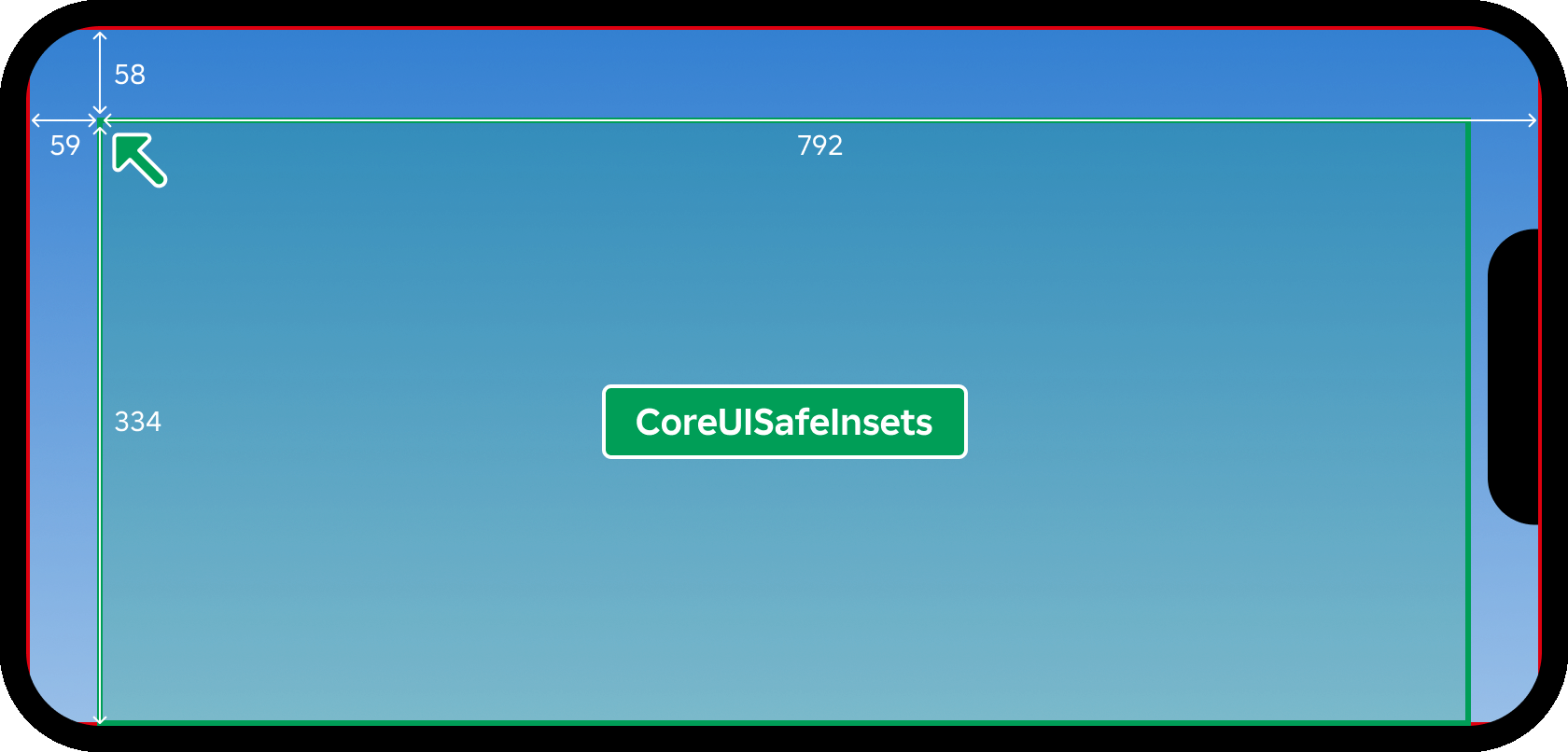
On a mobile device screen, for example, querying
GetInsetArea(Enum.ScreenInsets.None) may return a result such as
-59, -58, 792, 334, meaning the usable rectangle for
ScreenInsets.None has a top‑left corner 59 pixels left and 58
pixels up from the top‑left corner of the core UI area, and a bottom‑right
corner 792 pixels right and 334 pixels down from the top‑left corner
of the core UI area.
| Name | Type | Default | Description |
|---|---|---|---|
screenInsets | ScreenInsets | The ScreenInsets value indicating which inset area to query. |
Returns
Rect— ARectof the usable region for the specifiedScreenInsetsarea.
GetInspectMenuEnabled(): boolean#
This method returns whether the
Avatar Inspect Menu is
currently enabled. The feature is enabled by default and can be disabled
using the
SetInspectMenuEnabled() method.
Returns
boolean— Whether the avatar inspection menu is enabled.
InspectPlayerFromHumanoidDescription(humanoidDescription: Instance, name: string): ()#
This method allows the
Avatar Inspect Menu to appear
showing the assets listed in a HumanoidDescription object. This
allows further customization with what is shown in the inspection menu
when players inspect other players in your experience.
See also
InspectPlayerFromUserId()
which allows the avatar inspection menu to appear showing the user that
has the given UserId.
| Name | Type | Default | Description |
|---|---|---|---|
humanoidDescription | Instance | A HumanoidDescription object that contains the assets to show
in the inspection menu. | |
name | string | The name of the player being inspected to show in the menu. |
Returns
()
InspectPlayerFromUserId(userId: User): ()#
This method allows the
Avatar Inspect Menu to appear
showing the user that has the given UserId. This is
especially useful when you want to inspect players who aren't in the
current experience.
See also
InspectPlayerFromHumanoidDescription()
which allows you to bring up the avatar inspection menu showing the assets
listed in a HumanoidDescription object.
Returns
()
IsTenFootInterface(): boolean#
Deprecated
Deprecated. This method has been superseded by the
ViewportDisplaySize property which
represents the internally‑categorized rendering size of the viewport.
Returns true if the client is using the ten foot interface, a special
version of Roblox's UI exclusive to consoles.
Note that you should not use this property in an attempt to verify if
the player is on a console or not. Instead, consider reading
ViewportDisplaySize. This method is
hardcoded to return true whenever the client runs on a console,
regardless of how the player is actually interacting with the device,
making it an unreliable proxy for rendering context.
Returns
boolean—trueif the client is using the ten foot interface (console UI mode);falseotherwise.
RemoveSelectionGroup(selectionName: string): ()#
Deprecated
Removes a group that was created with
AddSelectionParent() or
AddSelectionTuple().
| Name | Type | Default | Description |
|---|---|---|---|
selectionName | string | The name of the selection group to remove. |
Returns
()
Select(selectionParent: Instance): ()#
When called on an instance selectionParent that is the PlayerGui
or a descendant of it, the engine searches all available selectable,
visible and on-screen GuiObjects that are descendants of
selectionParent and sets the
SelectedObject to the GuiObject
with the smallest SelectionOrder.
| Name | Type | Default | Description |
|---|---|---|---|
selectionParent | Instance | The parent of selection whose descendants are searched. |
Returns
()
SendNotification(notificationInfo: Dictionary): string#
Displays a notification built from the notificationInfo dictionary using
Roblox's native notification UI, and returns a unique identifier string
for the notification. The following fields of notificationInfo are
recognized:
| Field | Type | Description |
|---|---|---|
Title |
string |
The notification's title text. |
Text |
string |
The notification's body text. |
Icon |
string |
An image asset to display with the notification. |
Buttons |
{[ButtonInfo]} |
An array of button definitions. Each entry is a table with a Text (string), a ButtonType (Enum.NotificationButtonType), and an OnActivated (function) callback invoked when the button is pressed. |
OnDisplay |
function |
Invoked when the notification is shown. |
OnDismiss |
function |
Invoked when the notification is dismissed. |
The returned identifier can be passed to
DismissNotification() to dismiss
the notification programmatically; an empty string is returned if the
notification could not be queued.
| Name | Type | Default | Description |
|---|---|---|---|
notificationInfo | Dictionary | A dictionary describing the notification. Recognized fields are
Title (string), Text (string), Icon (string), Buttons (an
array of button tables, each with a Text string, a ButtonType
NotificationButtonType value, and an OnActivated callback),
and OnDisplay/OnDismiss callback functions. |
Returns
string— A unique identifier string for the notification, which can be passed toDismissNotification(). Returns an empty string if the notification could not be queued.
SetEmotesMenuOpen(isOpen: boolean): ()#
Opens or closes the player emotes menu.
| Name | Type | Default | Description |
|---|---|---|---|
isOpen | boolean | Whether to open (true) or close (false) the emotes menu. |
Returns
()
SetGameplayPausedNotificationEnabled(enabled: boolean): ()#
This method lets you disable the built-in notification when a player's gameplay is paused. You can then add in your own UI and customize it.
You can query whether the notification is enabled by calling the
GetGameplayPausedNotificationEnabled()
method.
See also Workspace.StreamingIntegrityMode and
StreamingIntegrityMode for more details on when gameplay is paused.
| Name | Type | Default | Description |
|---|---|---|---|
enabled | boolean | Whether or not the built-in notification GUI is disabled. |
Returns
()
SetInspectMenuEnabled(enabled: boolean): ()#
This method allows you to enable or disable the Avatar Inspect Menu. The feature is enabled by default.
| Name | Type | Default | Description |
|---|---|---|---|
enabled | boolean | A boolean indicating whether to enable or disable the menu. |
Returns
()
Events 2#
| MenuClosed | Fires when the user closes the Roblox CoreGui escape menu. |
| MenuOpened | Fires when the user opens the Roblox CoreGui escape menu. |
Inherited members#
Inherited from Instance 58
Properties (10)
Archivable, archivable, Capabilities, IsInSandbox, Name, Parent, PredictionMode, RobloxLocked, Sandboxed, UniqueId
Methods (39)
AddTag, children, ClearAllChildren, Clone, clone, Destroy, destroy, FindFirstAncestor, FindFirstAncestorOfClass, FindFirstAncestorWhichIsA, FindFirstChild, findFirstChild, FindFirstChildOfClass, FindFirstChildWhichIsA, FindFirstDescendant, GetActor, GetAttribute, GetAttributeChangedSignal, GetAttributes, GetChildren, getChildren, GetDebugId, GetDescendants, GetFullName, GetStyled, GetStyledPropertyChangedSignal, GetTags, HasTag, IsAncestorOf, IsDescendantOf, isDescendantOf, IsPropertyModified, QueryDescendants, Remove, remove, RemoveTag, ResetPropertyToDefault, SetAttribute, WaitForChild