Class
ScreenshotHud
NotCreatableNotReplicated
A 2D user interface that allows users to capture and save screenshots to their local device.
The ScreenshotHud is a 2D user interface that allows users to capture
and save screenshots to their local device. It consists of the following UI
elements:
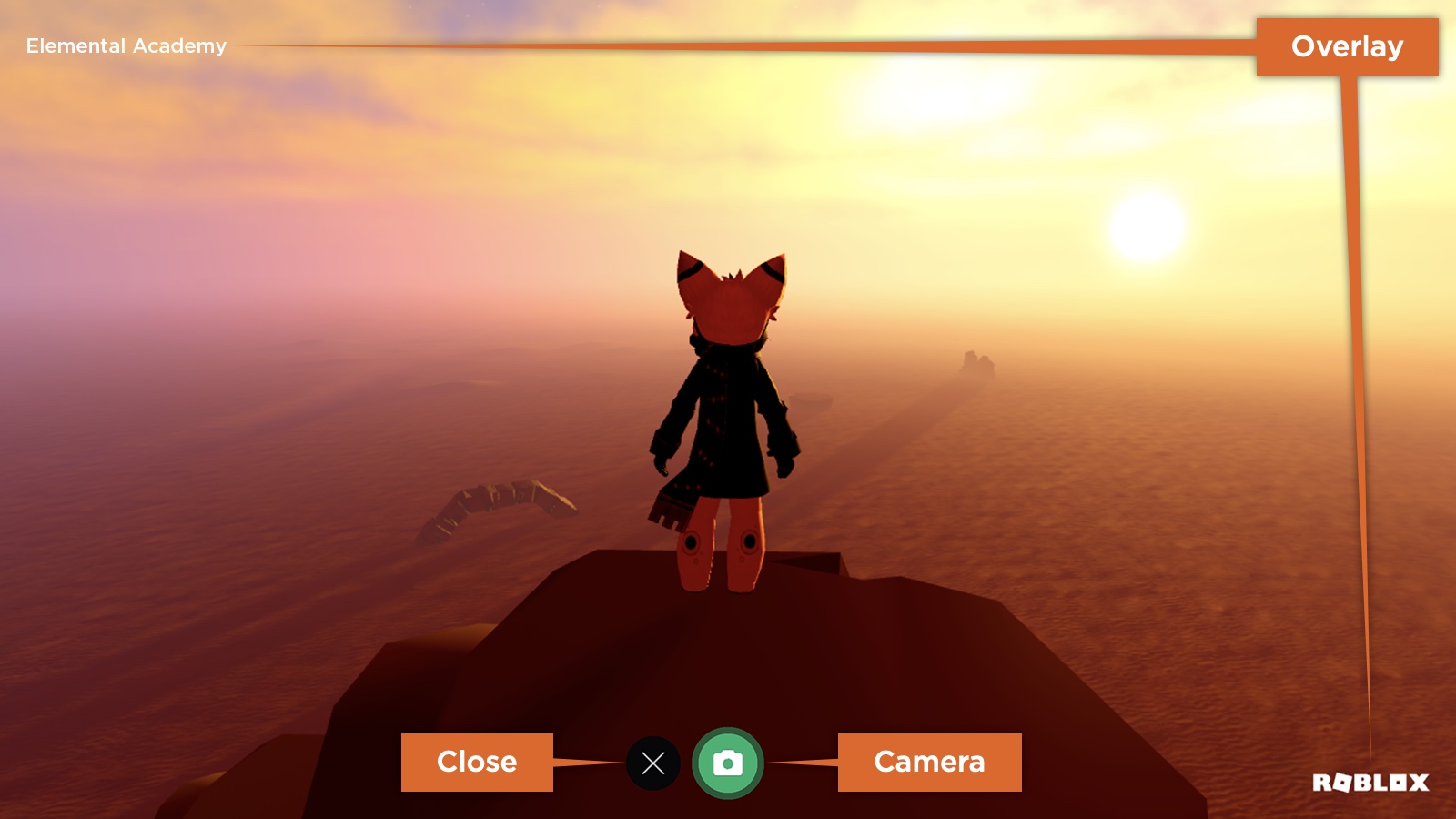
- An overlay containing the experience name and Roblox branding. These remain
on screen when a screenshot is taken, although the experience name can be
disabled through the
ScreenshotHud.ExperienceNameOverlayEnabledproperty. - A camera button that hides all UI except for the overlay and takes a screenshot.
- A close button that closes the
ScreenshotHud.
Properties 11#
CameraButtonIconContentId | Asset ID of the icon used for the camera button.ReadSafe |
CameraButtonIconContentContent | The image content used as the icon for the camera button.ReadSafe |
CameraButtonPositionUDim2 | Screen location of the camera button.ReadSafe |
CloseButtonPositionUDim2 | Screen location of the close button.ReadSafe |
CloseWhenScreenshotTakenboolean | Whether the ScreenshotHud closes automatically when a screenshot
is taken.ReadSafe |
ExperienceNameOverlayEnabledboolean | Whether the experience name in the overlay is enabled.ReadSafeDeprecatedHidden |
HideCoreGuiForCapturesboolean | Whether Roblox's core GUI is hidden while a screenshot is captured.ReadSafe |
HidePlayerGuiForCapturesboolean | Whether the local player's GUI is hidden while a screenshot is captured.ReadSafe |
OverlayFontEnum.Font | Font used for the experience name in the overlay.ReadSafeDeprecatedHidden |
UsernameOverlayEnabledboolean | Has no effect.ReadSafeDeprecatedHidden |
Visibleboolean | Determines whether the ScreenshotHud is visible.ReadSafe |
CameraButtonIcon: ContentId#
ReadSafe
Asset ID of the icon used for the camera button.
CameraButtonIconContent: Content#
ReadSafe
The image Content used as the icon for the camera button on the
ScreenshotHud. This is the Content-type equivalent of
the legacy ScreenshotHud.CameraButtonIcon property and supports
asset URIs. When set, the camera button displays the specified image
instead of the default icon.
CameraButtonPosition: UDim2#
ReadSafe
Screen location of the camera button.
CloseButtonPosition: UDim2#
ReadSafe
Screen location of the close button.
CloseWhenScreenshotTaken: boolean#
ReadSafe
Determines whether the ScreenshotHud closes automatically when a
screenshot is taken.
ExperienceNameOverlayEnabled: boolean#
HiddenDeprecatedReadSafeDeprecated
Deprecated. This property is deprecated. Do not use it for new work.
Determines whether the experience name in the overlay is enabled.
HideCoreGuiForCaptures: boolean#
ReadSafe
Determines whether Roblox's core GUI is hidden while a screenshot is
captured through the ScreenshotHud. Defaults to true, so any
enabled CoreGuiType elements are hidden for the duration of the
capture and restored afterward. A saved capture is only flagged as
GUI-free when both this property and
ScreenshotHud.HidePlayerGuiForCaptures are enabled.
HidePlayerGuiForCaptures: boolean#
ReadSafe
Determines whether the local player's GUI is hidden while a screenshot is
captured through the ScreenshotHud. Defaults to true, so any
enabled ScreenGui instances under the
Players.LocalPlayer's PlayerGui are hidden for the
duration of the capture and restored afterward. A saved capture is only
flagged as GUI-free when both this property and
ScreenshotHud.HideCoreGuiForCaptures are enabled.
OverlayFont: Enum.Font#
HiddenDeprecatedReadSafeDeprecated
Deprecated. This property is deprecated. Do not use it for new work.
The Font used for the experience name in the overlay.
UsernameOverlayEnabled: boolean#
HiddenDeprecatedReadSafeDeprecated
Deprecated. This property is deprecated. Do not use it for new work.
Currently has no effect.
Visible: boolean#
ReadSafe
Determines whether the ScreenshotHud is visible.
Inherited members#
Inherited from Instance 58
Properties (10)
Archivable, archivable, Capabilities, IsInSandbox, Name, Parent, PredictionMode, RobloxLocked, Sandboxed, UniqueId
Methods (39)
AddTag, children, ClearAllChildren, Clone, clone, Destroy, destroy, FindFirstAncestor, FindFirstAncestorOfClass, FindFirstAncestorWhichIsA, FindFirstChild, findFirstChild, FindFirstChildOfClass, FindFirstChildWhichIsA, FindFirstDescendant, GetActor, GetAttribute, GetAttributeChangedSignal, GetAttributes, GetChildren, getChildren, GetDebugId, GetDescendants, GetFullName, GetStyled, GetStyledPropertyChangedSignal, GetTags, HasTag, IsAncestorOf, IsDescendantOf, isDescendantOf, IsPropertyModified, QueryDescendants, Remove, remove, RemoveTag, ResetPropertyToDefault, SetAttribute, WaitForChild