Class
AudioChannelSplitter
Splits an audio stream into component channels so that each can be processed independently.
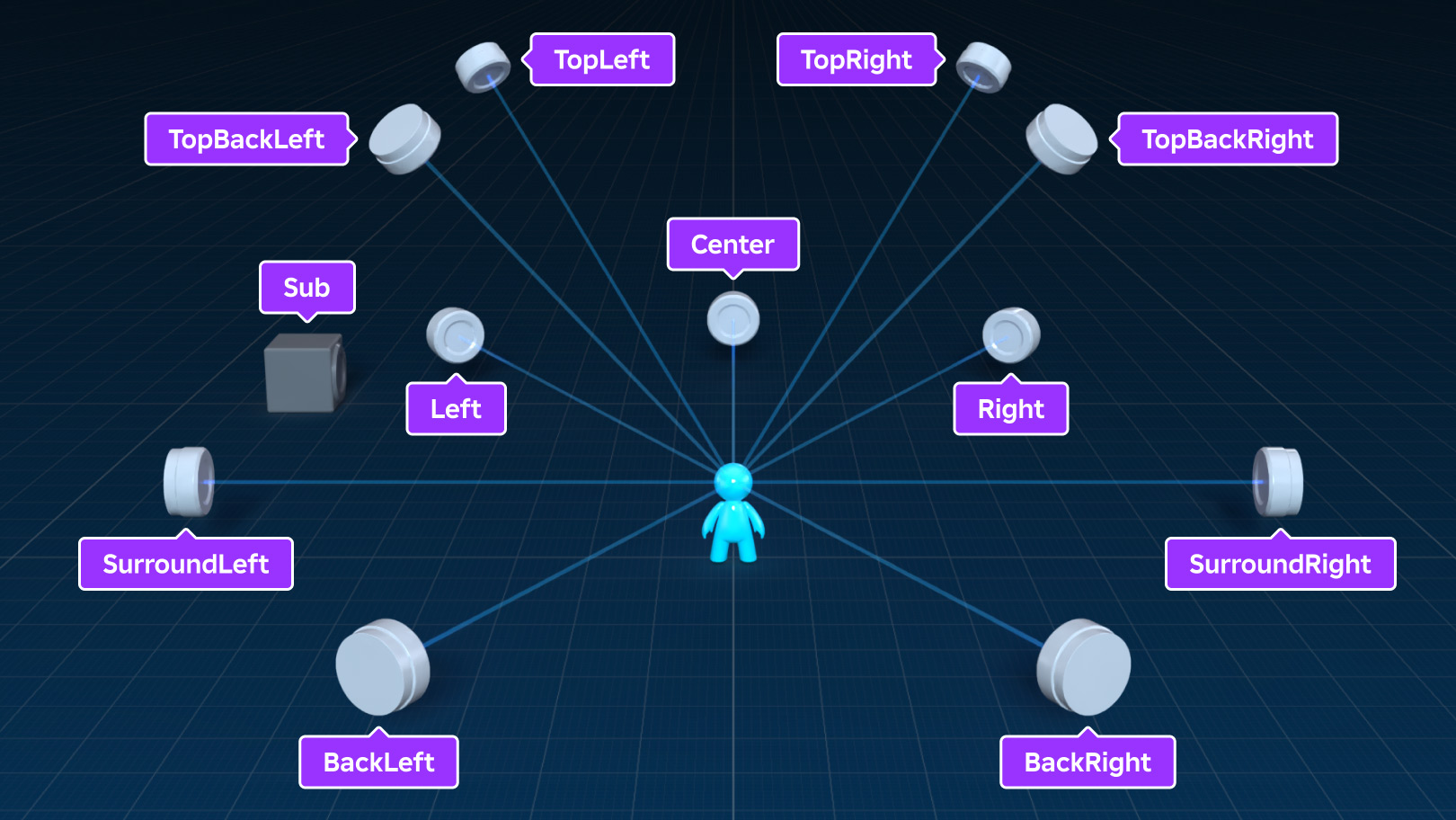
AudioChannelSplitter splits an audio stream into component channels so
that each can be processed independently. It provides one Input pin, one
combined Output pin, as well as the following secondary output pins, all
of which can be connected to/from by Wires: Left, Right,
Center, SurroundLeft, SurroundRight, Sub, BackLeft,
BackRight, TopLeft, TopRight, TopBackLeft, and
TopBackRight.
Properties 1#
LayoutAudioChannelLayout | Controls the input channel layout to be split from.ReadSafe |
Layout: AudioChannelLayout#
ReadSafe
Controls the input channel layout to be split from. When changed, all audio streams prior to this channel splitter's input may need to be up-mixed (widened to at least as many channels as the input requires).
The Output pin produces a copy of the stream wired to Input but,
depending on the value of AudioChannelSplitter.Layout:
- For
Mono, the Center pin produces an audio stream. - For
Stereo, the Left and Right pins produce audio streams. - For
Quad, the Left, Right, BackLeft, and BackRight pins produce audio streams. Surround_5is the same asQuad, plus Center produces an audio stream.Surround_5_1is the same asSurround_5, plus Sub produces an audio stream.Surround_7_1is the same asSurround_5_1, plus SurroundLeft and SurroundRight produce audio streams.- For
Surround_7_1_4, all secondary output pins produce audio streams.
Methods 3#
| GetConnectedWires | Returns an array of Wires that are connected to the specified
pin. |
| GetInputPins | Gets the list of pins that Wire can use in Wire.TargetName
to connect to this instance via its Wire.TargetInstance property. |
| GetOutputPins | Gets the list of pins that Wire can use in Wire.SourceName
to connect to this instance via its Wire.SourceInstance property. |
GetConnectedWires(pin: string): List<Wire>#
Returns an array of Wires that are connected to the specified
pin. For AudioChannelSplitter, this can be one "Input" pin or a
number of output pins - see AudioChannelSplitter.GetInputPins for
a full list.
| Name | Type | Default | Description |
|---|---|---|---|
pin | string | An input or output pin on this instance |
Returns
List<Wire>— An array ofWires
GetInputPins(): Array#
Gets the list of pins that Wire can use in Wire.TargetName
to connect to this instance via its Wire.TargetInstance property.
For AudioChannelSplitter, this is Input only.
Returns
Array— An array of strings representing valid pin names.
GetOutputPins(): Array#
Gets the list of pins that Wire can use in Wire.SourceName
to connect to this instance via its Wire.SourceInstance property.
For AudioChannelSplitter, these are:
"Output""Left""Right""Center""SurroundLeft""SurroundRight""BackLeft""BackRight""Sub""TopLeft""TopRight""TopBackLeft""TopBackRight"
Returns
Array— An array of strings representing valid pin names.
Events 1#
| WiringChanged | Fires when another instance is connected to or disconnected from the
AudioChannelSplitter via a Wire. |
WiringChanged(connected: boolean, pin: string, wire: Wire, instance: Instance)#
Event that fires after a Wire becomes connected or disconnected,
and that Wire is now or was previously connected to a pin on the
AudioChannelSplitter and to some other wirable instance.
| Name | Type | Default | Description |
|---|---|---|---|
connected | boolean | Whether the instance got connected or disconnected. | |
pin | string | The pin on the AudioChannelSplitter that the Wire
targets. | |
wire | Wire | The Wire between the AudioChannelSplitter and the
other instance. | |
instance | Instance | The other instance that is or was connected through the Wire. |
Inherited members#
Inherited from Instance 58
Properties (10)
Archivable, archivable, Capabilities, IsInSandbox, Name, Parent, PredictionMode, RobloxLocked, Sandboxed, UniqueId
Methods (39)
AddTag, children, ClearAllChildren, Clone, clone, Destroy, destroy, FindFirstAncestor, FindFirstAncestorOfClass, FindFirstAncestorWhichIsA, FindFirstChild, findFirstChild, FindFirstChildOfClass, FindFirstChildWhichIsA, FindFirstDescendant, GetActor, GetAttribute, GetAttributeChangedSignal, GetAttributes, GetChildren, getChildren, GetDebugId, GetDescendants, GetFullName, GetStyled, GetStyledPropertyChangedSignal, GetTags, HasTag, IsAncestorOf, IsDescendantOf, isDescendantOf, IsPropertyModified, QueryDescendants, Remove, remove, RemoveTag, ResetPropertyToDefault, SetAttribute, WaitForChild