Class
SurfaceGui
Container for GuiObjects that are rendered on the surface of a part.
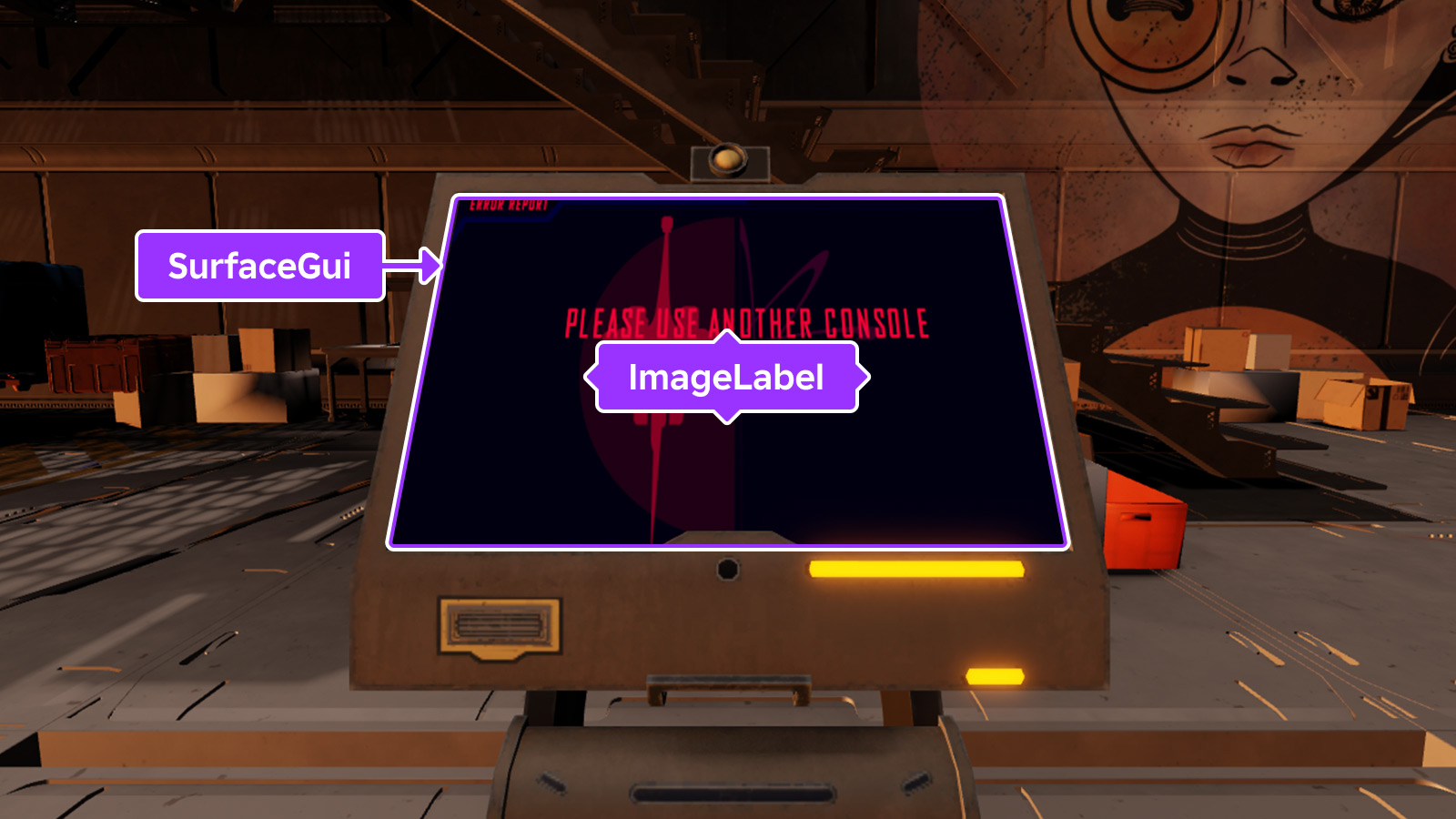
SurfaceGui allows for the rendering of UI objects onto a part's
surface in the 3D world while also allowing for basic user interaction to
occur. Similar to Decals and Textures, UI
objects such as TextLabels and
ImageLabels parented to a SurfaceGui face the same
direction as the surface they're on, editable through the
Face property.
Note that interactive UI elements like ImageButtons and
TextButtons inside a SurfaceGui will only receive
user input if they are parented to the PlayerGui, typically via
placing the SurfaceGui inside StarterGui (the
Adornee property can be used to target a part in
the 3D world while the SurfaceGui itself remains in the
PlayerGui). Additionally, the part's
CanQuery property must be true for the interactive
UI element to receive input.
See In-Experience UI for
a guide on working with SurfaceGui containers.
Caching Behavior#
To help improve performance, the appearance of a SurfaceGui is cached
until one of the following occurs, after which its appearance will be
recomputed on the next rendering frame.
- A descendant is added to or removed from the
SurfaceGui. - A property of a descendant of the
SurfaceGuichanges. - A property of the
SurfaceGuiitself changes.
Properties 10#
AlwaysOnTopboolean | Determines whether the SurfaceGui will always be rendered on top
of other 3D objects.ReadSafe |
Brightnessfloat | Determines the factor by which the SurfaceGui container's light is
scaled when LightInfluence is 0.ReadSafe |
CanvasSizeVector2 | The size of a "virtual screen" in "virtual pixels" which makes
SurfaceGuis pixel-to-pixel compatible with
ScreenGuis.ReadSafe |
ClipsDescendantsboolean | Whether portions of GuiObjects that fall outside of the
SurfaceGui canvas borders will be drawn.ReadSafe |
LightInfluencefloat | Controls how much the SurfaceGui is influenced by environmental
lighting.ReadSafe |
MaxDistancefloat | Controls how far away the SurfaceGui can be displayed before it
stops rendering.ReadSafe |
PixelsPerStudfloat | Determines the density of pixels used for each world-space stud to render
the contents of the SurfaceGui.ReadSafe |
SizingModeSurfaceGuiSizingMode | Determines whether the SurfaceGui will render at a fixed size or
scale with its size in studs.ReadSafe |
ToolPunchThroughDistancefloat | Sets the distance in which left clicking starts acting on the
SurfaceGui instead of for the held Tool.ReadSafe |
ZOffsetfloat | Layers this SurfaceGui in relation to other
SurfaceGuis on the same face.ReadSafe |
AlwaysOnTop: boolean#
ReadSafe
This property determines whether the SurfaceGui will always render
on top of other 3D objects.
When set to false (default), the SurfaceGui renders like other
3D content and is occluded by other 3D objects. When set to true, the
SurfaceGui always renders on top of 3D content and the appearance
changes significantly:
- Colors match how they appear inside a
ScreenGui. - Text may appear sharper on high DPI devices.
LightInfluenceis treated as though it's0.Brightnesshas no effect.
Brightness: float#
ReadSafe
This property determines the factor by which the SurfaceGui
container's light is scaled when
LightInfluence is 0. By default, this
property is 1 and can be set to any number between 0 and 1000. By
modifying this property, the apparent brightness of a SurfaceGui
can be better matched to its environment. For instance, a video billboard
can be brightened inside a dark room by increasing
Brightness to 10.
Note that Brightness is inaccessible in
Studio and has no effect when either
LightInfluence is 1 or
AlwaysOnTop is true.
CanvasSize: Vector2#
ReadSafe
The size of a "virtual screen" in "virtual pixels" which makes
SurfaceGuis pixel-to-pixel compatible with
ScreenGuis.
ClipsDescendants: boolean#
ReadSafe
When set to true (default), portions of GuiObjects
that fall outside of the SurfaceGui canvas borders will not be
drawn.
Even when this property is false, GuiObjects that are
completely outside of the canvas will not render.
LightInfluence: float#
ReadSafe
Controls how much the SurfaceGui is influenced by environmental
lighting, in a range from 0 to 1. Setting this to 1 means that
surrounding lighting has complete control over the appearance, while
setting it to 0 means that the lighting has no effect.
MaxDistance: float#
ReadSafe
This property controls how far from the camera the SurfaceGui will
be displayed before it stops rendering. A value of 0 means there is no
limit and it will render infinitely far away. The default value of 1000
works fine for most cases.
For SurfaceGuis that appear outdoors, it's recommended
that MaxDistance is high enough to ensure
that the container's UI is sufficiently small on the screen when it
appears or disappears, minimizing the sudden pop‑in/out effect.
PixelsPerStud: float#
ReadSafe
This property determines the density of pixels used for each world-space
stud to render the contents of the SurfaceGui. Higher values will
cause the various GuiObjects within to appear smaller if
they are kept the same size. Conversely, lower values will cause objects
to appear larger. However, if the GuiObjects are scaled
proportionally through use of UIScale, GuiObject.Size,
TextLabel.TextSize, or similar, this property allows for higher
definition to be used.
It's important to select a value based on how far away you expect a player
to view the SurfaceGui. Also be mindful that a large pixel density
could negatively affect performance if the face of the adorned part is
large enough.
SizingMode: SurfaceGuiSizingMode#
ReadSafe
When set to SurfaceGuiSizingMode.PixelsPerStud (default), the
SurfaceGui renders with a variable size based on
PixelsPerStud and the surface's size in
studs.
When set to SurfaceGuiSizingMode.FixedSize, the SurfaceGui
renders with a fixed size set through
CanvasSize.
ToolPunchThroughDistance: float#
ReadSafe
Sets the distance in which left clicking starts acting on the
SurfaceGui instead of for the held Tool. If a character is
within this distance of the SurfaceGui, the Tool will not
activate on click.
ZOffset: float#
ReadSafe
Layers this SurfaceGui in relation to others on the same face
(changing this does not visually "lift" or "sink" a SurfaceGui
from the surface).
Inherited members#
Inherited from SurfaceGuiBase 3
Inherited from GuiBase2d 12
Properties (11)
AbsolutePosition, AbsoluteRotation, AbsoluteSize, AutoLocalize, Localize, RootLocalizationTable, SelectionBehaviorDown, SelectionBehaviorLeft, SelectionBehaviorRight, SelectionBehaviorUp, SelectionGroup
Events (1)
Inherited from Instance 58
Properties (10)
Archivable, archivable, Capabilities, IsInSandbox, Name, Parent, PredictionMode, RobloxLocked, Sandboxed, UniqueId
Methods (39)
AddTag, children, ClearAllChildren, Clone, clone, Destroy, destroy, FindFirstAncestor, FindFirstAncestorOfClass, FindFirstAncestorWhichIsA, FindFirstChild, findFirstChild, FindFirstChildOfClass, FindFirstChildWhichIsA, FindFirstDescendant, GetActor, GetAttribute, GetAttributeChangedSignal, GetAttributes, GetChildren, getChildren, GetDebugId, GetDescendants, GetFullName, GetStyled, GetStyledPropertyChangedSignal, GetTags, HasTag, IsAncestorOf, IsDescendantOf, isDescendantOf, IsPropertyModified, QueryDescendants, Remove, remove, RemoveTag, ResetPropertyToDefault, SetAttribute, WaitForChild