Class
HapticEffect
An object that provides waveform-based haptic feedback (vibrations and rumbles) on supported controllers and mobile devices.
Modern controllers and devices have motors built‑in to provide haptic feedback. Adding rumbles and vibrations can provide subtle feedback that is hard to convey through visuals or audio.
Roblox supports haptics for the following devices:
- Android and iOS phones supporting haptics including most iPhone, Pixel, and Samsung Galaxy devices
- PlayStation gamepads
- Xbox gamepads
- Quest Touch controller
Properties 4#
Loopedboolean | Whether the haptic effect loops continuously.ReadSafe |
PositionVector3 | Along with Radius, specifies the impact
position relative to the input device and, effectively, how broadly that
impact effects nearby motors.ReadSafe |
Radiusfloat | Along with Position, specifies the impact
radius relative to the input device and, effectively, how broadly that
impact effects nearby motors.ReadSafe |
TypeHapticEffectType | HapticEffectType describing the haptic type.ReadSafe |
Looped: boolean#
ReadSafe
Whether the haptic effect loops continuously.
Position: Vector3#
ReadSafe
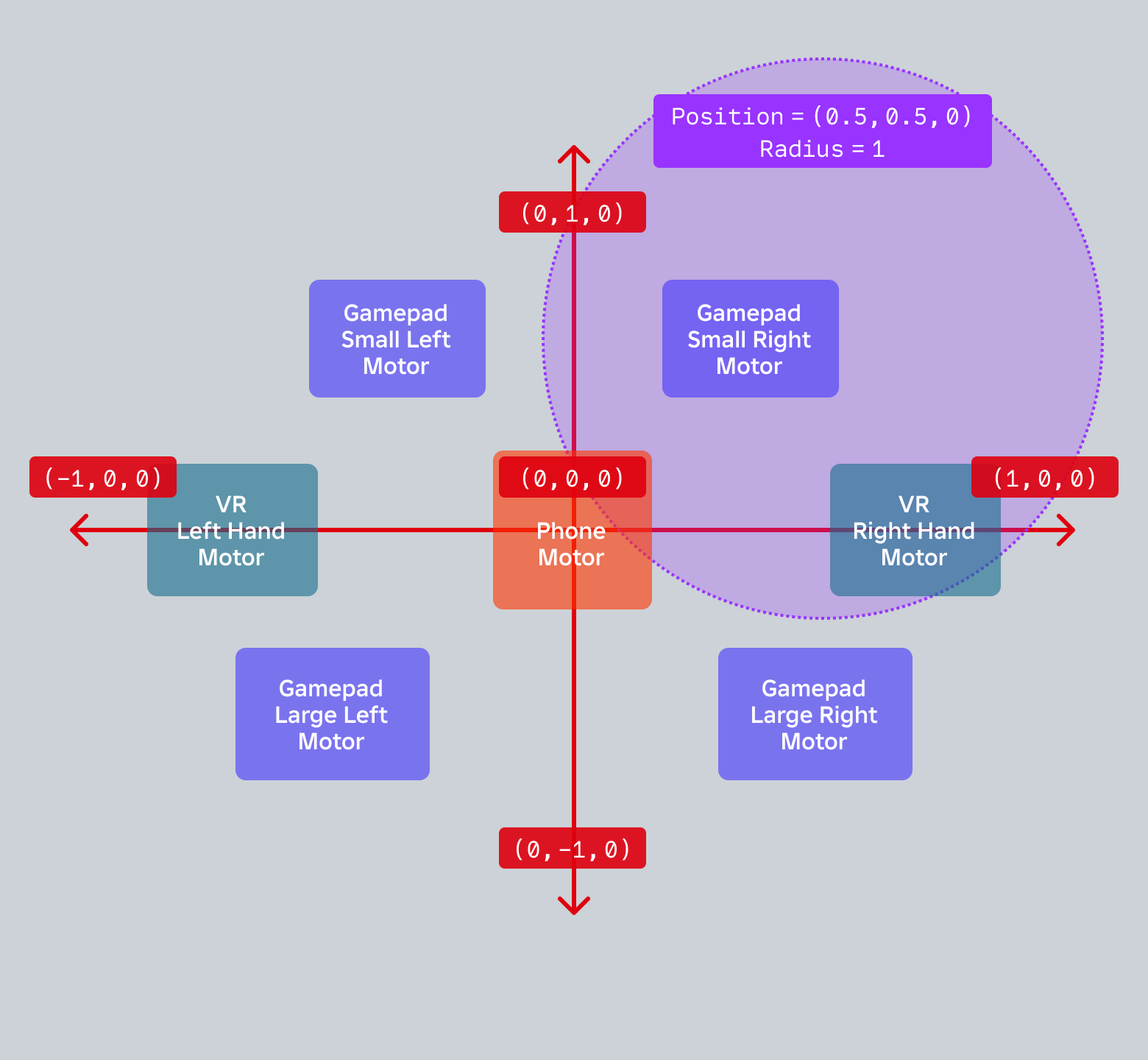
Along with Radius, specifies the impact
position relative to the input device and, effectively, how broadly that
impact effects nearby motors. Note that some gamepads do not have both
"small" and "large" motors, and that "gamepad large left/right" is not
supported on PC.
Radius: float#
ReadSafe
Along with Position, specifies the impact
radius relative to the input device and, effectively, how broadly that
impact effects nearby motors. Note that some gamepads do not have both
"small" and "large" motors, and that "gamepad large left/right" is not
supported on PC.
Type: HapticEffectType#
ReadSafe
The haptic type, such as HapticEffectType.GameplayCollision for a
large immediate rumble that dies down quickly. The
HapticEffectType.Custom value lets you specify a haptic with custom
waveform keys defined through
SetWaveformKeys().
Methods 3#
| Play | Plays the haptic effect. |
| SetWaveformKeys | Defines a custom waveform as a table and applies it to the haptic.
This method takes in an array of |
| Stop | Stops the haptic effect. |
Play(): ()#
Plays the haptic effect.
Returns
()
SetWaveformKeys(keys: Array): ()#
This method lets you define a custom waveform as a table and apply it to
the haptic. It takes an array of FloatCurveKey objects, each
constructed with three arguments: time in milliseconds, value
ranging from 0 (no haptic) to 1 (full intensity), and an
KeyInterpolationMode that controls how the curve interpolates.
between keys.
| Name | Type | Default | Description |
|---|---|---|---|
keys | Array | An array of FloatCurveKey objects defining the custom
haptic waveform, where each key specifies a time in milliseconds, an
intensity value from 0 (no haptic) to 1 (full intensity), and an
KeyInterpolationMode for interpolation between keys. |
Returns
()
Stop(): ()#
Stops the haptic effect.
Returns
()
Events 1#
| Ended | Fires when the HapticEffect has completed playback and stopped. |
Ended()#
Fires when the HapticEffect has completed playback and stopped.
Note this event will not fire for haptics with
Looped set to true since they continue
playing upon reaching the end. This event will also not fire when the
haptic is stopped before playback has completed.
This event is often used to destroy an HapticEffect when it has
completed playback.
Inherited members#
Inherited from Instance 58
Properties (10)
Archivable, archivable, Capabilities, IsInSandbox, Name, Parent, PredictionMode, RobloxLocked, Sandboxed, UniqueId
Methods (39)
AddTag, children, ClearAllChildren, Clone, clone, Destroy, destroy, FindFirstAncestor, FindFirstAncestorOfClass, FindFirstAncestorWhichIsA, FindFirstChild, findFirstChild, FindFirstChildOfClass, FindFirstChildWhichIsA, FindFirstDescendant, GetActor, GetAttribute, GetAttributeChangedSignal, GetAttributes, GetChildren, getChildren, GetDebugId, GetDescendants, GetFullName, GetStyled, GetStyledPropertyChangedSignal, GetTags, HasTag, IsAncestorOf, IsDescendantOf, isDescendantOf, IsPropertyModified, QueryDescendants, Remove, remove, RemoveTag, ResetPropertyToDefault, SetAttribute, WaitForChild