Class
UIGridStyleLayout
NotCreatableNotBrowsable
The base class for grid style UI layouts.
The base class for grid style UI layouts.
Properties 5#
AbsoluteContentSizeVector2 | The absolute size of space being taken up by the grid layout.ReadOnlyNotReplicated |
FillDirectionFillDirection | Determines the axis in which UI objects are laid out.ReadSafe |
HorizontalAlignmentHorizontalAlignment | Determines the horizontal alignment of UI elements within the parent element.ReadSafe |
SortOrderSortOrder | Determines the order in which child UI objects are placed in a layout.ReadSafe |
VerticalAlignmentVerticalAlignment | Determines the vertical alignment of UI elements within the parent element.ReadSafe |
AbsoluteContentSize: Vector2#
ReadOnlyNotReplicated
The AbsoluteContentSize property of a UIGridStyleLayout
reveals how much space the elements of the grid are taking up, including
any padding created by the grid. This property is particularly useful to
size containers of grids such as Frames to make sure they
aren't any larger than the grid itself.
This property updates as soon as it's read. It will not fire a
Object.Changed event immediately after the UI has changed, but if
the value is read, it will become current and a Object.Changed
event will fire on the next render step.
FillDirection: FillDirection#
ReadSafe
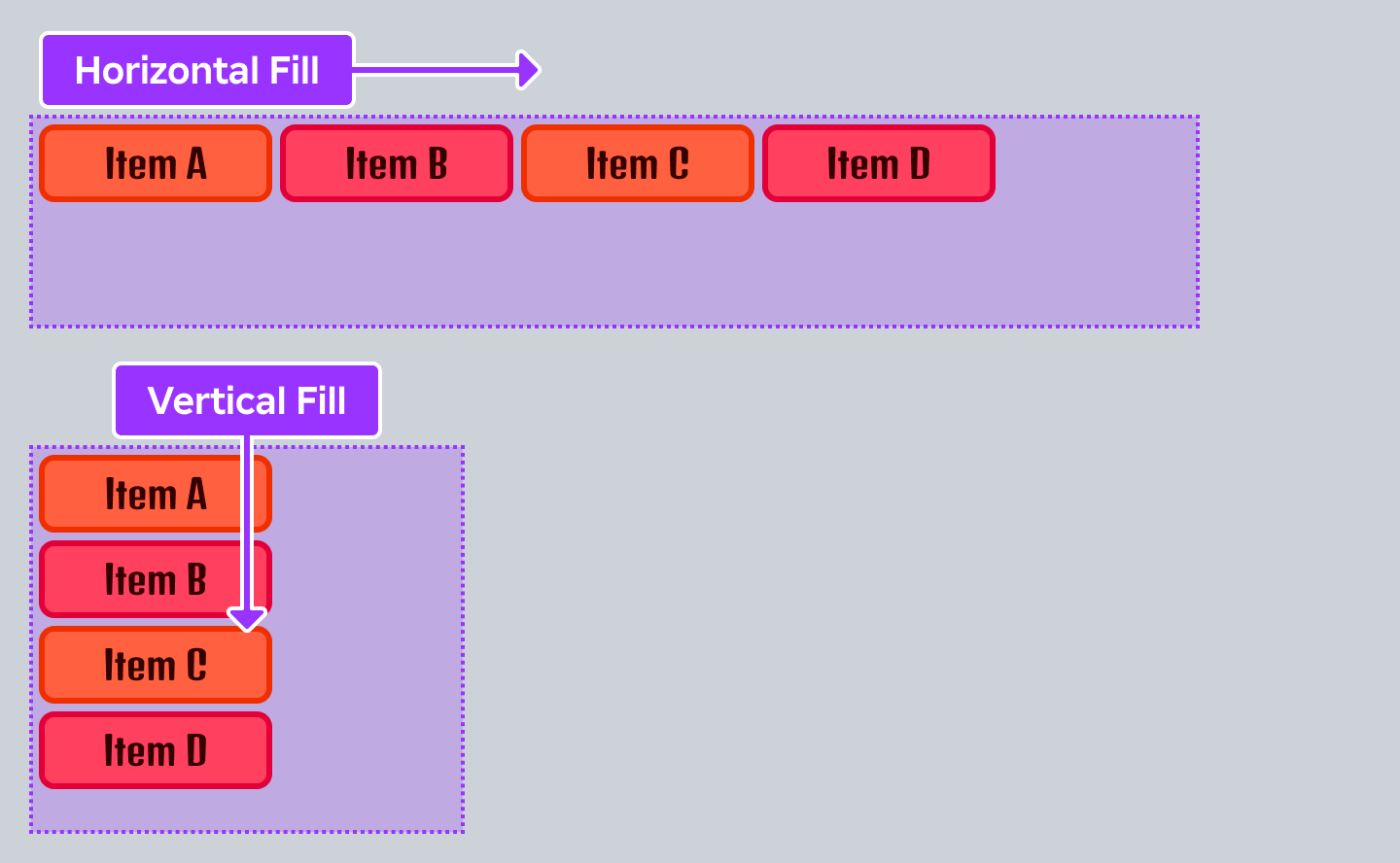
The FillDirection property determines the axis in which UI elements
are laid out. FillDirection.Horizontal arranges objects from left
to right, while FillDirection.Vertical arranges objects from top to
bottom. To reverse elements, such as to arrange right to left, you'll need
to reverse the sorting; for example by negating the child UI objects'
GuiObject.LayoutOrder values when
UIGridStyleLayout.SortOrder is set to
SortOrder.LayoutOrder.
HorizontalAlignment: HorizontalAlignment#
ReadSafe
The HorizontalAlignment property determines the X axis alignment
of the grid of UI elements, much like TextLabel.TextXAlignment
does with TextLabel.Text.
SortOrder: SortOrder#
ReadSafe
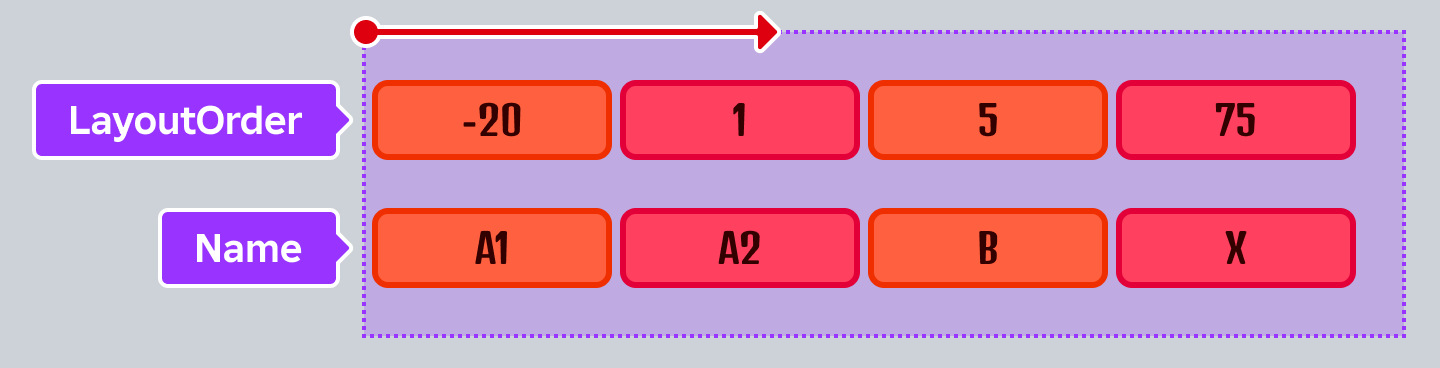
The SortOrder property determines the order in which child UI objects are placed in a layout.
For SortOrder.LayoutOrder, an ascending sort is used on the
LayoutOrder property of child UI objects. If
two children share the same LayoutOrder,
whichever was added sooner to the parent object takes precedence.
For SortOrder.Name, an alphanumeric sort is used on the
Instance.Name of the child UI objects.
VerticalAlignment: VerticalAlignment#
ReadSafe
The VerticalAlignment property determines the Y axis alignment of
the grid of UI elements, much like TextLabel.TextYAlignment does
with TextLabel.Text.
Methods 2#
| ApplyLayout | Force re-layout of sibling UI elements. |
| SetCustomSortFunction | Sets the function used to determine the order of elements when SortOrder is set to Custom.Deprecated |
ApplyLayout(): ()#
Deprecated
The ApplyLayout method forces sibling UI elements to be re-laid out in
case the sorting criteria may have changed (such as when
UIGridStyleLayout.SortOrder is set to Custom, and the
UIGridStyleLayout:SetCustomSortFunction() behavior changed).
Re-layouts automatically happen when UI elements are added/removed, or
their Instance.Name or GuiObject.LayoutOrder change.
The manner in which sibling UI elements are laid out is dependent on the
implementation of this abstract class. In other words, a concrete class
like UIListLayout or UIGridLayout is responsible for the
actual element positioning.
Returns
()
SetCustomSortFunction(function: Function = nil): ()#
DeprecatedDeprecated
Deprecated. This method is deprecated in favor of using other SortOrder means, such as by Name or LayoutOrder.
This method is deprecated. Use UIGridStyleLayout.SortOrder
instead.
The function should take two arguments (each will be an Instance
child to compare), and return true if a comes before b, otherwise return
false. In other words, use this function the same way you would use a '
function. The sorting should be deterministic, otherwise sort will fail
and fall back to name order.
| Name | Type | Default | Description |
|---|---|---|---|
function | Function | nil |
Returns
()
Inherited members#
Inherited from Instance 58
Properties (10)
Archivable, archivable, Capabilities, IsInSandbox, Name, Parent, PredictionMode, RobloxLocked, Sandboxed, UniqueId
Methods (39)
AddTag, children, ClearAllChildren, Clone, clone, Destroy, destroy, FindFirstAncestor, FindFirstAncestorOfClass, FindFirstAncestorWhichIsA, FindFirstChild, findFirstChild, FindFirstChildOfClass, FindFirstChildWhichIsA, FindFirstDescendant, GetActor, GetAttribute, GetAttributeChangedSignal, GetAttributes, GetChildren, getChildren, GetDebugId, GetDescendants, GetFullName, GetStyled, GetStyledPropertyChangedSignal, GetTags, HasTag, IsAncestorOf, IsDescendantOf, isDescendantOf, IsPropertyModified, QueryDescendants, Remove, remove, RemoveTag, ResetPropertyToDefault, SetAttribute, WaitForChild