Class
ScrollingFrame
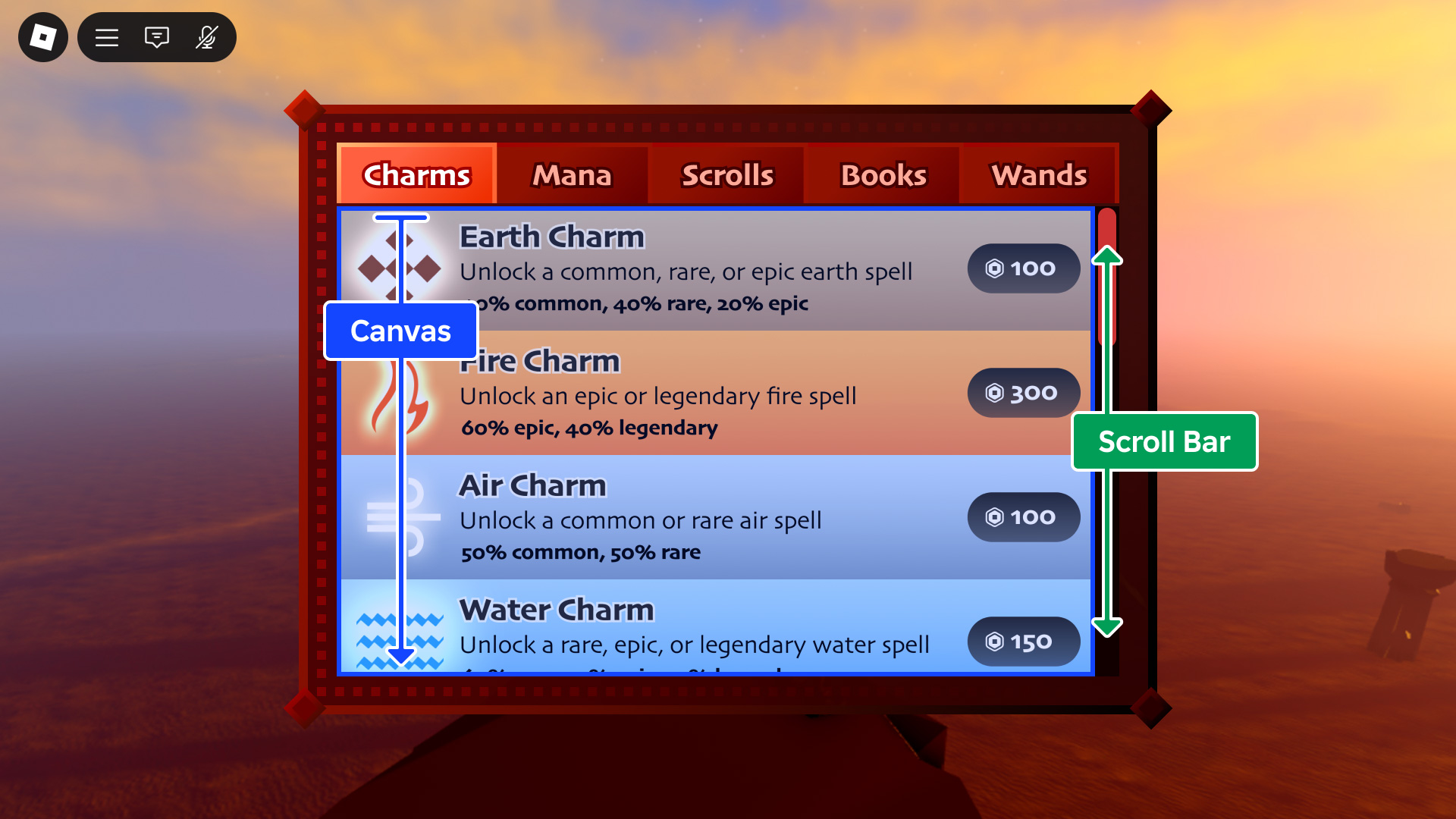
ScrollingFrame is a special Frame type with built-in scrolling
interactivity and different ways to customize how the scrolling works.
ScrollingFrame is a special Frame type with built-in scrolling
interactivity and different ways to customize how the scrolling works.
Properties 20#
AbsoluteCanvasSizeVector2 | The size of the area that is scrollable, in offsets.ReadOnlyNotReplicated |
AbsoluteWindowSizeVector2 | The size of the frame, in offsets, without the scroll bars.ReadOnlyNotReplicated |
AutomaticCanvasSizeAutomaticSize | Determines whether ScrollingFrame.CanvasSize is resized based on
child content.ReadSafe |
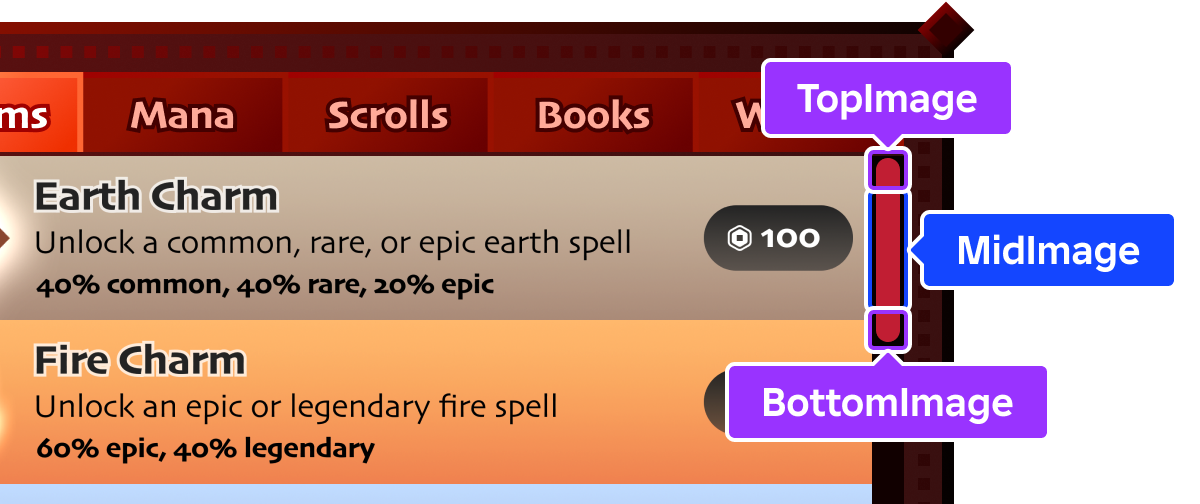
BottomImageContentId | Image that displays on the bottom of a vertical scroll bar, or the right of a horizontal scroll bar (rotated 90° counterclockwise for a horizontal scroll bar).ReadSafe |
BottomImageContentContent | The Content-typed equivalent of
BottomImage.ReadSafe |
CanvasPositionVector2 | Reflects the current positional offset of the canvas within the frame, in pixels, and sets the position of scroll bars accordingly.ReadSafe |
CanvasSizeUDim2 | Determines the size of the scrollable area.ReadSafe |
ElasticBehaviorElasticBehavior | Determines if and when elastic scrolling is allowed on touch‑enabled devices.ReadSafe |
HorizontalScrollBarInsetScrollBarInset | Indicates whether CanvasSize is inset by
ScrollBarThickness on the
horizontal axis.ReadSafe |
MidImageContentId | Image which spans the area between
TopImage and
BottomImage (rotated 90°
counterclockwise for a horizontal scroll bar).ReadSafe |
MidImageContentContent | The Content-typed equivalent of
MidImage.ReadSafe |
ScrollBarImageColor3Color3 | Determines how the rendered scroll bar images are colorized.ReadSafe |
ScrollBarImageTransparencyfloat | Determines the opacity of the scroll bar images.ReadSafe |
ScrollBarThicknessint | Thickness of the scroll bar in pixels; applies to both horizontal and vertical scroll bars.ReadSafe |
ScrollingDirectionScrollingDirection | Determines the direction(s) in which scrolling is allowed.ReadSafe |
ScrollingEnabledboolean | Determines whether scrolling is allowed on the frame.ReadSafe |
TopImageContentId | Image which displays on the top of a vertical scroll bar, or the left of a horizontal scroll bar (rotated 90° counterclockwise for a horizontal scroll bar).ReadSafe |
TopImageContentContent | The Content-typed equivalent of
TopImage.ReadSafe |
VerticalScrollBarInsetScrollBarInset | Indicates whether CanvasSize is inset by
ScrollBarThickness on the
vertical axis.ReadSafe |
VerticalScrollBarPositionVerticalScrollBarPosition | Indicates whether the vertical scroll bar is positioned to the left or right of the canvas.ReadSafe |
AbsoluteCanvasSize: Vector2#
ReadOnlyNotReplicated
The size of the area that is scrollable, in offsets. This property is set
to the maximum of the CanvasSize
property and the size of the children if
AutomaticCanvasSize is set to
something other than AutomaticSize.None.
AbsoluteWindowSize: Vector2#
ReadOnlyNotReplicated
The size of the frame, in offsets, without the scroll bars. This read-only
property represents the visible content area of the ScrollingFrame: the
frame's AbsoluteSize minus the space
occupied by any currently visible scroll bar gutters
(ScrollBarThickness). If no
scroll bars are visible, this equals the frame's absolute size.
AutomaticCanvasSize: AutomaticSize#
ReadSafe
This property is used to automatically size parent UI objects based on the
size of its descendants. You can use this property to dynamically add text
and other content to a ScrollingFrame at edit or run time and the size
will adjust to fit that content.
When this property is set to an AutomaticSize value other than
None,
AbsoluteCanvasSize may resize
depending on its child content.
BottomImage: ContentId#
ReadSafe
Image that displays on the bottom of a vertical scroll bar, or the right of a horizontal scroll bar (rotated 90° counterclockwise for a horizontal scroll bar).
BottomImageContent: Content#
ReadSafe
Image that displays on the bottom of a vertical scroll bar, or the right of a horizontal scroll bar (rotated 90° counterclockwise for a horizontal scroll bar). Only supports asset URIs as textures.
CanvasPosition: Vector2#
ReadSafe
Reflects the current positional offset of the canvas within the frame, in pixels, and sets the position of scroll bars accordingly. Note that this property doesn't do anything if scroll bars aren't visible.
CanvasSize: UDim2#
ReadSafe
Determines the size of the scrollable area. For an adaptive alternative
based on the overall size of children within the ScrollingFrame,
consider using
AutomaticCanvasSize.
ElasticBehavior: ElasticBehavior#
ReadSafe
This property determines if and when elastic scrolling is allowed on
touch‑enabled devices. Defaults to WhenScrollable.
HorizontalScrollBarInset: ScrollBarInset#
ReadSafe
Indicates whether the scrollable canvas is inset by
ScrollBarThickness to account
for the horizontal scroll bar. Because the horizontal scroll bar occupies
space along the bottom edge, this inset reduces the canvas height.
Defaults to ScrollBarInset.None.
MidImage: ContentId#
ReadSafe
Image which spans the area between
TopImage and
BottomImage (rotated 90°
counterclockwise for a horizontal scroll bar). This image automatically
scales to fill the space between the cap segments.
MidImageContent: Content#
ReadSafe
Image which spans the area between
TopImageContent and
BottomImageContent (rotated
90° counterclockwise for a horizontal scroll bar). This image
automatically scales to fill the space between the cap segments. Only
supports asset URIs as textures.
ScrollBarImageColor3: Color3#
ReadSafe
Determines how the scroll bar images
(TopImage,
MidImage,
BottomImage) are colorized. When set to
white, no colorization occurs. This property is useful for reusing image
assets; if the source images are completely white with transparency, you
can set the color of the entire scroll bar at once.
ScrollBarImageTransparency: float#
ReadSafe
Determines the opacity of the scroll bar images
(TopImage,
MidImage,
BottomImage). A value of 0 is
completely opaque and a value of 1 is completely transparent
(invisible).
ScrollBarThickness: int#
ReadSafe
Thickness of the scroll bar in pixels; applies to both horizontal and
vertical scroll bars. If set to 0, no scroll bars are rendered.
ScrollingDirection: ScrollingDirection#
ReadSafe
This property determines the direction(s) in which scrolling is allowed.
If scrolling is disallowed in a direction, the associated scroll bar will
not appear. Defaults to ScrollingDirection.XY.
ScrollingEnabled: boolean#
ReadSafe
Determines whether scrolling is allowed on the frame. If false, no
scroll bars will be rendered.
TopImage: ContentId#
ReadSafe
Image which displays on the top of a vertical scroll bar, or the left of a horizontal scroll bar (rotated 90° counterclockwise for a horizontal scroll bar).
TopImageContent: Content#
ReadSafe
Image which displays on the top of a vertical scroll bar, or the left of a
horizontal scroll bar (rotated 90° counterclockwise for a horizontal
scroll bar). Only supports asset URIs as textures. Defaults to the
built-in scroll bar top cap texture
(rbxasset://textures/ui/Scroll/scroll-top.png).
VerticalScrollBarInset: ScrollBarInset#
ReadSafe
Indicates whether the scrollable canvas is inset by
ScrollBarThickness to account
for the vertical scroll bar. Because the vertical scroll bar occupies
space along a side edge, this inset reduces the canvas width. Defaults to
ScrollBarInset.None.
VerticalScrollBarPosition: VerticalScrollBarPosition#
ReadSafe
Indicates whether the vertical scroll bar is positioned to the left or
right of the canvas. Defaults to VerticalScrollBarPosition.Right.
Methods 2#
| GetScrollVelocity | Returns a Vector2 representing the current inertial scroll
velocity after the user stops their input. |
| ResetScrollVelocity | Resets the inertial scroll velocity of the ScrollingFrame to 0 on both
axes. |
GetScrollVelocity(): Vector2#
Returns a Vector2 representing the current inertial scroll
velocity after the user stops their input, for example lifts their finger
off the ScrollingFrame on a touch-enabled device.
Note that this method may only produce noticable data on an actual device or in an emulated scenario from Studio's Device Emulator.
Returns
Vector2— The current inertial scroll velocity in pixels per second on each axis, or(0, 0)if the frame is not coasting.
ResetScrollVelocity(): ()#
Resets the inertial scroll velocity of the ScrollingFrame to 0 on both
axes.
Returns
()
Inherited members#
Inherited from GuiObject 51
Properties (30)
Active, AnchorPoint, AutomaticSize, BackgroundColor, BackgroundColor3, BackgroundTransparency, BorderColor, BorderColor3, BorderMode, BorderSizePixel, ClipsDescendants, Draggable, GuiState, InputSink, Interactable, LayoutOrder, NextSelectionDown, NextSelectionLeft, NextSelectionRight, NextSelectionUp, Position, Rotation, Selectable, SelectionImageObject, SelectionOrder, Size, SizeConstraint, Transparency, Visible, ZIndex
Methods (3)
Inherited from GuiBase2d 12
Properties (11)
AbsolutePosition, AbsoluteRotation, AbsoluteSize, AutoLocalize, Localize, RootLocalizationTable, SelectionBehaviorDown, SelectionBehaviorLeft, SelectionBehaviorRight, SelectionBehaviorUp, SelectionGroup
Events (1)
Inherited from Instance 58
Properties (10)
Archivable, archivable, Capabilities, IsInSandbox, Name, Parent, PredictionMode, RobloxLocked, Sandboxed, UniqueId
Methods (39)
AddTag, children, ClearAllChildren, Clone, clone, Destroy, destroy, FindFirstAncestor, FindFirstAncestorOfClass, FindFirstAncestorWhichIsA, FindFirstChild, findFirstChild, FindFirstChildOfClass, FindFirstChildWhichIsA, FindFirstDescendant, GetActor, GetAttribute, GetAttributeChangedSignal, GetAttributes, GetChildren, getChildren, GetDebugId, GetDescendants, GetFullName, GetStyled, GetStyledPropertyChangedSignal, GetTags, HasTag, IsAncestorOf, IsDescendantOf, isDescendantOf, IsPropertyModified, QueryDescendants, Remove, remove, RemoveTag, ResetPropertyToDefault, SetAttribute, WaitForChild