Class
UIStroke
Applies an outline to text or a UI border.
UIStroke applies an outline to text or a UI border. Some properties
may require enabling the
Improved UIStrokes beta.
Key features include:
- Adjust the
ColorandThicknessof the stroke outline. - Change the stroke
Transparencyindependently from the text or UI object. - Choose the
LineJoinModeof the stroke (round, bevel, or miter). - Specify the
BorderStrokePositionon its parent's border and/or an additionalBorderOffsetto the stroke's position. - Add a gradient to the stroke via the
UIGradientinstance. - Use rich text tags to add stroke to inline text segments.
For more details on the UIStroke object, see
Appearance Modifiers.
Properties 10#
ApplyStrokeModeApplyStrokeMode | Determines whether to apply the stroke to the object's border instead of the text itself.ReadSafe |
BorderOffsetUDim | Specifies an additional offset to the stroke's position, relative to the parent's minimum height or width.ReadSafe |
BorderStrokePositionBorderStrokePosition | Determines the stroke's position on its parent's border.ReadSafe |
ColorColor3 | Determines the stroke color.ReadSafe |
Enabledboolean | Determines whether the stroke in visible.ReadSafe |
LineJoinModeLineJoinMode | Determines how corners are interpreted.ReadSafe |
StrokeSizingModeStrokeSizingMode | Determines whether the stroke's Thickness will
be measured in pixels or be relative to the parent.ReadSafe |
Thicknessfloat | Determines the stroke's thickness.ReadSafe |
Transparencyfloat | Sets the stroke opacity independently of the parent object's
BackgroundTransparency or
TextTransparency.ReadSafe |
ZIndexint | Determines the order in which the stroke renders relative to sibling
UIStroke instances.ReadSafe |
ApplyStrokeMode: ApplyStrokeMode#
ReadSafe
When a UIStroke instance is applied to a text object, this
property determines whether to apply the stroke to the object's border
instead of the text itself.
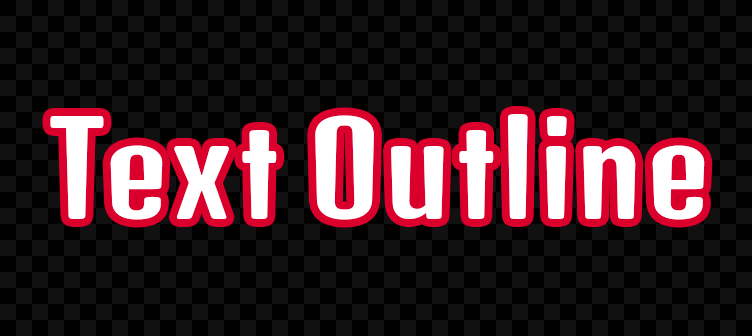
ApplyStrokeMode = Enum.ApplyStrokeMode.Contextual|Contextual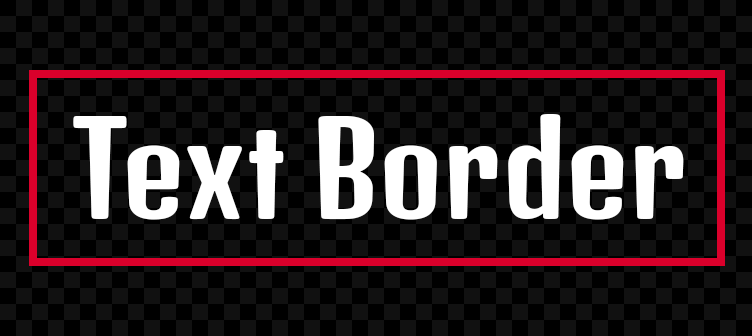
ApplyStrokeMode = Enum.ApplyStrokeMode.Border|BorderBorderOffset: UDim#
ReadSafe
This property specifies an additional offset (UDim) to the
stroke's position, relative to the parent's minimum height or width.
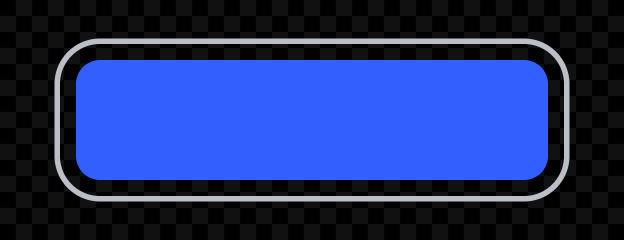
BorderOffset = (0.15, 0)
BorderOffset = (0, -16)BorderStrokePosition: BorderStrokePosition#
ReadSafe
This property determines the stroke's position on its parent's border as
an BorderStrokePosition value.
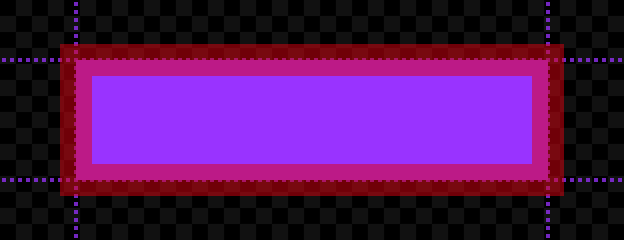
BorderStrokePosition = Enum.BorderStrokePosition.Center|Center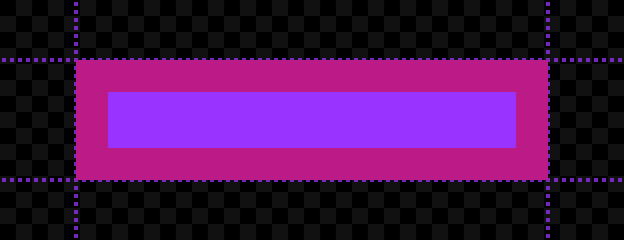
BorderStrokePosition = Enum.BorderStrokePosition.Inner|Inner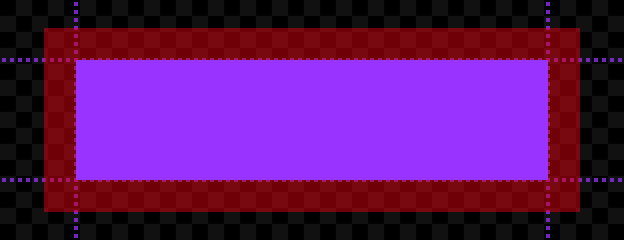
BorderStrokePosition = Enum.BorderStrokePosition.Outer|OuterColor: Color3#
ReadSafe
Determines the UIStroke color. You can also insert a
UIGradient instance as a child to create gradient strokes.

Color = (0, 95, 225)
UIStroke with Class.UIGradient childEnabled: boolean#
ReadSafe
This property determines whether the UIStroke is visible. When set
to false, the stroke will not be rendered. Defaults to true.
LineJoinMode: LineJoinMode#
ReadSafe
This property determines how corners are interpreted. It accepts an
LineJoinMode value of either Round
(default), Bevel, or
Miter.

LineJoinMode = Enum.LineJoinMode.Round|Round
LineJoinMode = Enum.LineJoinMode.Bevel|Bevel
LineJoinMode = Enum.LineJoinMode.Miter|MiterStrokeSizingMode: StrokeSizingMode#
ReadSafe
This property determines whether the stroke's
Thickness will be measured in pixels or be
scaled relative to the parent. See StrokeSizingMode for further
details.
Thickness: float#
ReadSafe
This property determines the stroke's thickness, measured in pixels
(default) or scaled relative to the parent, depending on
StrokeSizingMode.

Thickness = 4
Thickness = 12Be mindful of tweening this UIStroke
property when applied to text objects. This renders and stores many glyph
sizes each frame, potentially causing performance issues or text
flickering.
Transparency: float#
ReadSafe
This property sets the stroke opacity independently of the parent object's
BackgroundTransparency or
TextTransparency. This allows you to
render text and borders that are "hollow" (consisting of only an outline).

Transparency = 0.5 · Class.TextLabel.TextTransparency = 0
Transparency = 0 · Class.TextLabel.TextTransparency = 1ZIndex: int#
ReadSafe
This property determines the order in which the stroke renders relative to
sibling UIStroke instances. Those with a lower ZIndex render
under (behind) those with a higher ZIndex.
Note that the rendering order for UIStroke instances with the same
ZIndex is undefined. Do not apply multiple UIStroke instances
with the same ZIndex if their rendering order matters.
Inherited members#
Inherited from Instance 58
Properties (10)
Archivable, archivable, Capabilities, IsInSandbox, Name, Parent, PredictionMode, RobloxLocked, Sandboxed, UniqueId
Methods (39)
AddTag, children, ClearAllChildren, Clone, clone, Destroy, destroy, FindFirstAncestor, FindFirstAncestorOfClass, FindFirstAncestorWhichIsA, FindFirstChild, findFirstChild, FindFirstChildOfClass, FindFirstChildWhichIsA, FindFirstDescendant, GetActor, GetAttribute, GetAttributeChangedSignal, GetAttributes, GetChildren, getChildren, GetDebugId, GetDescendants, GetFullName, GetStyled, GetStyledPropertyChangedSignal, GetTags, HasTag, IsAncestorOf, IsDescendantOf, isDescendantOf, IsPropertyModified, QueryDescendants, Remove, remove, RemoveTag, ResetPropertyToDefault, SetAttribute, WaitForChild