Class
Trail
Used to create a trail effect between two attachments.
The Trail object is used to create a trail effect between two attachments. As the attachments move through space, a texture is drawn on their defined plane. This is commonly used to create effects that visualize movements like tracer trails behind projectiles, footprints, tire tracks, and similar effects.
See Trails for more information.
Properties 18#
Attachment0Attachment | Along with Attachment1, determines where the
trail will start drawing its segments.ReadSafe |
Attachment1Attachment | Along with Attachment0, determines where the
trail will start drawing its segments.ReadSafe |
Brightnessfloat | Scales the light emitted from the trail when
LightInfluence is less than 1.ReadSafe |
ColorColorSequence | The color of the trail throughout its lifetime.ReadSafe |
Enabledboolean | Determines whether the trail will be drawn or not.ReadSafe |
FaceCameraboolean | Determines whether the trail will always face the camera, regardless of its orientation.ReadSafe |
Lifetimefloat | Determines how long each segment in a trail will last, in seconds.ReadSafe |
LightEmissionfloat | Determines to what degree the colors of the trail are blended with the colors behind it.ReadSafe |
LightInfluencefloat | Determines the degree to which the trail is influenced by the environment's lighting.ReadSafe |
LocalTransparencyModifierfloat | Determines a multiplier for Trail.Transparency that is only
visible to the local client.ReadSafeHiddenNotReplicated |
MaxLengthfloat | Sets the maximum length of the trail.ReadSafe |
MinLengthfloat | Sets the minimum length of the trail.ReadSafe |
TextureContentId | The content ID of the texture to be displayed on the trail.ReadSafe |
TextureContentContent | The texture displayed on the trail. Supports asset URIs.ReadSafe |
TextureLengthfloat | Sets the length of the trail's texture, dependent on
TextureMode.ReadSafe |
TextureModeTextureMode | Determines the manner in which the Texture scales,
repeats, and moves along with the trail's attachments.ReadSafe |
TransparencyNumberSequence | Sets the transparency of the trail's segments over its
Lifetime.ReadSafe |
WidthScaleNumberSequence | Scales the width of the trail over the course of its lifetime.ReadSafe |
Attachment0: Attachment#
ReadSafe
A Trail starts drawing its segments at the positions of its
Attachment0 and Attachment1. When the trail
is Enabled, it records the positions of its
attachments every frame and connects these positions to the attachments'
positions on the previous frame, creating a polygon that is then filled in
by the trail's Color and
Texture.
Changing the attachments of a trail while a trail is drawing will remove all of the segments the trail has already drawn.
Attachment1: Attachment#
ReadSafe
A Trail starts drawing its segments at the positions of its
Attachment0 and Attachment1. When the trail
is Enabled, it records the positions of its
attachments every frame and connects these positions to the attachments'
positions on the previous frame, creating a polygon that is then filled in
by the trail's Color and
Texture.
Changing the attachments of a trail while a trail is drawing will remove all of the segments the trail has already drawn.
Brightness: float#
ReadSafe
Scales the light emitted from the trail when
LightInfluence is less than 1. This property
is 1 by default and can set to any number within the range of 0 to 10000.
Increasing the value of LightInfluence
decreases the effect of this property's value.
Color: ColorSequence#
ReadSafe
Determines the color of the trail throughout its lifetime. If
Texture is set, this color will tint the texture.
This property is a ColorSequence, allowing the color to be
configured to vary across the length of the trail. If the color changes
after some of the trail segments have been drawn, all of the old segments
will be updated to match the new colors.
Enabled: boolean#
ReadSafe
This property determines whether the trail will be drawn or not.
If set to false while a trail is drawing, no new segments will be drawn,
but any existing segments will be cleaned up naturally when they reach the
end of their Lifetime. To forcibly clean up
existing segments, call the Clear() method at the
same time.
FaceCamera: boolean#
ReadSafe
A Trail is a 2D projection existing in 3D space, meaning that it
may not be visible from every angle. The FaceCamera property, when set
to true, ensures that the trail always faces the
CurrentCamera, regardless of its
orientation.
Changing this property immediately affects all existing and future trail segments.
Lifetime: float#
ReadSafe
The Lifetime property determines how long each segment in a trail will last, in seconds, before it disappears. Defaults to 2 seconds but can be set anywhere between 0.01 and 20.
The lifetime of a trail is also used by that effect's
Color and Transparency
properties to determine how each segment is drawn. Both of these
properties are sequences, meaning that they define their values at certain
keypoints in the segment's lifetime and then interpolate between the
values as the segment ages.
If a trail's lifetime changes, existing segments will immediately behave as if they always had the new lifetime, meaning that if they've existed for longer than the new lifetime, they will be removed immediately.
LightEmission: float#
ReadSafe
Determines to what degree the colors of the trail are blended with the colors behind it. It should be set in the range of 0 to 1. A value of 0 uses normal blending modes and a value of 1 uses additive blending.
This property should not be confused with
LightInfluence which determines how the trail
is affected by environmental light.
Changing this property immediately affects all existing and future segments of the trail.
This property does not cause the trail to light the environment.
LightInfluence: float#
ReadSafe
Determines the degree to which the trail is influenced by the
environment's lighting, clamped between 0 and 1. When 0, the trail will be
unaffected by the environment's lighting. When 1, it will be fully
affected by lighting as a BasePart would be.
Changing this property immediately affects all existing and future segments of the trail.
See also LightEmission which specifies to what
degree the colors of the trail are blended with the colors behind it.
LocalTransparencyModifier: float#
HiddenNotReplicatedReadSafe
The LocalTransparencyModifier property is a multiplier applied to the
trail's Transparency that is only visible to
the local client. It does not replicate from client to server and is
useful for when a trail should not render for a specific client.
Uses the same formula as BasePart.LocalTransparencyModifier:
1 - ((1 - Transparency) × (1 -
LocalTransparencyModifier))
A value of 0 (default) has no effect on the trail's transparency. A
value of 1 makes the trail completely invisible to the local client
regardless of its Transparency value.
MaxLength: float#
ReadSafe
This property determines the maximum length of the trail, in studs. Its
value defaults to 0, meaning that the trail will not have a maximum length
and trail segments will expire in their Lifetime.
This property can be used alongside the MinLength
property which determines the minimum length a trail must be before it's
drawn.
MinLength: float#
ReadSafe
This property determines the minimum length of the trail, in studs. If neither of the trail's attachments have moved at least this value, no new segments will be created and the endpoints of the current segment will be moved to the current position of the attachments.
Note that changing this property will only affect new segments that are drawn; any old segments that have already been drawn will maintain their current length.
This property can be used alongside the MaxLength
property which determines the maximum trail length before its oldest
segments are erased.
Texture: ContentId#
ReadSafe
The content ID of the texture to be displayed on the trail. If this property is not set, the trail will be displayed as a solid plane; this also occurs when the texture is set to an invalid content ID or the image associated with the texture has not yet loaded.
The appearance of the texture can be further modified by other trail
properties including Color and
Transparency.
Scaling of the texture is determined by the distance between
Attachment0 and
Attachment1, as well as the
TextureMode,
TextureLength, and
WidthScale properties.
TextureContent: Content#
ReadSafe
The texture displayed on the trail. Supports asset URIs.
This property is the Content equivalent of
Texture. Assigning TextureContent updates
Texture.
If this property is set to Content.none, the trail displays as
a solid plane colored by its Color property. The
appearance of the texture can be further modified by
Color and Transparency.
Scaling of the texture is determined by the distance between
Attachment0 and
Attachment1, as well as
TextureMode,
TextureLength, and
WidthScale.
TextureLength: float#
ReadSafe
Sets the length of the trail's texture, dependent on
TextureMode. Changing this property immediately
affects all existing and future trail segments.
TextureMode: TextureMode#
ReadSafe
This property, alongside TextureLength,
determines how a trail's Texture scales, repeats,
and moves along with the trail's attachments. Changing this property
immediately affects all existing and future trail segments.
Scale and Repetition#
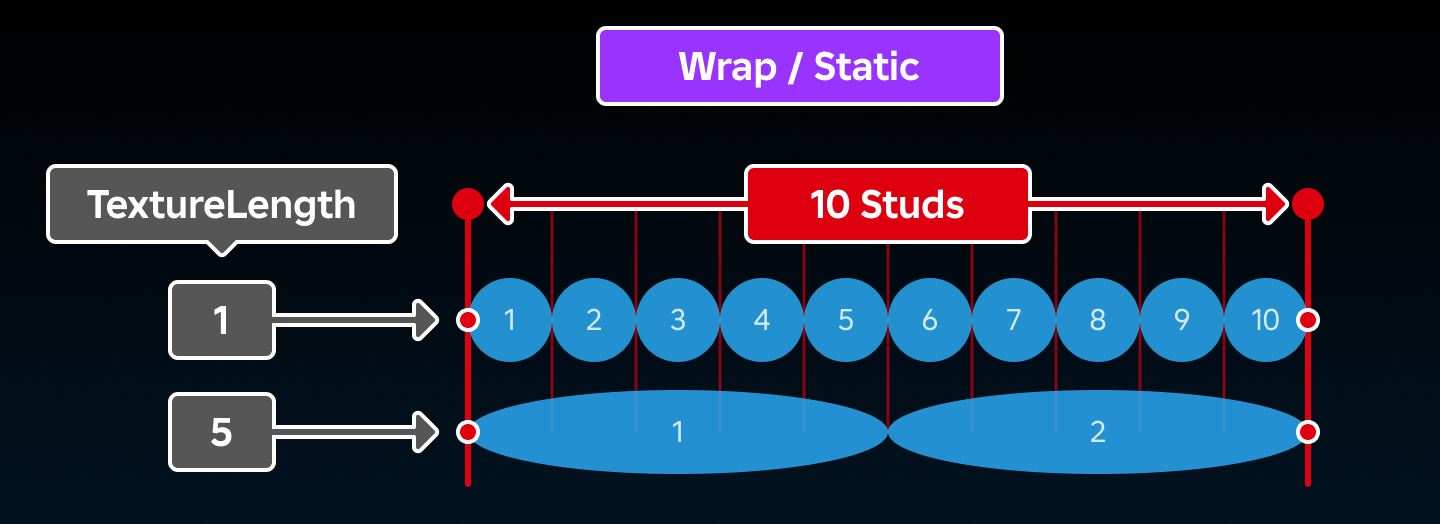
When TextureMode is set to TextureMode.Wrap or
TextureMode.Static, the TextureLength
property sets the length of the texture as it repeats across the trail's
length.
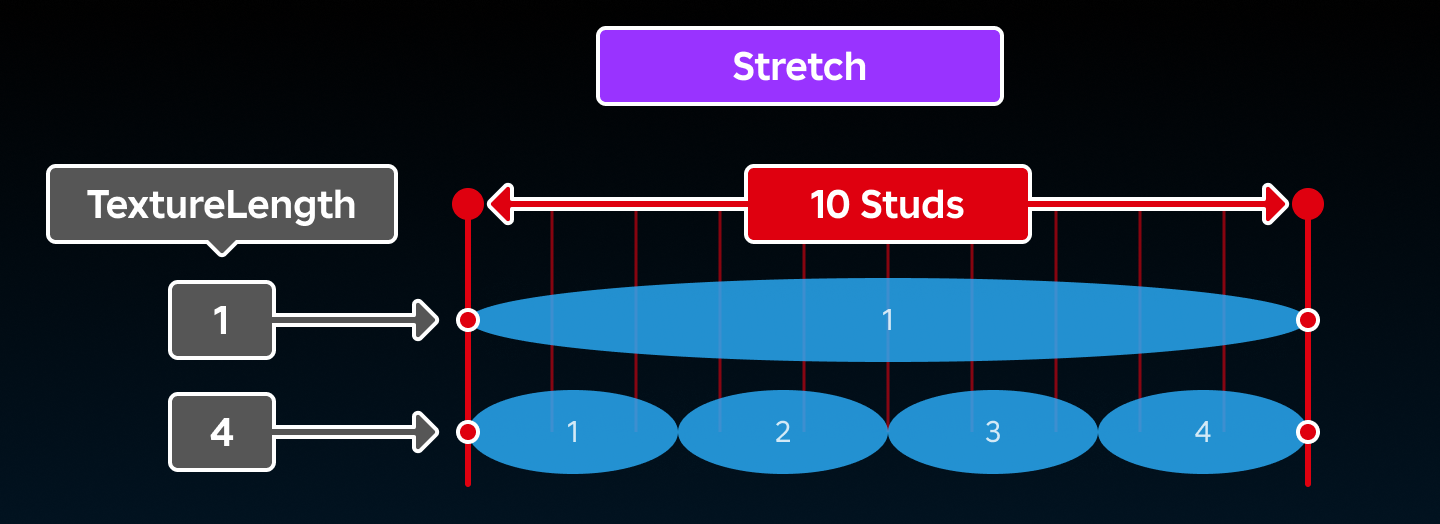
When TextureMode is set to TextureMode.Stretch, the texture
will repeat TextureLength times across the
trail's overall length.
Movement#
The TextureMode property also affects the movement of the trail's texture as follows:
If set to
TextureMode.Stretch, the texture will stretch out based on the lifetime of the trail, and shrink inwards if the trail's attachments stop moving.If set to
TextureMode.Wrap, the texture will be tiled as the length of the trail changes, but the textures will remain stationary relative to their attachments.If set to
TextureMode.Static, the texture will be rolled out as the attachments move, and they will remain in place until their lifetime is met. This setting is ideal for trail textures that should appear "stamped" where rendered, such as paw prints or tire tracks.
Transparency: NumberSequence#
ReadSafe
Sets the transparency of the trail's segments over its
Lifetime. This value is a
NumberSequence, meaning it can be a static value or can change
throughout the lifetime of the trail segments.
WidthScale: NumberSequence#
ReadSafe
This property is a NumberSequence that scales the width of the
trail over the course of its lifetime. Values can range between 0 and 1,
acting as a multiplier on the distance between the trail's attachments.
For example, if the trail's attachments are 2 stud's apart and the value
of this property is 0.5, the trail's width will be 1 stud and the trail
will be centered between the two attachments.
Methods 1#
| Clear | Clears the segments of the trail. |
Clear(): ()#
This method immediately clears all segments of the trail and is useful for cleaning up trails with longer lifetimes or for cases where the trail should be removed because of a specific action.
Calling this method only affects existing segments. To clear existing
trail segments and temporarily prevent new segments from being drawn,
toggle the trail's Enabled property to false at
the same time.
Returns
()
Inherited members#
Inherited from Instance 58
Properties (10)
Archivable, archivable, Capabilities, IsInSandbox, Name, Parent, PredictionMode, RobloxLocked, Sandboxed, UniqueId
Methods (39)
AddTag, children, ClearAllChildren, Clone, clone, Destroy, destroy, FindFirstAncestor, FindFirstAncestorOfClass, FindFirstAncestorWhichIsA, FindFirstChild, findFirstChild, FindFirstChildOfClass, FindFirstChildWhichIsA, FindFirstDescendant, GetActor, GetAttribute, GetAttributeChangedSignal, GetAttributes, GetChildren, getChildren, GetDebugId, GetDescendants, GetFullName, GetStyled, GetStyledPropertyChangedSignal, GetTags, HasTag, IsAncestorOf, IsDescendantOf, isDescendantOf, IsPropertyModified, QueryDescendants, Remove, remove, RemoveTag, ResetPropertyToDefault, SetAttribute, WaitForChild