Class
ProximityPrompt
An object that lets you prompt players to interact with an object in the 3D world.
The ProximityPrompt instance lets you prompt players to interact with an
object in the 3D world, such as opening a door or picking up an item. A
ProximityPrompt object works when parented to a BasePart,
Attachment, or Model (with
PrimaryPart set) in the workspace. When the player's
character approaches, a UI appears to prompt them for input.
Prompts consist of three primary elements, each of which can be controlled by
the noted properties. The default UI can be swapped out for your own custom
appearance as outlined in Style.
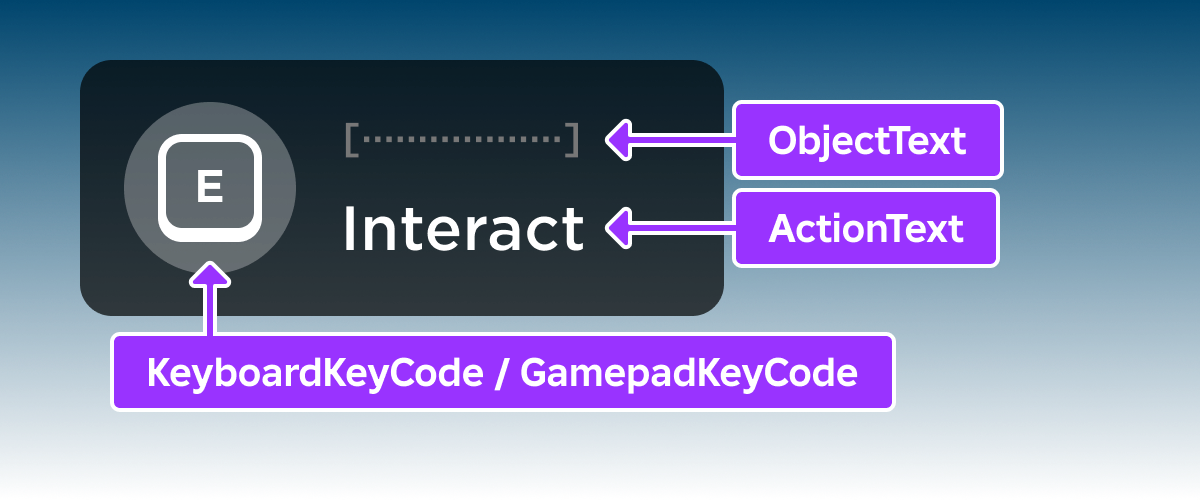
| Property | Description | Default |
Class.ProximityPrompt.ObjectText|ObjectText |
An optional name for the object being interacted with. | |
Class.ProximityPrompt.ActionText|ActionText |
An optional action name shown to the player. | Interact |
Class.ProximityPrompt.KeyboardKeyCode|KeyboardKeyCode |
The keyboard key which will trigger the prompt. | E |
Class.ProximityPrompt.GamepadKeyCode|GamepadKeyCode |
The gamepad button which will trigger the prompt. | ButtonX |
You can connect to proximity prompt events either on the
ProximityPrompt object itself or globally through
ProximityPromptService. The ProximityPromptService allows you
to manage all proximity prompt behavior from one location, preventing any need
for duplicate code in your experience.
For more information regarding proximity prompts, see the Proximity Prompts guide.
Properties 15#
ActionTextstring | The action text shown to the user.ReadSafe |
AutoLocalizeboolean | Whether the prompt's ProximityPrompt.ActionText and
ProximityPrompt.ObjectText will be localized according to the
ProximityPrompt.RootLocalizationTable.ReadSafe |
ClickablePromptboolean | Whether the prompt can be activated by clicking/tapping on the prompt UI.ReadSafe |
Enabledboolean | Whether or not this prompt should be shown.ReadSafe |
ExclusivityProximityPromptExclusivity | Used to customize which prompts can be shown at the same time.ReadSafe |
GamepadKeyCodeKeyCode | The gamepad button the player should press to trigger the prompt.ReadSafe |
HoldDurationfloat | The duration, in seconds, that the player must hold the button/key down to trigger the prompt.ReadSafe |
KeyboardKeyCodeKeyCode | The key the player should press to trigger the prompt.ReadSafe |
MaxActivationDistancefloat | The maximum distance a Player's character can be
from the ProximityPrompt for the prompt to appear.ReadSafe |
MaxIndicatorDistancefloat | The maximum distance at which a lightweight indicator for the prompt is shown, hinting at a nearby interaction before the player is close enough to trigger it.ReadSafe |
ObjectTextstring | An optional property that determines the object name text shown to the user.ReadSafe |
RequiresLineOfSightboolean | Whether the prompt is hidden if the path between the player's
Camera and object parented to the ProximityPrompt is
obstructed.ReadSafe |
RootLocalizationTableLocalizationTable | A reference to a LocalizationTable to be used to apply automated
localization to this prompt's ProximityPrompt.ActionText and
ProximityPrompt.ObjectText.ReadSafe |
StyleProximityPromptStyle | The style of the prompt's UI.ReadSafe |
UIOffsetVector2 | The pixel offset applied to the prompt's UI.ReadSafe |
ActionText: string#
ReadSafe
This property determines the action text shown to the user.
AutoLocalize: boolean#
ReadSafe
This property determines whether the prompt's
ProximityPrompt.ActionText and ProximityPrompt.ObjectText
will be localized according to the
ProximityPrompt.RootLocalizationTable. When set to true,
localization will be applied.
ClickablePrompt: boolean#
ReadSafe
This property determines whether the prompt can be activated by clicking/tapping on the prompt's UI. When set to false, the prompt cannot be activated by click/tap except on mobile.
Enabled: boolean#
ReadSafe
This property indicates whether or this ProximityPrompt should be
shown.
Exclusivity: ProximityPromptExclusivity#
ReadSafe
This property is used to customize which prompts can be shown at the same time.
GamepadKeyCode: KeyCode#
ReadSafe
This property determines the gamepad button the player should press to
trigger the ProximityPrompt. Default is
ButtonX.
HoldDuration: float#
ReadSafe
This property indicates the duration, in seconds, that the player must hold the button/key down to trigger the prompt.
KeyboardKeyCode: KeyCode#
ReadSafe
This property determines the key the player should press to trigger the
ProximityPrompt. Default is E.
MaxActivationDistance: float#
ReadSafe
This property determines the maximum distance a Player's
character can be from the ProximityPrompt
for the prompt to appear.
MaxIndicatorDistance: float#
ReadSafe
The maximum distance a player's character can be
from the ProximityPrompt for a lightweight indicator to appear. An
indicator is shown while the player is farther than
ProximityPrompt.MaxActivationDistance but no farther than
MaxIndicatorDistance, hinting that an interaction is nearby before the
prompt itself becomes active.
The default is 0, which disables the indicator; an indicator only
appears when this property is set to a value greater than 0. The number
of indicators shown at once is capped by
ProximityPromptService.MaxIndicatorsVisible.
ObjectText: string#
ReadSafe
This optional property determines the optional object name text shown to the user.
RequiresLineOfSight: boolean#
ReadSafe
This property indicates whether the prompt is hidden if the path between
the player's Camera and object parented to the
ProximityPrompt is obstructed. If true, this prompt will only be
shown if there is a clear path from the camera to the object.
The parent Part or Model of the prompt will be excluded
from this check.
RootLocalizationTable: LocalizationTable#
ReadSafe
This property serves as a reference to the LocalizationTable used
to apply automated localization to the prompt's
ProximityPrompt.ActionText and ProximityPrompt.ObjectText.
In order for this to apply, ProximityPrompt.AutoLocalize must be
set.
Developers can set this to reference a LocalizationTable anywhere in the
DataModel. It is not required to be a child of
LocalizationService. If there is no translation available in the
referenced table it will look for a translation in the parent of that
table, if it is also a LocalizationTable, and so on.
Style: ProximityPromptStyle#
ReadSafe
This property indicates the prompt's style. When set to Custom, no default UI will be provided.
The provided UI can be swapped out for a custom UI. In order to do this,
set Style to Custom. Then, listen to the
ProximityPrompt.PromptShown and
ProximityPrompt.PromptHidden events in a LocalScript,
where developers should create and tear down the UI.
Developers may also use ProximityPrompt.PromptButtonHoldBegan and
ProximityPrompt.PromptButtonHoldEnded in order to utilize the
ProximityPrompt.HoldDuration progress animation feature.
UIOffset: Vector2#
ReadSafe
This property indicates the pixel offset applied to the prompt's UI.
Methods 2#
| InputHoldBegin | Fires a signal indicating that the user began pressing the prompt GUI button. |
| InputHoldEnd | Fires a signal indicating that the user ended pressing the prompt GUI button. |
InputHoldBegin(): ()#
This function triggers a signal indicating that the user began pressing
the ProximityPrompt prompt button. It should be used by developers
who wish to customize the prompt and trigger it from a prompt GUI button
press.
Returns
()
InputHoldEnd(): ()#
A counterpoint to ProximityPrompt:InputHoldBegin(), this signals
that the user ended pressing the prompt GUI button.
Returns
()
Events 8#
| IndicatorHidden | Fires on the client when a lightweight indicator for the prompt is no longer shown. |
| IndicatorShown | Fires on the client when a lightweight indicator for the prompt becomes visible. |
| PromptButtonHoldBegan | Triggered when a player begins holding down the
key/button connected to a prompt
with a non-zero ProximityPrompt.HoldDuration. |
| PromptButtonHoldEnded | Triggers when the player ends holding down the button on a prompt with a
non-zero ProximityPrompt.HoldDuration. |
| PromptHidden | Triggers when the prompt becomes hidden. |
| PromptShown | Triggers when the prompt becomes visible. |
| Triggered | Triggered when the prompt
key/button is pressed, or after a
specified amount of time holding the button, if
ProximityPrompt.HoldDuration is used. |
| TriggerEnded | Triggers when key/button is
released, for longer events where the user is required to hold down the
button. |
IndicatorHidden()#
Fires client-side when a lightweight indicator for this
ProximityPrompt is hidden, which occurs when the player's
character moves farther than
ProximityPrompt.MaxIndicatorDistance from the prompt or the prompt
itself becomes active. Use this event to tear down a custom indicator UI.
As with ProximityPrompt.IndicatorShown, indicators only appear
when ProximityPrompt.MaxIndicatorDistance is set to a value
greater than 0; it defaults to 0.
IndicatorShown()#
Fires client-side when a lightweight indicator for this
ProximityPrompt becomes visible, which occurs when the player's
character is within
ProximityPrompt.MaxIndicatorDistance of the prompt but still
farther away than ProximityPrompt.MaxActivationDistance. Listen to
this event to render a custom indicator UI.
Because ProximityPrompt.MaxIndicatorDistance defaults to 0,
indicators are disabled unless you set it to a value greater than 0.
PromptButtonHoldBegan(playerWhoTriggered: Player)#
This event triggers when a player begins holding down the
key/button on a prompt with a
non-zero ProximityPrompt.HoldDuration. One possible usage includes
to animate a hold progress bar.
PromptButtonHoldEnded(playerWhoTriggered: Player)#
This event triggers when the player ends holding down the button on a
prompt with a non-zero ProximityPrompt.HoldDuration. One possible
usage includes to animate a hold progress bar.
| Name | Type | Default | Description |
|---|---|---|---|
playerWhoTriggered | Player | The player who ended the input hold. |
PromptHidden()#
This event triggers when the prompt becomes
hidden. This event is triggered client-side for LocalScripts.
PromptShown(inputType: ProximityPromptInputType)#
This event triggers when the prompt becomes
visible. This event is triggered client-side for LocalScripts.
| Name | Type | Default | Description |
|---|---|---|---|
inputType | ProximityPromptInputType | The input that triggers the prompt. |
Triggered(playerWhoTriggered: Player)#
This event is triggered when the prompt
key/button is pressed, or after a
specified amount of time holding the button, if
ProximityPrompt.HoldDuration is used.
TriggerEnded(playerWhoTriggered: Player)#
This event is triggered when the
key/button is released, for longer
events where the user is required to hold down the button (e.g. heal
another player over time.)
Inherited members#
Inherited from Instance 58
Properties (10)
Archivable, archivable, Capabilities, IsInSandbox, Name, Parent, PredictionMode, RobloxLocked, Sandboxed, UniqueId
Methods (39)
AddTag, children, ClearAllChildren, Clone, clone, Destroy, destroy, FindFirstAncestor, FindFirstAncestorOfClass, FindFirstAncestorWhichIsA, FindFirstChild, findFirstChild, FindFirstChildOfClass, FindFirstChildWhichIsA, FindFirstDescendant, GetActor, GetAttribute, GetAttributeChangedSignal, GetAttributes, GetChildren, getChildren, GetDebugId, GetDescendants, GetFullName, GetStyled, GetStyledPropertyChangedSignal, GetTags, HasTag, IsAncestorOf, IsDescendantOf, isDescendantOf, IsPropertyModified, QueryDescendants, Remove, remove, RemoveTag, ResetPropertyToDefault, SetAttribute, WaitForChild