Class
BillboardGui
A container for GuiObjects that renders in 3D space facing
the camera.
BillboardGui is a container for UI objects to appear in the 3D space
but always face the camera. The container's position is relative to the parent
BasePart or Attachment (or the
Adornee). For BaseParts, the
Position property is used, while for
Attachments, the
WorldPosition property is used.
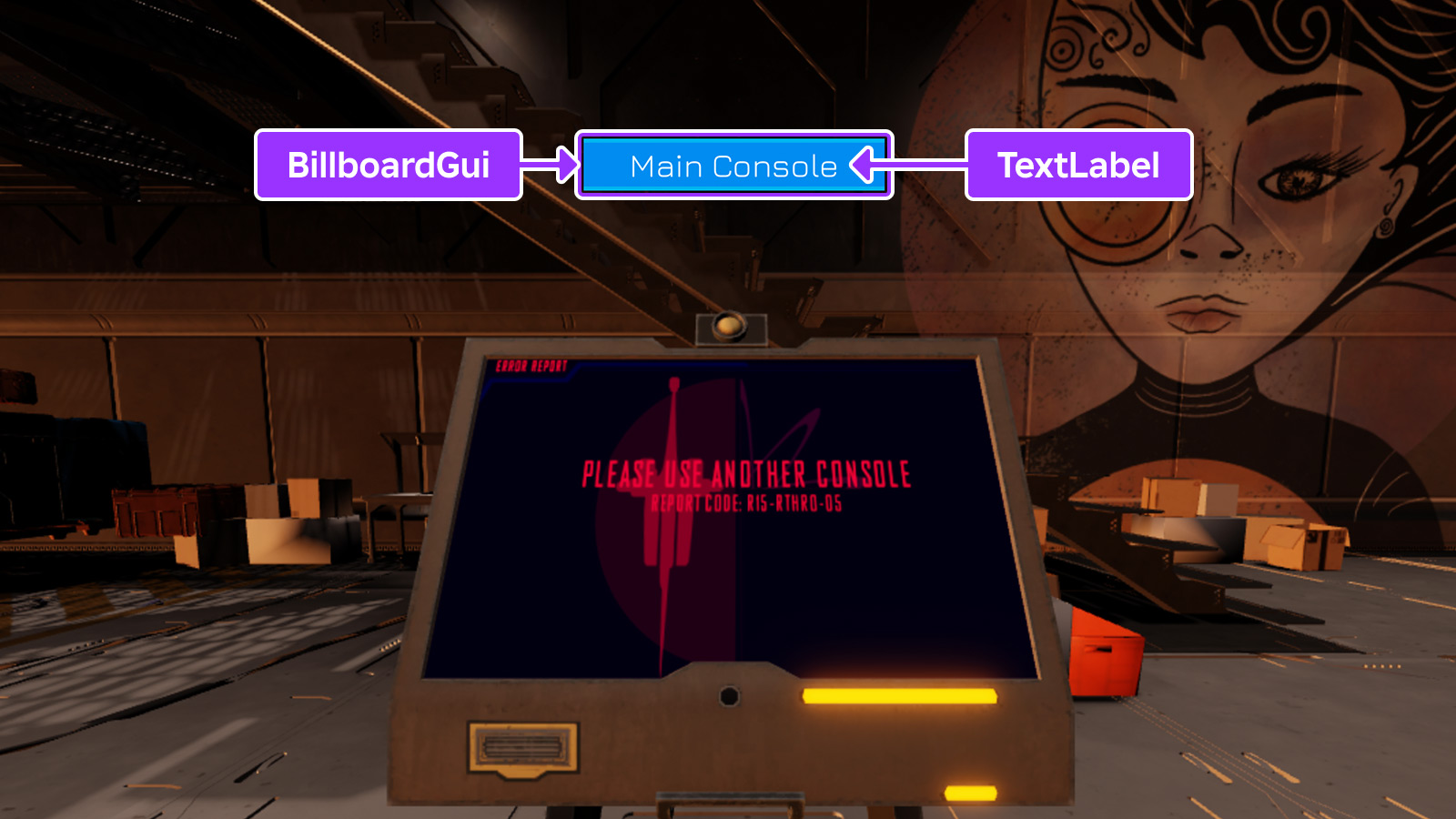
A billboard's Size property works slightly
differently than GuiObject.Size. While the offset components work
the same, the scale components are used as stud sizes in 3D space.
When creating a size-scaled BillboardGui that contains a
TextLabel, it's useful to enable the label's
TextScaled property so that its text scales along
with the billboard canvas as the camera distance changes.
Note that interactive UI elements like ImageButtons and
TextButtons inside a BillboardGui will only receive
user input if they are parented to the PlayerGui, typically via
placing the BillboardGui inside StarterGui. The
Adornee property can be used to target a part or
attachment in the 3D world while the BillboardGui itself remains in
the PlayerGui.
See In-Experience UI
for a guide on working with BillboardGui containers.
Caching Behavior#
To help improve performance, the appearance of a BillboardGui is
cached until one of the following occurs, after which its appearance will be
recomputed on the next rendering frame.
- A descendant is added to or removed from the
BillboardGui. - A property of a descendant of the
BillboardGuichanges. - A property of the
BillboardGuiitself changes.
Properties 18#
Activeboolean | Controls whether the descendants will receive input events.ReadSafe |
AdorneeInstance | Sets the target part or attachment that the BillboardGui is
positioned relative to.ReadSafe |
AlwaysOnTopboolean | Determines whether the BillboardGui will always be rendered on top
of other 3D objects.ReadSafe |
Brightnessfloat | Determines the factor by which the BillboardGui container's light
is scaled when LightInfluence is 0.ReadSafe |
ClipsDescendantsboolean | Whether portions of GuiObjects that fall outside of the
BillboardGui canvas borders will be drawn.ReadSafe |
CurrentDistancefloat | The current distance in studs that the BillboardGui is from the
player's camera.ReadSafeReadOnlyNotReplicated |
DistanceLowerLimitfloat | Determines the distance in studs at which the BillboardGui will
stop scaling larger in size.ReadSafe |
DistanceStepfloat | Determines the size CurrentDistance
increments and decrements in studs as the player's camera moves closer and
further from the BillboardGui.ReadSafeNotReplicated |
DistanceUpperLimitfloat | Determines the distance in studs at which the BillboardGui will
stop scaling smaller in size.ReadSafe |
ExtentsOffsetVector3 | Determines how the BillboardGui is offset from its
Adornee, relative to the Camera
orientation, in units half the dimensions of the model's
Camera-aligned bounding box.ReadSafe |
ExtentsOffsetWorldSpaceVector3 | Determines how the BillboardGui is offset from its
Adornee, relative to the global axes, in
units half the dimensions of the model's axis-aligned bounding box.ReadSafe |
LightInfluencefloat | Controls how much the BillboardGui is influenced by environmental
lighting.ReadSafe |
MaxDistancefloat | Controls how far away the BillboardGui can be displayed before it
stops rendering.ReadSafe |
PlayerToHideFromInstance | Used by scripts to hide the BillboardGui from a specific player.ReadSafe |
SizeUDim2 | Controls the size that the BillboardGui will have on screen.ReadSafe |
SizeOffsetVector2 | A 2D offset in size-relative units that acts like an anchor point.ReadSafe |
StudsOffsetVector3 | Determines how the BillboardGui is offset from its
Adornee in studs, relative to the
Camera orientation.ReadSafe |
StudsOffsetWorldSpaceVector3 | Determines how the BillboardGui is offset from its
Adornee in studs, relative to the global
axes.ReadSafe |
Active: boolean#
ReadSafe
Controls whether the descendants will receive input events. If the
BillboardGui contains a GuiButton, that button will become
clickable only if Active is set to true on
both the BillboardGui and the button.
Note that interactive UI elements like ImageButtons
and TextButtons inside a BillboardGui will only
receive user input if they are parented to the PlayerGui,
typically via placing the BillboardGui inside StarterGui.
The Adornee property can be used to target a
part or attachment in the 3D world while the BillboardGui itself
remains in the PlayerGui.
Adornee: Instance#
ReadSafe
Sets the target BasePart or Attachment that the
BillboardGui is positioned relative to, overriding the parent part
or attachment.
AlwaysOnTop: boolean#
ReadSafe
This property determines whether the BillboardGui will always
render on top of other 3D objects.
When set to false (default), the BillboardGui renders like other
3D content and is occluded by other 3D objects. When set to true, the
BillboardGui always renders on top of 3D content and the
appearance changes significantly:
- Colors match how they appear inside a
ScreenGui. - Text may appear sharper on high DPI devices.
LightInfluenceis treated as though it's0.Brightnesshas no effect.
Brightness: float#
ReadSafe
This property determines the factor by which the BillboardGui
container's light is scaled when
LightInfluence is 0. By default,
this property is 1 and can be set to any number between 0 and 1000.
By modifying this property, the apparent brightness of a
BillboardGui can be better matched to its environment. For
instance, a video billboard can be brightened inside a dark room by
increasing Brightness to 10.
Note that Brightness is inaccessible in
Studio and has no effect when either
LightInfluence is 1 or
AlwaysOnTop is true.
ClipsDescendants: boolean#
ReadSafe
When set to true (default), portions of GuiObjects
that fall outside of the BillboardGui canvas borders will not be
drawn.
Even when this property is false, GuiObjects that are
completely outside of the canvas will not render.
CurrentDistance: float#
ReadOnlyNotReplicatedReadSafe
The current distance in studs that the BillboardGui is from the
player's camera. A changed event does not fire for this property unless
DistanceStep is more than 0.
DistanceLowerLimit: float#
DeprecatedReadSafe
Determines the distance in studs at which the BillboardGui will
stop scaling larger in size relative to the player's current camera, with
a default of 0. If the
CurrentDistance of the
BillboardGui is below this value, it will not scale any larger
than it would at this distance.
DistanceStep: float#
NotReplicatedReadSafe
Determines the size CurrentDistance
increments and decrements in studs as the player's camera moves closer and
further from the BillboardGui. The property defaults to 0.
DistanceUpperLimit: float#
DeprecatedReadSafe
Determines the distance in studs at which the BillboardGui will
stop scaling smaller in size relative to the player's current camera. If
the CurrentDistance of the
BillboardGui is above this value, it will not scale any smaller
than it would at this distance.
This property is ignored if the value is less than 0. The default value
is -1, meaning the property is ignored by default.
ExtentsOffset: Vector3#
ReadSafe
This property determines how the BillboardGui is offset from its
Adornee, relative to the Camera
orientation, in units half the dimensions of the model's
Camera-aligned bounding box.
See also StudsOffset which works
similarly but uses stud units, or
ExtentsOffsetWorldSpace which
works similarly except the offset orientation is relative to the global
axes.
ExtentsOffsetWorldSpace: Vector3#
ReadSafe
This property determines how the BillboardGui is offset from its
Adornee, relative to the global axes, in
units half the dimensions of the model's axis-aligned bounding box.
See also StudsOffset which works
similarly but uses stud units, or
ExtentsOffset which works similarly
except the offset orientation is relative to the Camera.
LightInfluence: float#
ReadSafe
Controls how much the BillboardGui is influenced by environmental
lighting, in a range from 0 to 1. Setting this to 1 means that
surrounding lighting has complete control over the appearance, while
setting it to 0 means that the lighting has no effect.
MaxDistance: float#
ReadSafe
This property controls how far from the camera the BillboardGui
will be displayed before it stops rendering. A value of 0 or inf
(default) means there is no limit and it will render infinitely far away.
For BillboardGuis that appear outdoors, it's
recommended that MaxDistance is high
enough to ensure that the container's UI is sufficiently small on the
screen when it appears or disappears, minimizing the sudden pop‑in/out
effect.
PlayerToHideFrom: Instance#
ReadSafe
Used by scripts to hide the BillboardGui from a specific player.
To hide a BillboardGui from more than one player, place it into
StarterGui and use a script to set the
Enabled property according to whether the
LocalPlayer should be able to see it. The
Adornee property can be used to attach the
BillboardGui to a BasePart or Attachment in the
Workspace, instead of parenting it.
Size: UDim2#
ReadSafe
Controls the size that the BillboardGui will have on screen.
Unlike GuiObject.Size, the
scale components of this property
set the billboard's stud size in 3D space.
SizeOffset: Vector2#
ReadSafe
A 2D offset in size-relative units that acts like an anchor point. This
can be used similarly to the GuiObject.AnchorPoint property, but
the values are different.
| Size Offset | Explanation |
|---|---|
0, 0 |
The default in which UI will be anchored at its center. |
0.5, 0.5 |
UI will anchor at the bottom left. |
0.5, -0.5 |
UI will anchor at the top left. |
-0.5, 0.5 |
UI will anchor at the top right. |
-0.5, -0.5 |
UI will anchor at the bottom right. |
See also StudsOffset,
StudsOffsetWorldSpace,
ExtentsOffset, and
ExtentsOffsetWorldSpace which
are offset properties that work in 3D space instead.
StudsOffset: Vector3#
ReadSafe
This property determines how the BillboardGui is offset from its
Adornee in studs, relative to the
Camera orientation.
See also StudsOffsetWorldSpace
which works similarly except the offset orientation is relative to the
global axes.
StudsOffsetWorldSpace: Vector3#
ReadSafe
This property determines how the BillboardGui is offset from its
Adornee in studs, relative to the global
axes.
See also StudsOffset which works
similarly except the offset orientation is relative to the Camera.