Enum
ScreenInsets
Insets associated with various screen safe areas.
This enum specifies screen edge insets that are associated with a particular screen safe area. The insets are relative to the fullscreen area, meaning the rectangular region that encompasses all visible pixels on the screen.
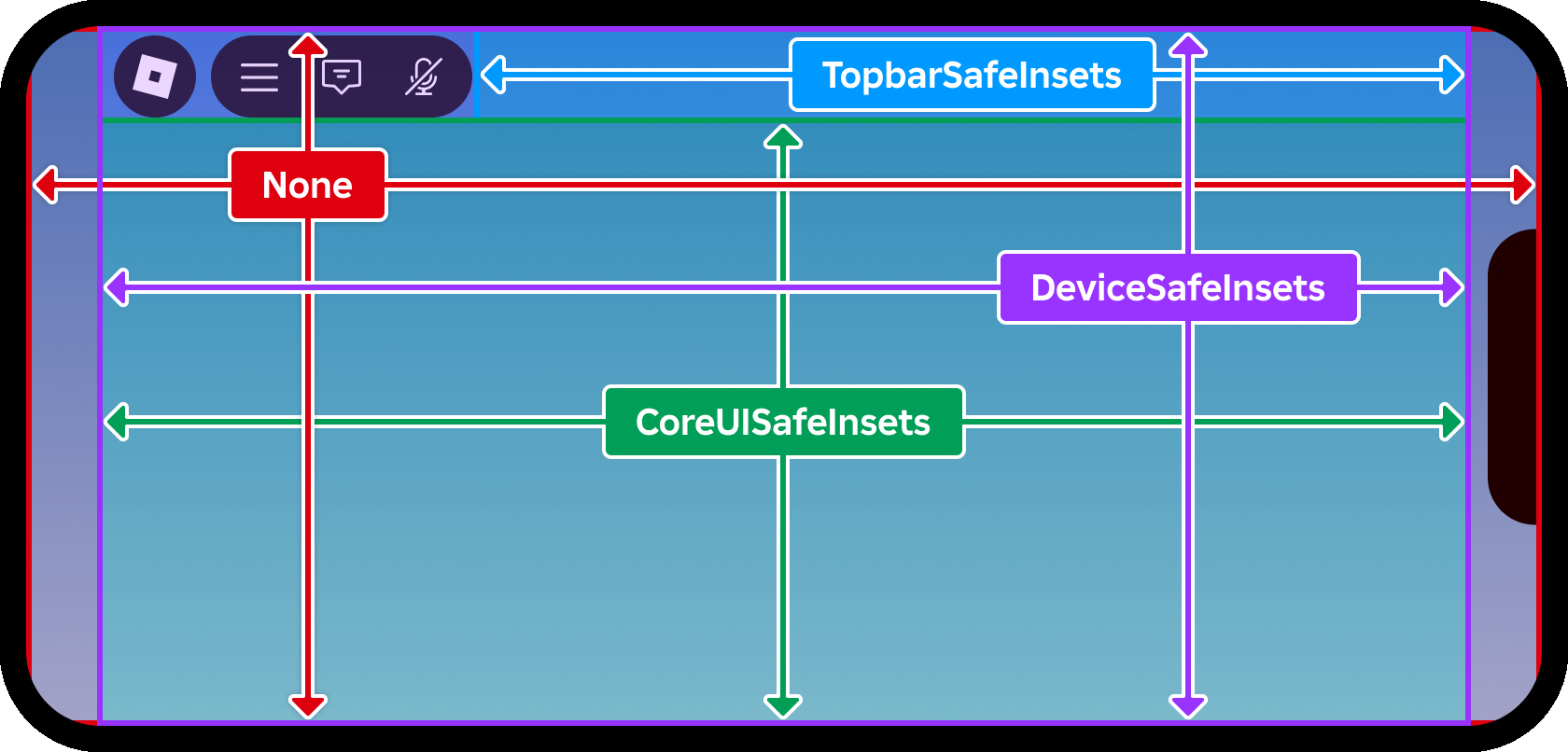
Items 4#
| Name | Value | Summary |
|---|---|---|
None | 0 | No insets are added to the fullscreen area. This mode may result in UI
that is obscured or completely hidden by device notches and cutouts, so
you should only use it for a ScreenGui that contains
non‑interactive content like background images. |
DeviceSafeInsets | 1 | Device safe area insets are added to the fullscreen area. The resulting
area is guaranteed to not be occluded by any device screen cutouts
such as the camera notch, although no inset is added for Roblox core UI
elements like the top bar buttons. As a result, it's recommended that you
use CoreUISafeInsets for a ScreenGui whose contents should
remain unobscured by both device cutouts and core screen elements. |
CoreUISafeInsets | 2 | Core UI insets are added to the DeviceSafeInsets area, resulting in an
area guaranteed to be unobscured by both device screen cutouts and Roblox
core UI elements like the top bar buttons. This mode is recommended for
any ScreenGui that contains interactive and/or important UI
elements such as buttons and status messages. |
TopbarSafeInsets | 3 | Top bar safe area insets are added to the DeviceSafeInsets area,
resulting in an area guaranteed to be unobscured by both device screen
cutouts and Roblox core UI elements like the experience controls. Unlike
CoreUISafeInsets, this area's position and size is dynamic and is
limited to the space available within the top bar area itself, outside of
CoreUISafeInsets. See the GuiService.TopbarInset property which
represents the absolute size and position of the unobstructed area within
the top bar space. |