Pathfinding
Pathfinding is the process of moving a character or object (agent) along a logical path to reach a destination.
Pathfinding is the process of moving a character or object (agent) along a logical path around obstacles to reach a destination, optionally avoiding hazardous materials or defined regions.
Navigation visualization#
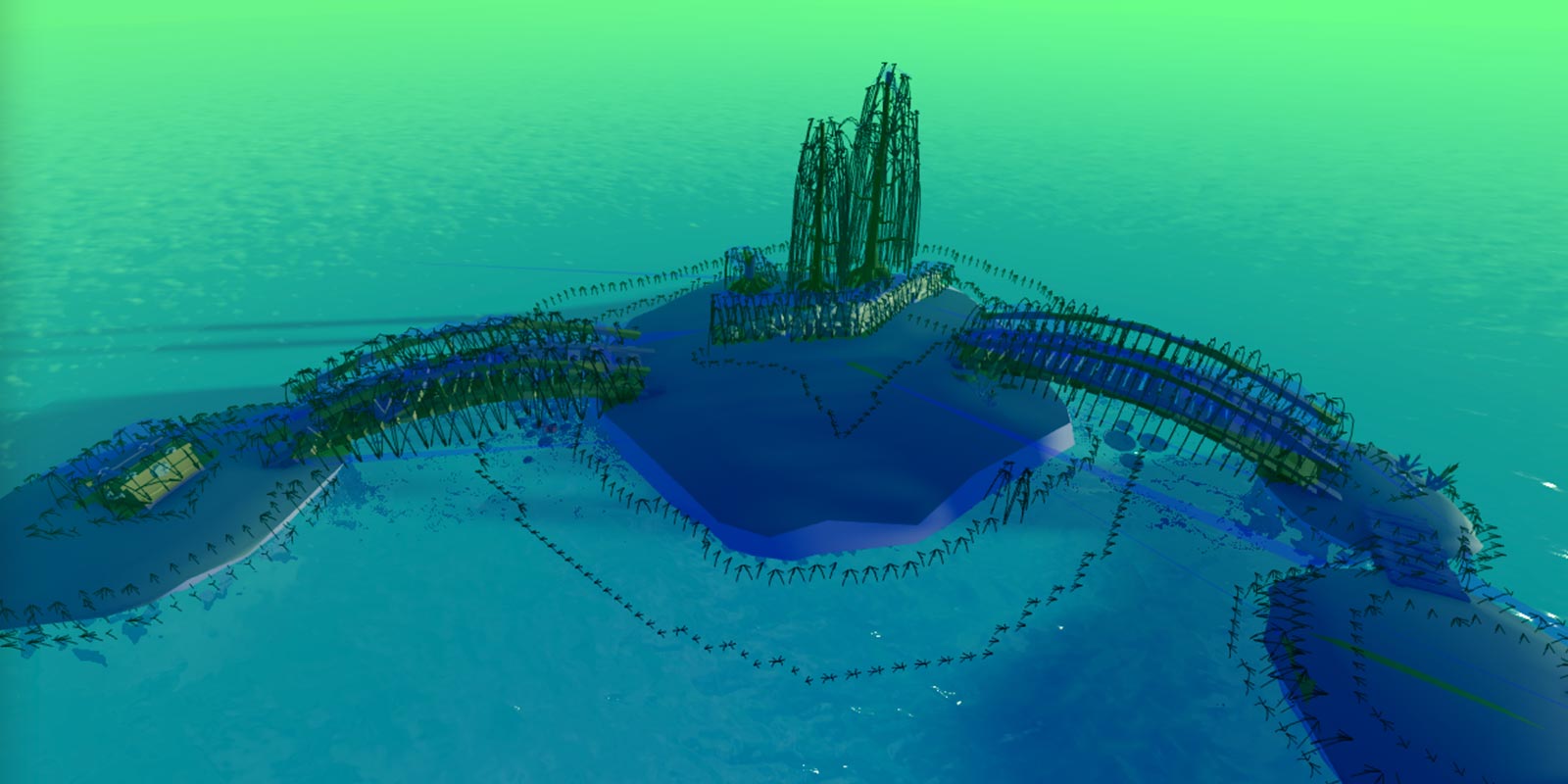
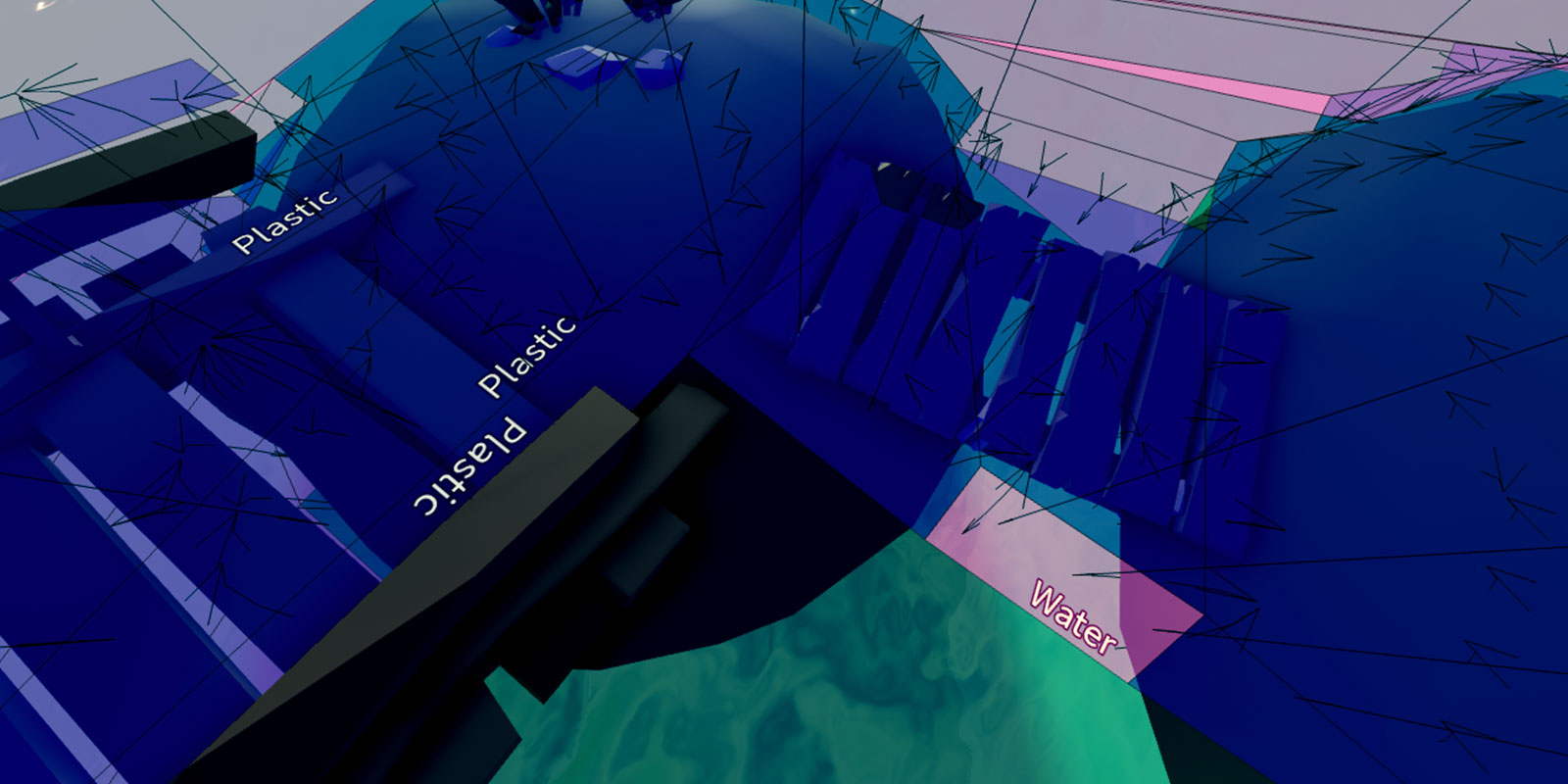
To assist with pathfinding layout and debugging, Studio can render a navigation mesh and modifier labels. To enable them, toggle on Navigation mesh and Pathfinding modifiers from the Visualization Options widget in the upper‑right corner of the 3D viewport.

Navigation Mesh
With Navigation mesh enabled, colored areas show where a character might walk or swim. Small arrows indicate areas that a character will attempt to reach by jumping.
Pathfinding Modifiers
With Pathfinding modifiers enabled, text labels indicate specific materials and regions that are taken into consideration when using pathfinding modifiers.
Implementation#
Although pathfinding can be implemented in various ways through PathfindingService and its associated methods such as CreatePath(), this section uses the following pathfinding script for the player's character.
To test while reading:
- IMPORTANT In the Explorer, select the
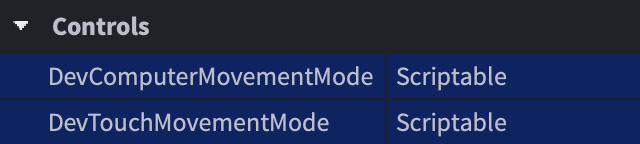
StarterPlayercontainer. Then, in the Properties window, set bothDevComputerMovementModeandDevTouchMovementModetoScriptable.

Copy the following code into a
LocalScriptwithinStarterCharacterScripts, or get this package and drop it intoStarterCharacterScripts.```lua title="PlayerPathFollow (LocalScript in StarterCharacterScripts)" local PathfindingService = game:GetService("PathfindingService") local Players = game:GetService("Players") local RunService = game:GetService("RunService")
local DESTINATION = Vector3.new(20, 0.5, 20) local GROUND_WAIT = 0.01 local VELOCITY_MULTIPLIER = 0.0625
local path = PathfindingService:CreatePath({ AgentCanClimb = true, Costs = { Water = 20 } })
local character = script.Parent local humanoid = character:WaitForChild("Humanoid") local waypoints local nextWaypointIndex local blockedConnection local currentWaypointReachedConnection local currentWaypointPlaneNormal = Vector3.zero local currentWaypointPlaneDistance = 0 local pathfinderWorking = false
local function disconnectCurrentWaypointReachedConnection() if not currentWaypointReachedConnection then return end currentWaypointReachedConnection:Disconnect() currentWaypointReachedConnection = nil end
local function isCurrentWaypointReached() if humanoid.FloorMaterial == Enum.Material.Air then return false end
local reached = false if currentWaypointPlaneNormal ~= Vector3.zero then -- Compute the distance from humanoid to destination plane local dist = currentWaypointPlaneNormal:Dot(humanoid.RootPart.Position) - currentWaypointPlaneDistance -- Compute the component of the humanoid velocity that is towards the plane local velocity = -currentWaypointPlaneNormal:Dot(humanoid.RootPart.Velocity) -- Compute the threshold from the destination plane based on humanoid velocity local threshold = math.max(1.0, VELOCITY_MULTIPLIER * velocity) -- Consider waypoint reached if less then threshold in front of the plane reached = dist < threshold else reached = true end
if reached then currentWaypointPlaneNormal = Vector3.zero currentWaypointPlaneDistance = 0 moveToNextWaypoint() end end
local function calculateNextWaypointApproach() nextWaypointIndex += 1 if nextWaypointIndex > #waypoints then return false end local currentWaypoint = waypoints[nextWaypointIndex - 1] local nextWaypoint = waypoints[nextWaypointIndex] -- Build destination plane from next waypoint towards current one currentWaypointPlaneNormal = currentWaypoint.Position - nextWaypoint.Position -- Set normal perpendicular to Y plane when not climbing up if nextWaypoint.Label ~= "Climb" then currentWaypointPlaneNormal = Vector3.new(currentWaypointPlaneNormal.X, 0, currentWaypointPlaneNormal.Z) end if currentWaypointPlaneNormal.Magnitude > 0.000001 then currentWaypointPlaneNormal = currentWaypointPlaneNormal.Unit currentWaypointPlaneDistance = currentWaypointPlaneNormal:Dot(nextWaypoint.Position) end
return true end
local function resetWaypointData() humanoid:Move(Vector3.zero) currentWaypointPlaneNormal = Vector3.zero currentWaypointPlaneDistance = 0 disconnectCurrentWaypointReachedConnection() pathfinderWorking = false end
local function waitForGround() while humanoid.FloorMaterial == Enum.Material.Air do task.wait(GROUND_WAIT) end end
function moveToNextWaypoint() if calculateNextWaypointApproach() then disconnectCurrentWaypointReachedConnection() currentWaypointReachedConnection = RunService.Heartbeat:Connect(isCurrentWaypointReached) local nextWaypointPosition = waypoints[nextWaypointIndex].Position local nextWaypointAction = waypoints[nextWaypointIndex].Action humanoid:Move(nextWaypointPosition - humanoid.RootPart.Position) if waypoints[nextWaypointIndex + 1] and waypoints[nextWaypointIndex + 1].Label == "UseBoat" then nextWaypointIndex += 1 -- Call your own customized function to make agent use the boat
elseif nextWaypointAction == Enum.PathWaypointAction.Jump then humanoid:ChangeState(Enum.HumanoidStateType.Jumping) while humanoid.FloorMaterial ~= Enum.Material.Air do task.wait(GROUND_WAIT) end humanoid:Move(nextWaypointPosition - humanoid.RootPart.Position) end else resetWaypointData() end end
local function findStartingPoint(waypoints) nextWaypointIndex = 1 while nextWaypointIndex + 1 <= #waypoints do local dist = waypoints[nextWaypointIndex + 1].Position - humanoid.RootPart.Position dist = Vector3.new(dist.X, 0, dist.Z) if dist.magnitude >= 2 then return end nextWaypointIndex += 1 end end
local function followPath() -- Compute the path pathfinderWorking = true waitForGround()
local success, errorMessage = pcall(function() path:ComputeAsync(character.PrimaryPart.Position, DESTINATION) end) if not success or path.Status ~= Enum.PathStatus.Success then warn("Path not computed!", errorMessage) return end
-- Get the path waypoints waypoints = path:GetWaypoints()
-- Detect if path becomes blocked blockedConnection = path.Blocked:Connect(function(blockedWaypointIndex) -- Check if the obstacle is further down the path if blockedWaypointIndex >= nextWaypointIndex then -- Stop detecting path blockage until path is re-computed blockedConnection:Disconnect() resetWaypointData() -- Call function to re-compute new path followPath() end end)
findStartingPoint(waypoints) moveToNextWaypoint() end
followPath() ```
Edit the
DESTINATIONvariable (LINE 5) to aVector3destination within the 3D world that the player character can reach.Proceed through the following sections to learn about path computation and character movement.
Path creation#
Pathfinding is initiated through PathfindingService and its CreatePath() method (LINES 9–14). This method accepts an optional table of parameters which fine tune how the character (agent) moves along the path.
| Key | Description | Type | Default |
|---|---|---|---|
AgentRadius |
Agent radius, in studs. Useful for determining the minimum separation from obstacles. | integer | 2 |
AgentHeight |
Agent height, in studs. Empty space smaller than this value, like the space under stairs, will be marked as non-traversable. | integer | 5 |
AgentCanJump |
Determines whether jumping during pathfinding is allowed. | boolean | true |
AgentCanClimb |
Determines whether climbing TrussParts during pathfinding is allowed. A climbable path has a Label named Climb and the cost for a climbable path is 1 by default. |
boolean | false |
WaypointSpacing |
Spacing between intermediate waypoints in path. If set to math.huge, there will be no intermediate waypoints. |
number | 4 |
Costs |
Table of materials or defined PathfindingModifiers and their cost for traversal. Useful for making the agent prefer certain materials/regions over others. See modifiers for details. |
table | nil |
Path computation#
After you've created a valid path with CreatePath(), it must be computed by calling Path:ComputeAsync() with a Vector3 for both the starting point and destination (LINES 133–139).
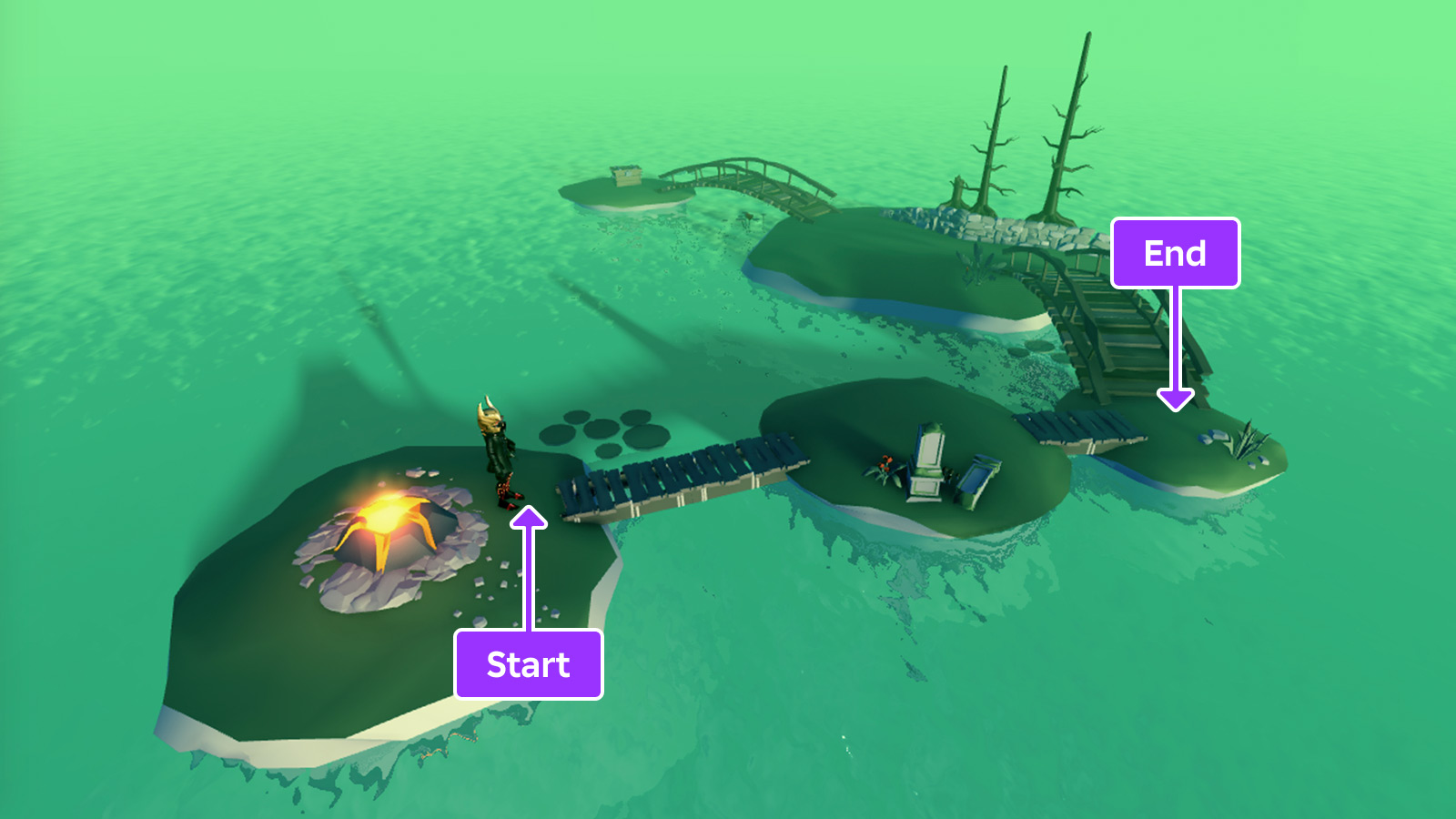
Once the Path is computed, it will contain a series of waypoints that trace the path from start to end. These points can be gathered with the Path:GetWaypoints() method (LINE 142). The returned array is arranged in order of waypoints from path start to path end.
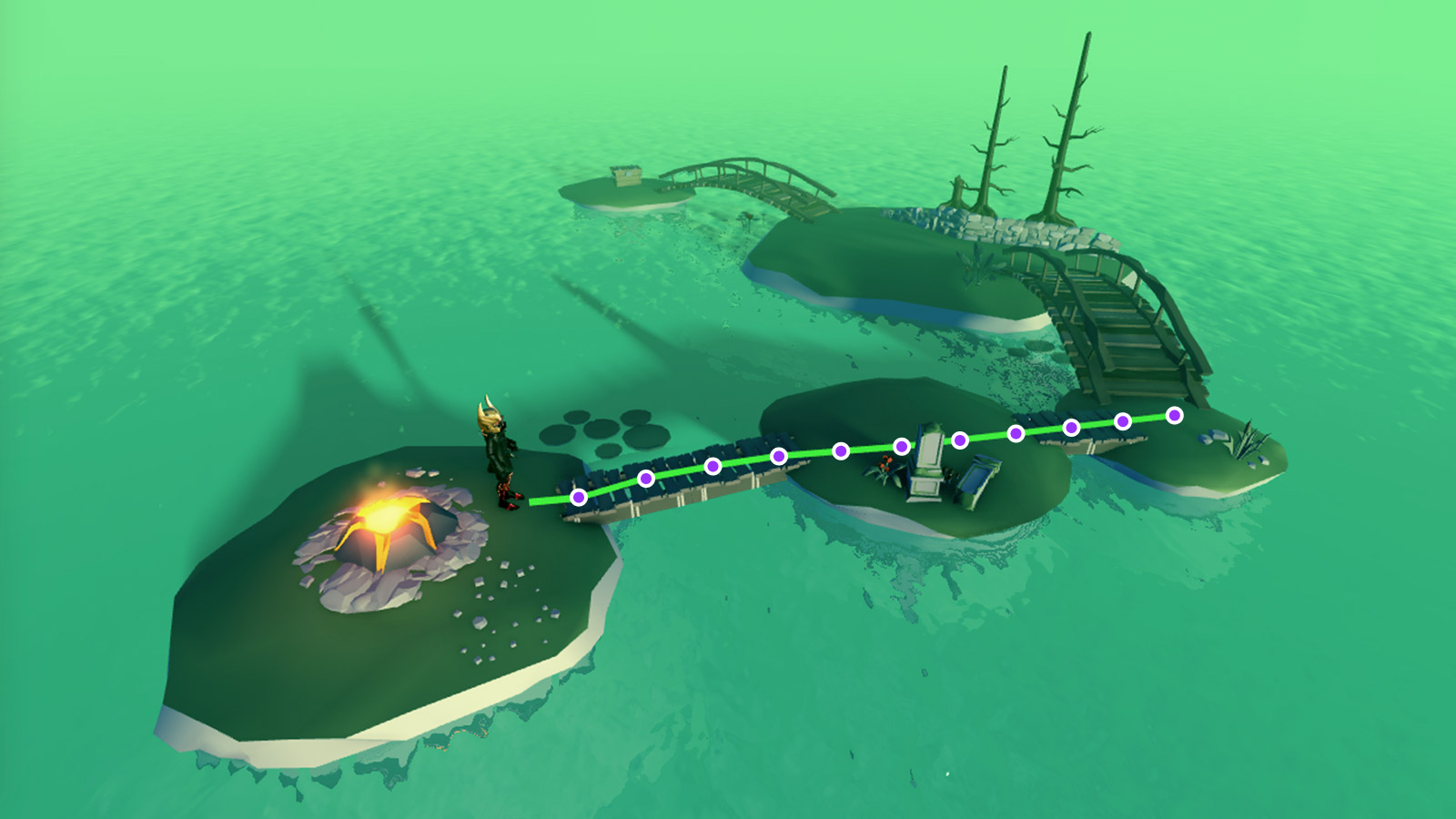
The pathfinding engine includes specific limitations, and pathfinding computations can fail for various reasons. If your implementation does not behave as expected, see limitations and failure factors for possible causes.
Path movement#
Each PathWaypoint consists of both a Position (Vector3) and Action (PathWaypointAction). To move a character containing a Humanoid, like a typical Roblox character, the best way is to call Humanoid:Move() from waypoint to waypoint and use the script's isCurrentWaypointReached() callback (LINES 32–56) to detect when the character reaches each waypoint.
Note that the script waits for the humanoid to be touching the ground before calling the pathfinder. If the path is computed while the character is falling through the air, the pathfinder will try to determine an appropriate start position for the path.
Blocked paths#
Many Roblox worlds are dynamic; parts might move or fall and floors may collapse. This can block a computed path and prevent the character from reaching its destination. To handle this, you can connect the Path.Blocked event and re-compute the path around whatever blocked it (LINES 145–154).
Paths may also become blocked somewhere behind the agent, such as a pile of rubble falling on a path as the agent runs away, but that doesn't mean the agent should stop moving. The if blockedWaypointIndex >= nextWaypointIndex check makes sure that the path is re-computed only if the blocked waypoint is ahead of the current waypoint.
Pathfinding modifiers#
By default, Path:ComputeAsync() returns the shortest path between the starting point and destination, with the exception that it attempts to avoid jumps. This looks unnatural in some situations; for instance, a path may go through swamp water rather than around it simply because the path through the water is geometrically shorter.
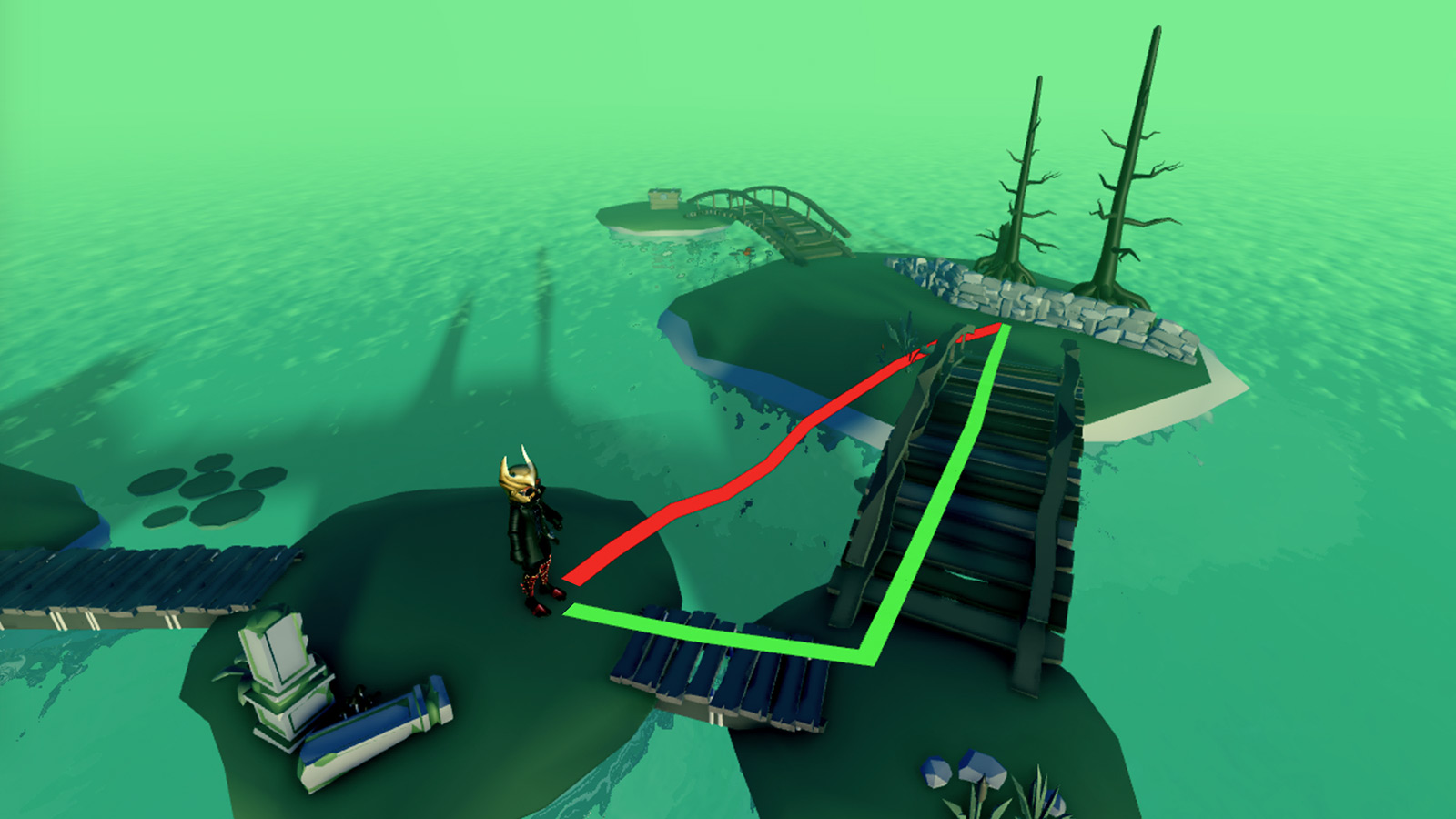
To optimize pathfinding even further, you can implement pathfinding modifiers to compute smarter paths across various materials, around defined regions, or to ignore obstacles.
Material costs#
When working with Terrain and BasePart materials, you can include a Costs table within CreatePath() to make certain materials more traversable than others. All materials have a default cost of 1 and any material can be defined as non‑traversable by setting its value to math.huge.
Keys in the Costs table should be string names representing Material names, for example Water for Material.Water or CrackedLava for Material.CrackedLava.
local PathfindingService = game:GetService("PathfindingService")
local Players = game:GetService("Players")
local RunService = game:GetService("RunService")

local DESTINATION = Vector3.new(20, 0.5, 20)
local GROUND_WAIT = 0.01
local VELOCITY_MULTIPLIER = 0.0625

local path = PathfindingService:CreatePath({
	AgentCanClimb = true,
	Costs = {
		Water = 20, CrackedLava = 100, Slate = 20
	}
})
To set a material such as CrackedLava as a "last option," assign it a high but finite material cost like 100 or 1000. Since there's no engine‑enforced upper cap below math.huge, the pathfinder will only route through the material if every alternative is more expensive.
Configure regions#
In some cases, material preference is not enough. For example, you might want characters to avoid a defined region, regardless of the materials underfoot. This can be achieved by adding a PathfindingModifier object to a part.
Create an
Anchoredpart around the region and set itsCanCollideproperty tofalse.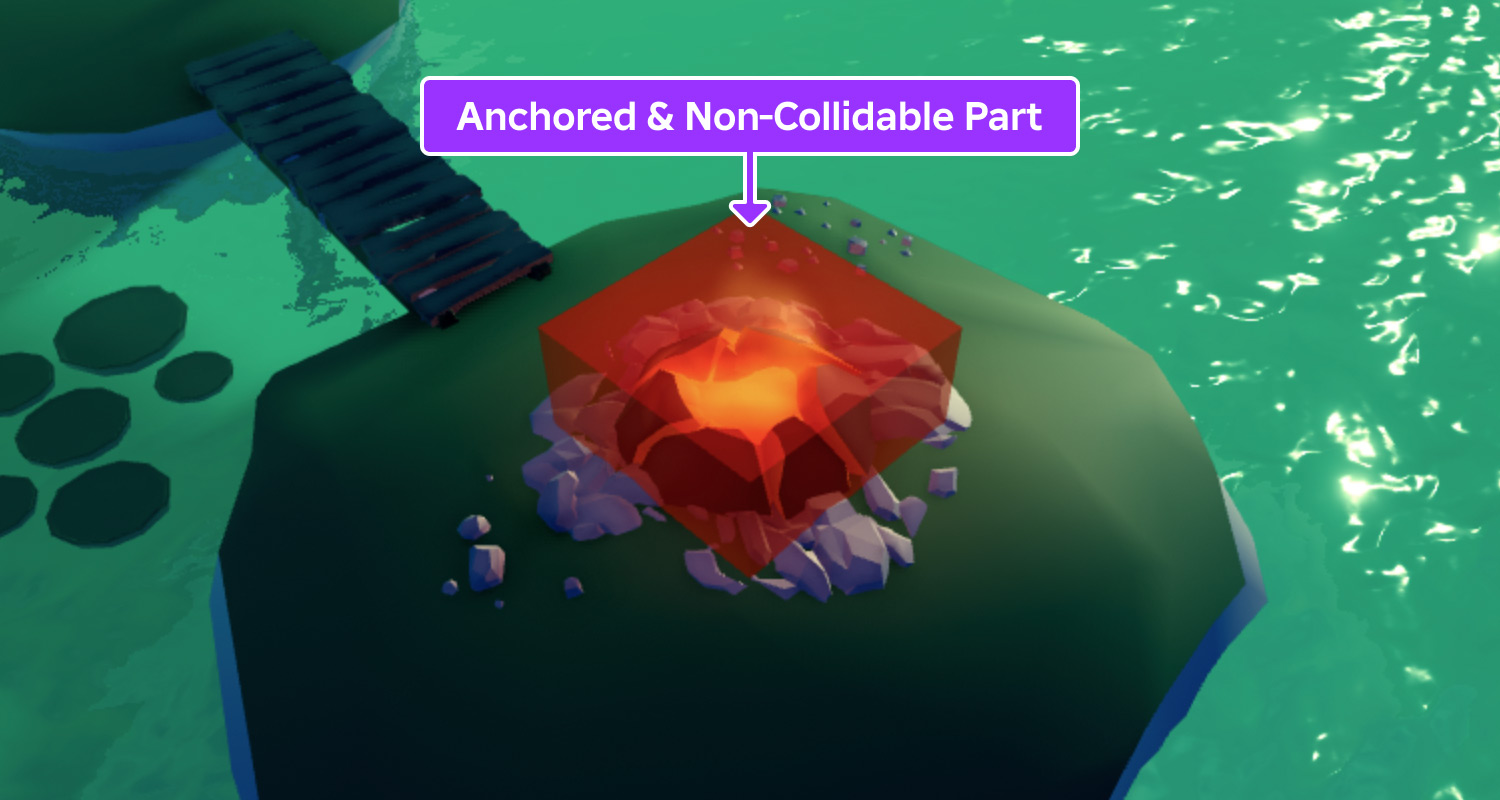
Insert a
PathfindingModifierinstance onto the part, locate itsLabelproperty, and assign a meaningful name likeDangerZone.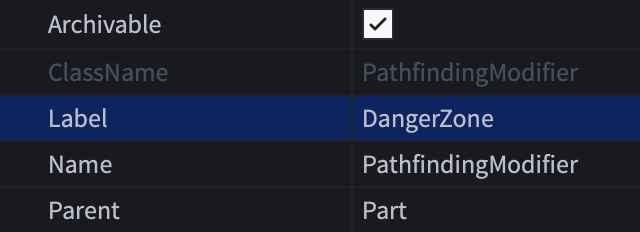
Include a matching
DangerZonekey and associated numeric value within theCoststable ofCreatePath(). A modifier can be defined as non‑traversable by setting its value tomath.huge.```lua title="PlayerPathFollow (LocalScript)" local PathfindingService = game:GetService("PathfindingService") local Players = game:GetService("Players") local RunService = game:GetService("RunService")
local DESTINATION = Vector3.new(20, 0.5, 20) local GROUND_WAIT = 0.01 local VELOCITY_MULTIPLIER = 0.0625
local path = PathfindingService:CreatePath({ AgentCanClimb = true, Costs = { DangerZone = math.huge, Water = 20, CrackedLava = 20, Slate = 20 } }) ```
Ignore obstacles#
In some cases, it's useful to pathfind through solid obstacles as if they didn't exist. This lets you compute a path through specific physical blockers, versus the computation failing outright.
Create an
Anchoredpart around the object and set itsCanCollideproperty tofalse.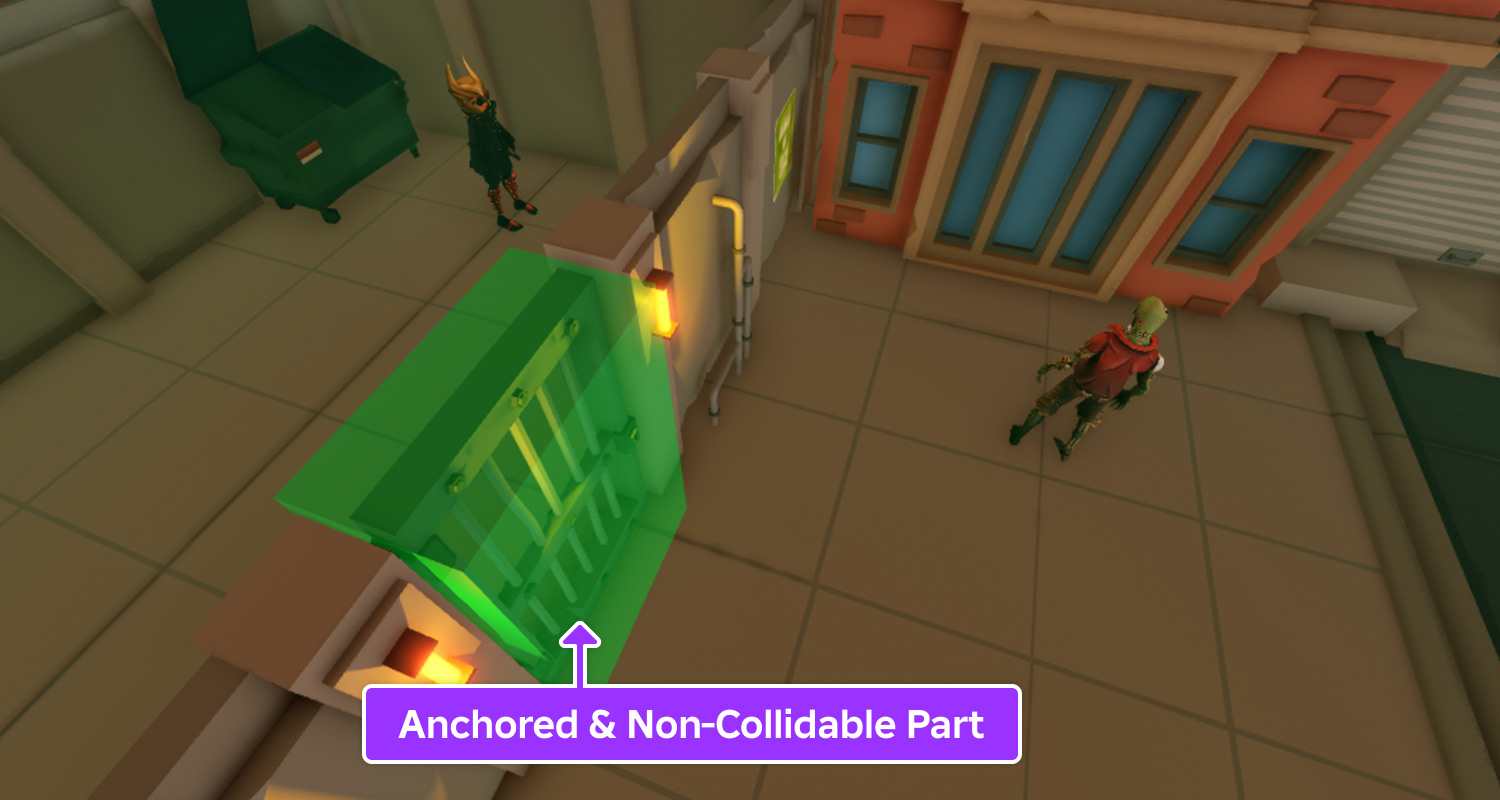
Insert a
PathfindingModifierinstance onto the part and enable itsPassThroughproperty.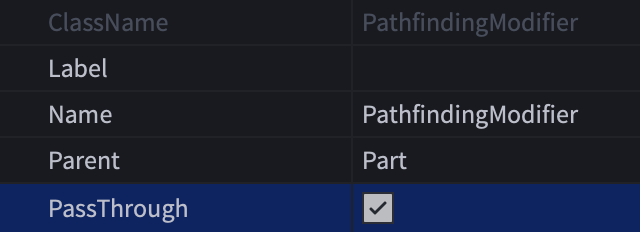
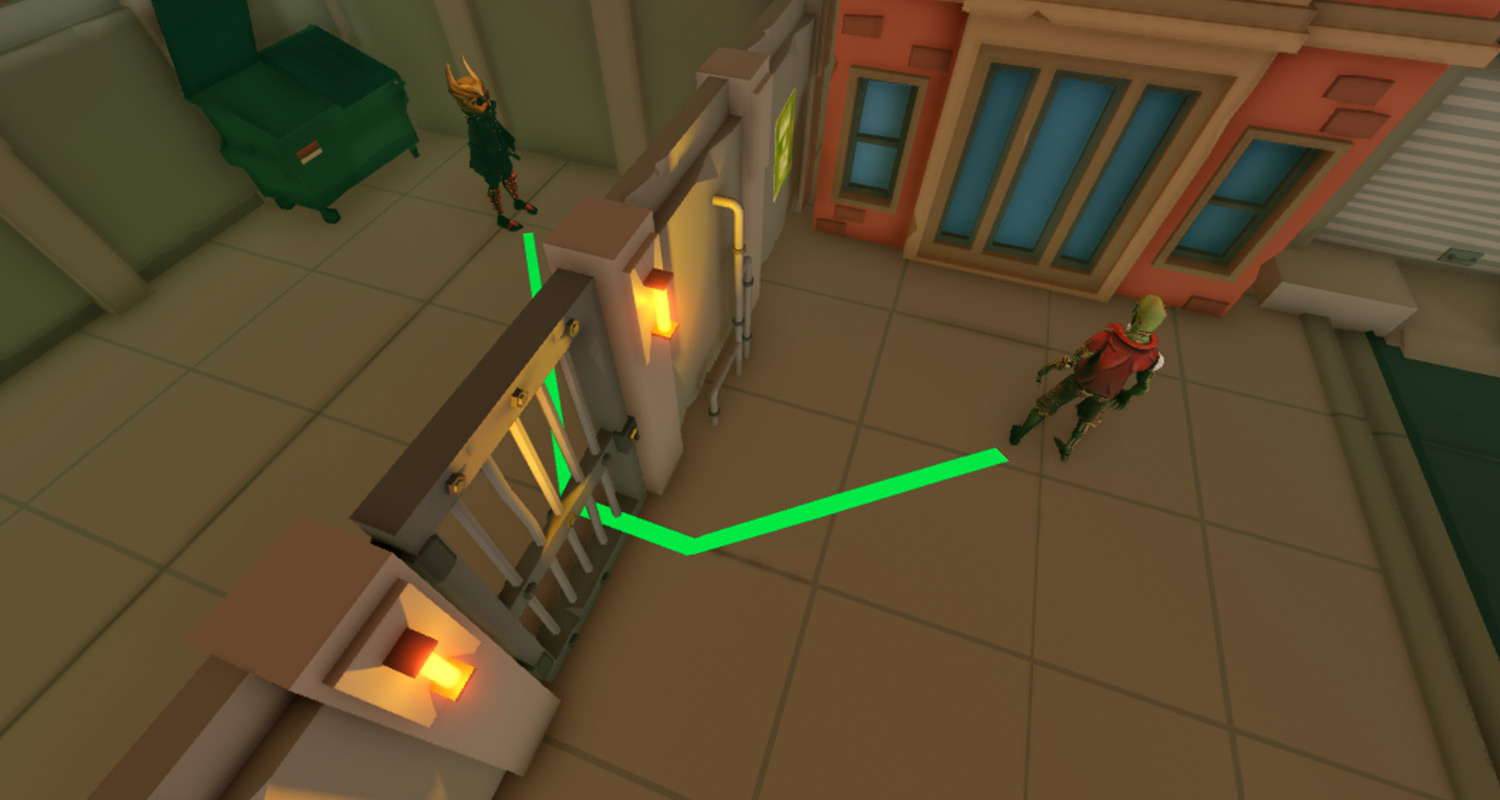
Now, when a path is computed from the zombie NPC to the player character, the path extends beyond the door and you can prompt the zombie to traverse it. Even if the zombie is unable to open the door, it reacts as if it "hears" the character behind the door.
Pathfinding links#
Sometimes it's necessary to find a path across a space that cannot be normally traversed, such as across a chasm, and perform a custom action to reach the next waypoint. This can be achieved through the PathfindingLink object.
Using the example from above, you can make the agent use a boat.
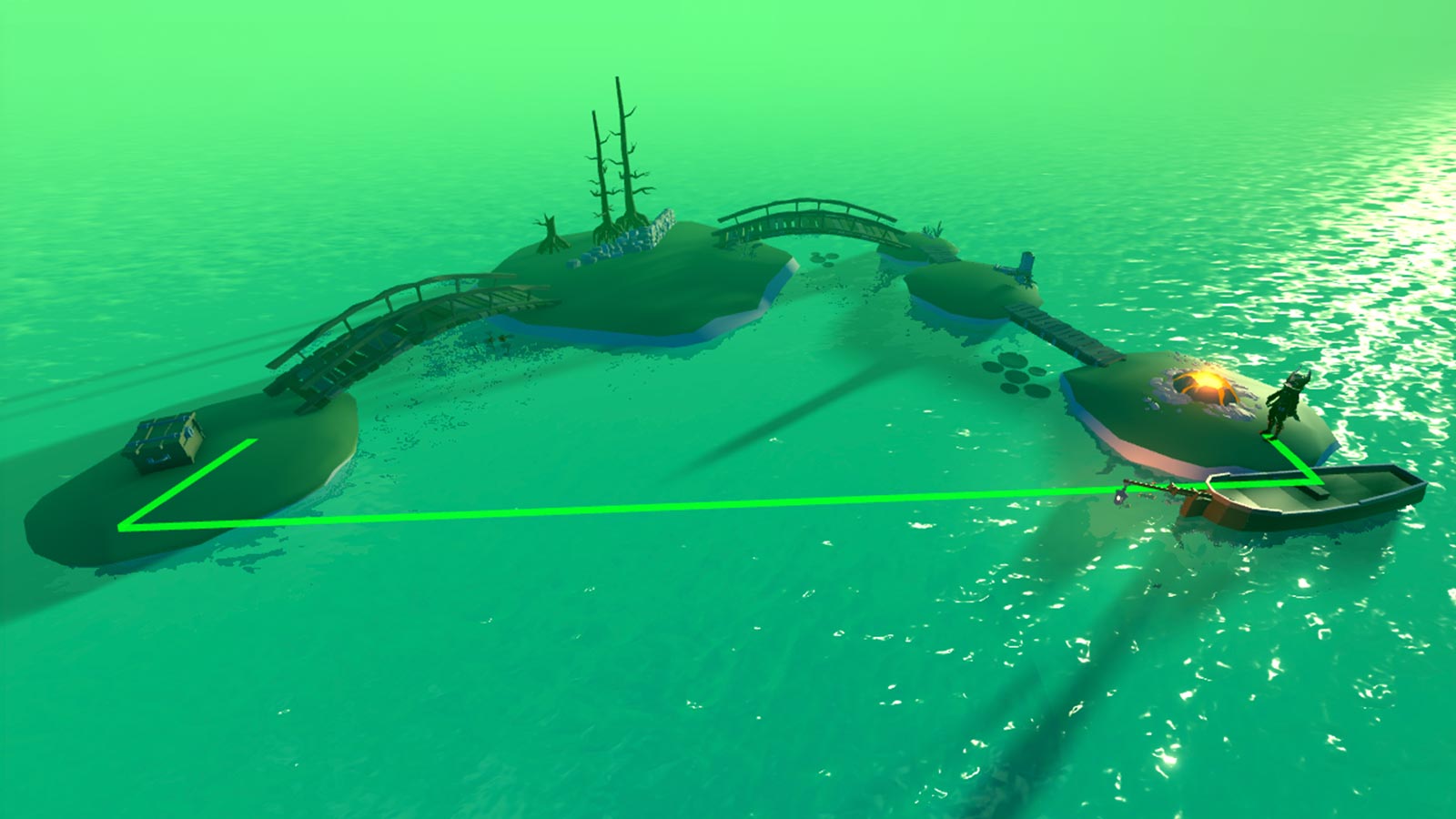
To create a PathfindingLink using this example:
OPTIONAL Toggle on Pathfinding links from the Visualization Options widget in the upper‑right corner of the 3D viewport. This helps with visualization and debugging when implementing pathfinding links.
Create two
Attachments, one on the boat's seat and one near the boat's landing point.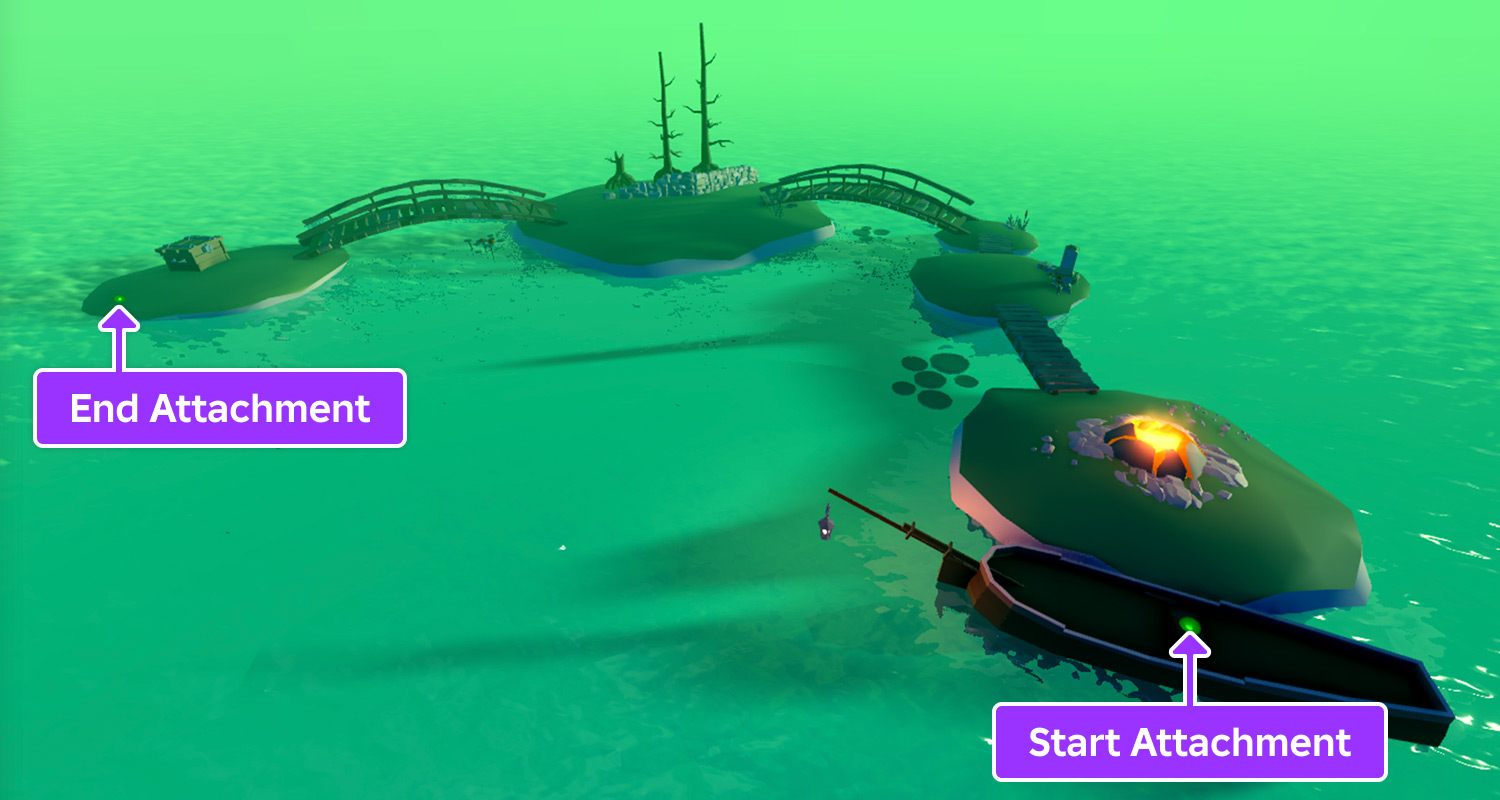
Create a
PathfindingLinkobject in the workspace, then assign itsAttachment0andAttachment1properties to the starting and ending attachments respectively.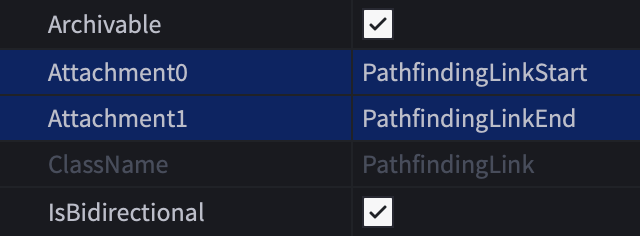
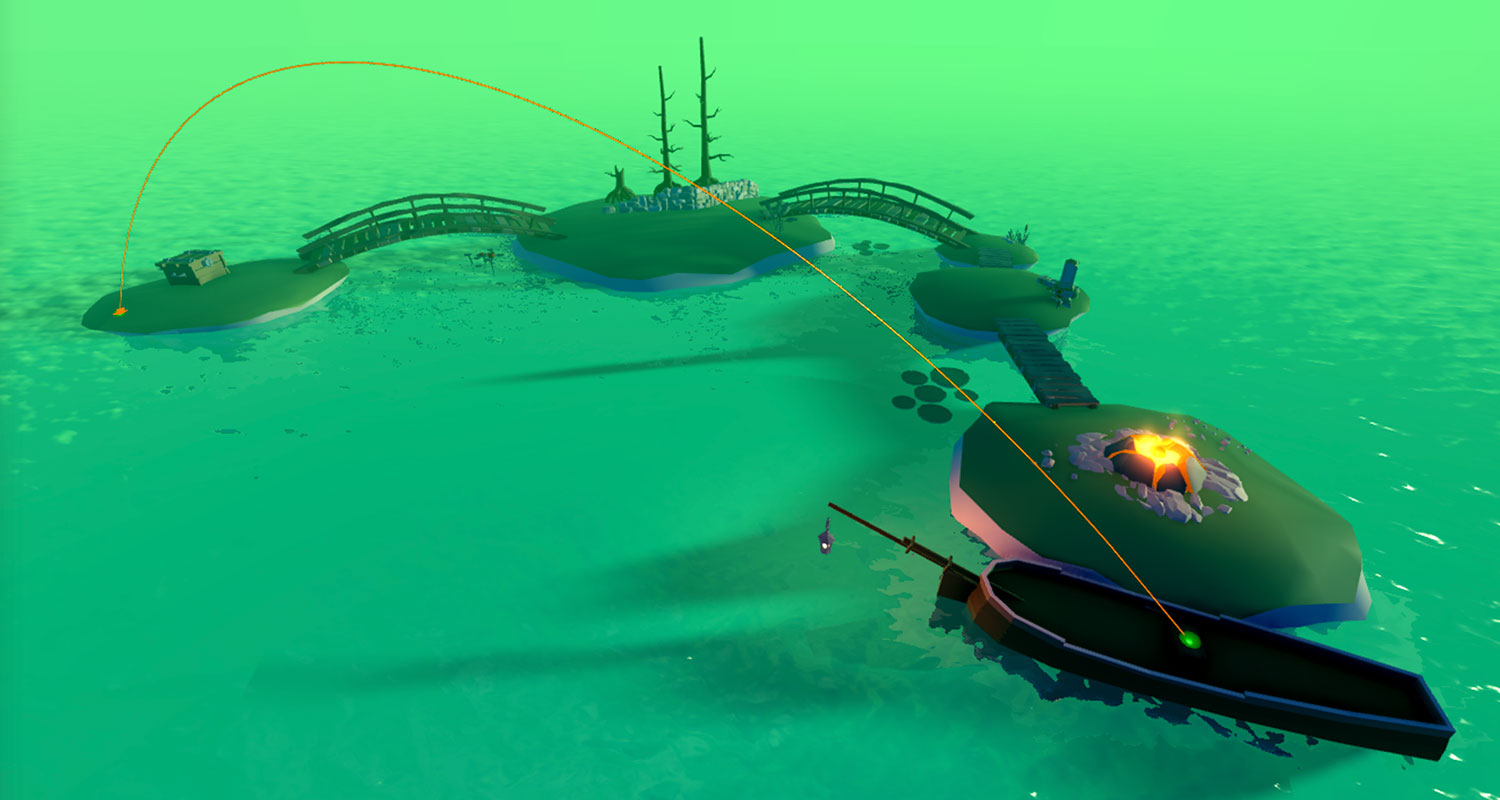
Assign a meaningful name like
UseBoatto itsLabelproperty. This name is used as a flag in the pathfinding script to trigger a custom action when the agent reaches the starting link point.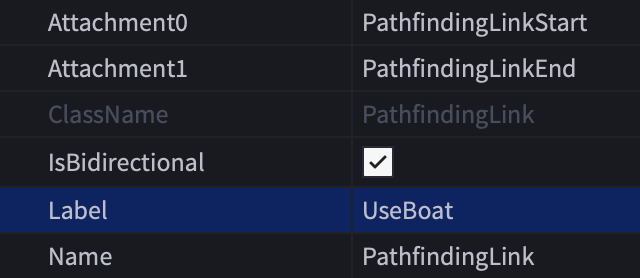
Include a
Coststable withinCreatePath()containing both aWaterkey and a custom key matching theLabelproperty name. Assign the custom key a value lower than that ofWater.```lua title="PlayerPathFollow (LocalScript)" local PathfindingService = game:GetService("PathfindingService") local Players = game:GetService("Players") local RunService = game:GetService("RunService")
local DESTINATION = Vector3.new(20, 0.5, 20) local GROUND_WAIT = 0.01 local VELOCITY_MULTIPLIER = 0.0625
local path = PathfindingService:CreatePath({ AgentCanClimb = true, Costs = { UseBoat = 2, Water = 20 } }) ```
In the
moveToNextWaypoint()function (LINES 93–114), a custom check for theLabelmodifier name can be used to take a different action thanHumanoid:Move(); in this case, you might call a function to seat the agent in the boat, move the boat across the water, unseat the agent at the boat's landing point, and then continue the agent's path to its final destination.
Streaming compatibility#
In-game instance streaming is a powerful feature that dynamically loads and unloads 3D content as a player's character moves around the world. As they explore the 3D space, new subsets of the space stream to their device and some of the existing subsets might stream out.
Consider the following best practices for using PathfindingService in streaming-enabled games:
Streaming can block or unblock a given path as a character moves along it. For example, while a character runs through a forest, a tree might stream in somewhere ahead of them and obstruct the path. To make pathfinding work seamlessly with streaming, it's highly recommended that you use the handling blocked paths technique and re-compute the path when necessary.
A common approach in pathfinding is to use the coordinates of existing objects for computation, such as setting a path destination to the position of an existing
TreasureChestmodel in the world. This approach is fully compatible with server-sideScriptssince the server has full view of the world at all times, butLocalScriptsandModuleScriptsthat run on the client may fail if they attempt to compute a path to an object that's not streamed in.To address this issue, consider setting the destination to the position of a
BasePartwithin a persistent model. Persistent models load soon after the player joins and they never stream out, so a client-side script can connect to thePersistentLoadedevent and safely access the model for creating waypoints after the event fires.
Limitations and failure factors#
The pathfinding engine includes specific limitations to ensure efficient processing and optimal performance. Additionally, pathfinding computations can fail for various reasons as outlined below.
Path request too long — The direct line‑of‑sight distance for pathfinding from the start to the finish point must not exceed 3,000 studs.
Node budget exhausted — A pathfinding computation may exceed 20,000 nodes well before reaching the distance cap of 3,000 studs, especially when pathfinding in a vast open world or through complex mazes.
Incompatible agent parameters — A pathfinding computation will fail if the creation parameters cannot resolve. For example, if the destination can only be reached by the agent jumping but AgentCanJump is false, or AgentHeight is greater than the height of any traversable path.
Vertical waypoint limits — Pathfinding calculations only consider paths within a set vertical boundary. Potential waypoints with a bottom global Y coordinate less than -65,536 studs or greater than 65,536 studs are ignored.